
✅Highly rated ✅Recently updated
Description
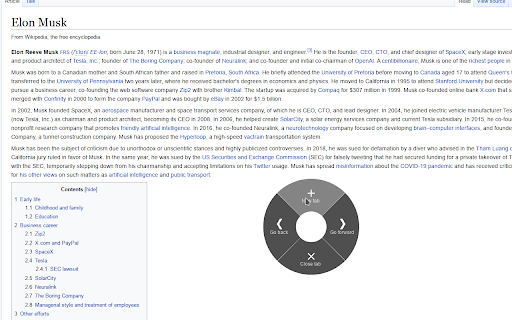
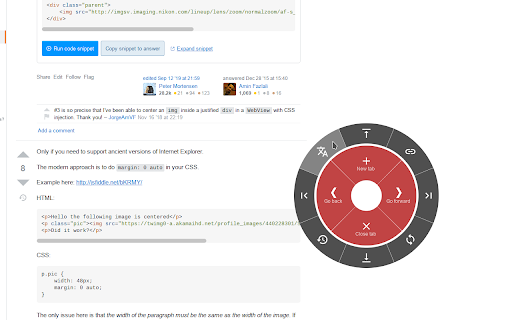
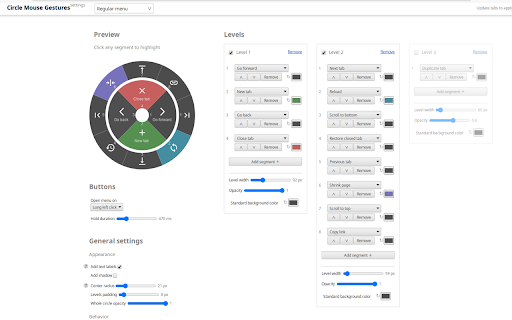
This extension introduces convenient circle menu (so-called pie menu) to improve interaction with your browser. Just hold down the right mouse button, highlight one of the preset actions and release the button.
Circle menu recreates the way mouse gestures were represented in good old Opera 12 browser, and allows to clearly see all available gestures, with no need to remember them all.
Circle Mouse Gestures is supposed to provide a better implementation of mouse gestures and drag gestures, while replacing the regular context menu at the same time — but regular context menu is always there whenever you need it. Perfect for fullscreen browsing!
Extension features:
- Regular actions, such as 'Go back', 'New tab', 'Scroll to top' etc.
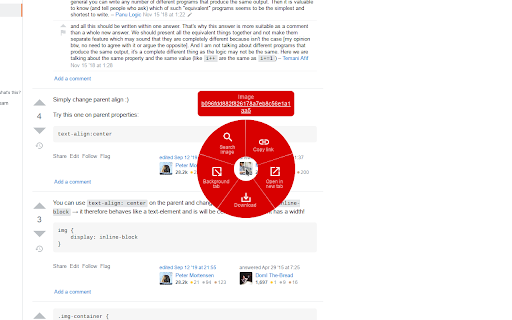
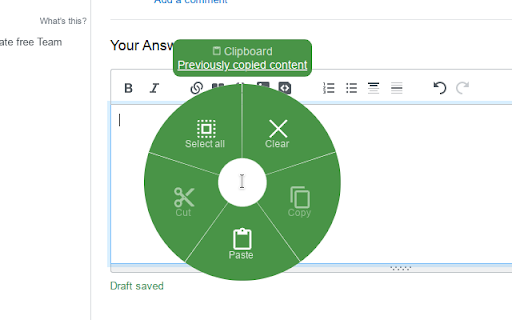
- Separate gestures for links, images, input fields etc.
- Support for rocker gestures and mouse wheel gestures
- Supports horizontal wheel gestures - great for mouses with horizontal scroll wheel, such as MX Master 3
- Support for trigger on long left click
- Great customization options - add actions levels, set their width and color for each action
Additional tools:
- Link preview (like in Safari on mac)
- Tab switcher (vertical/horizontal/grid), with ability to quickly switch, search and close tabs
- Bookmarks viewer (list/grid), with ability to search and open bookmarks
- Image viewer, with ability to zoom and rotate given image
- Page shrinker, which adds horizontal space to page for easier reading on some websites

Reviews (1 cached)
★★★☆☆2025-08-14
Kellan Lutz
You cannot search for or copy images in the image menu. I would like to see a feature added to the settings for Menu for text selection that allows you to "search for selected text on any site."
Permissions (9)
Permissions
bookmarksℹ Can read and modify your bookmarks clipboardReadℹ Can read from your clipboard clipboardWriteℹ Can write to your clipboard downloadsℹ Can manage and monitor downloads notificationsℹ Can show desktop notifications scriptingℹ Can inject scripts into web pages sessionsℹ Can access recently closed tabs and windows storageℹ Can store data locally in your browser tabsℹ Can see your open tabs and their URLs
Details
| Version | 1.6.1 |
| Updated | Mar 20, 2026 |
| Size | 126KiB |
| First Seen | Mar 24, 2026 |
More by emvaized

Popular in workflow

Adobe Acrobat: PDF edit, convert, sign tools
by Adobe Inc.
330M
★ 4.40
workflow
330M
★ 4.40
workflow

Chrome Remote Desktop
by Chrome Remote Desktop Release Managers
38M
★ 3.14
workflow
38M
★ 3.14
workflow

Microsoft Power Automate
by Microsoft Corporation
10M
★ 1.99
workflow
10M
★ 1.99
workflow

Screencastify - Screen Video Recorder
by castify-ext-dev
9M
★ 3.95
workflow
9M
★ 3.95
workflow

iCloud Bookmarks
by Apple Inc.
7M
★ 3.38
workflow
7M
★ 3.38
workflow
Popular Extensions
Adobe Acrobat: PDF edit, convert, sign tools
by Adobe Inc.
330M
★ 4.40
workflow
330M
★ 4.40
workflow
Chrome Remote Desktop
by Chrome Remote Desktop Release Managers
38M
★ 3.14
workflow
38M
★ 3.14
workflow

Cisco Webex Extension
by cisco.chromestore
24M
★ 2.34
social
24M
★ 2.34
social

Kami for Google Chrome™
by Kami
17M
★ 4.56
education
17M
★ 4.56
education

Read&Write for Google Chrome™
by Texthelp
17M
★ 3.44
accessibility
17M
★ 3.44
accessibility