
User Count Trend
Loading...
Description
About LoiLo Web Card
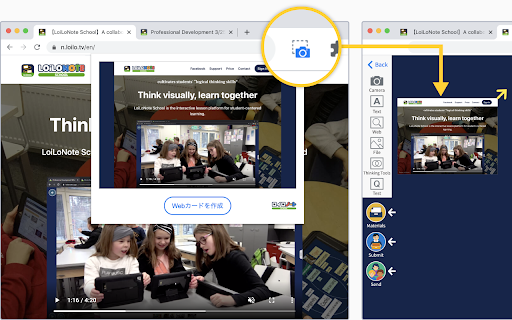
LoiLo Web Card is a browser extension that makes it easy to create Web Cards—URL links with webpage snapshots.
Simply click the camera icon to create a Web Card.
Using the Web Card Extension
1. Pin the extension
After installing the Web Card extension, it needs to be pinned on each device.
① Click the puzzle piece icon in the top-right corner of the browser.
② Click the pin icon next to LoiLo Web Card to add it to the toolbar.
*When pinned, the icon turns blue.
2. Create a Web Card from a website
Open the website you want to save, then click the camera icon in the extension.
Choose a LoiLoNote note to save it to.
Notes
A destination note in LoiLoNote must be selected to save a Web Card.
The captured image may differ depending on how the website is structured.
Reviews
Loading reviews...
Permissions (3)
Permissions
activeTabℹ Can access the current tab when you click the extension storageℹ Can store data locally in your browser tabsℹ Can see your open tabs and their URLs
Details
| Version | 0.7.0 |
| Updated | Jan 13, 2026 |
| Size | 129KiB |
| First Seen | Mar 21, 2026 |
Ad space
Popular in workflow

Microsoft Defender Browser Protection
by Microsoft Corporation
2M
★ 4.15
workflow
2M
★ 4.15
workflow

Pop up blocker for Chrome™ - Poper Blocker
by dingosolutions
2M
★ 4.76
workflow
2M
★ 4.76
workflow

Keep Awake
by extensions@chromium.org
1M
★ 4.00
workflow
1M
★ 4.00
workflow

Tab Resize - split screen layouts
by Peter Shin
1M
★ 4.31
workflow
1M
★ 4.31
workflow

Unhook - Remove YouTube Recommended & Shorts
by Unhook
1M
★ 4.85
workflow
1M
★ 4.85
workflow
Popular Extensions

Cisco Webex Extension
by cisco.chromestore
24M
★ 2.34
social
24M
★ 2.34
social

uBlock Origin
by Raymond Hill (gorhill)
15M
★ 4.70
privacy
15M
★ 4.70
privacy

DuckDuckGo Search & Tracker Protection
by DuckDuckGo
4M
★ 4.24
privacy
4M
★ 4.24
privacy
Microsoft Defender Browser Protection
by Microsoft Corporation
2M
★ 4.15
workflow
2M
★ 4.15
workflow
Pop up blocker for Chrome™ - Poper Blocker
by dingosolutions
2M
★ 4.76
workflow
2M
★ 4.76
workflow