
Zero(formerly ID Guard Offline)
v2025.06 Updated Jun 21, 2025 261KiB
User Count Trend
Loading...
Description
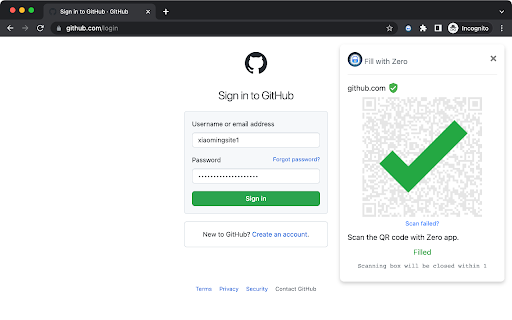
Autofill your password in browser by scanning QR code with Zero(formerly ID Guard Offline) app on your phone.
How does it work?
1. A QR code will show up when you open a web page with a login form.
2. Open Zero app(not this extension) on your phone and scan the QR code.
3. Choose the account.
4. Your login form on the web page will be filled automatically.
How secure is it?
When filling password from your phone to the web page, your password is encrypted with a one time encryption key known only by this extension and the app on your phone. It can never be decrypted during the transmission on Internet.
Unlike most password manager extensions, this extension does not save any passwords. Your passwords are stored on your smartphone with security chip and sandbox protection. No password can be sent to the browser automatically unless you scan the QR code with the app on your smartphone. That means, no malicious desktop program or website can steal your passwords without your awareness.

Reviews
Loading reviews...
Permissions (2)
Permissions
contextMenusℹ Can add items to the right-click menu storageℹ Can store data locally in your browser
Details
| Version | 2025.06 |
| Updated | Jun 21, 2025 |
| Size | 261KiB |
| First Seen | Mar 21, 2026 |
Ad space
Popular in workflow

Microsoft Defender Browser Protection
by Microsoft Corporation
2M
★ 4.15
workflow
2M
★ 4.15
workflow

Pop up blocker for Chrome™ - Poper Blocker
by dingosolutions
2M
★ 4.76
workflow
2M
★ 4.76
workflow

Keep Awake
by extensions@chromium.org
1M
★ 4.00
workflow
1M
★ 4.00
workflow

Tab Resize - split screen layouts
by Peter Shin
1M
★ 4.31
workflow
1M
★ 4.31
workflow

Unhook - Remove YouTube Recommended & Shorts
by Unhook
1M
★ 4.85
workflow
1M
★ 4.85
workflow
Popular Extensions

Cisco Webex Extension
by cisco.chromestore
24M
★ 2.34
social
24M
★ 2.34
social

Kami for Google Chrome™
by Kami
17M
★ 4.56
education
17M
★ 4.56
education

uBlock Origin
by Raymond Hill (gorhill)
15M
★ 4.70
privacy
15M
★ 4.70
privacy

Custom Cursor for Chrome™
by BLife Team LLC
5M
★ 4.67
fun
5M
★ 4.67
fun

DuckDuckGo Search & Tracker Protection
by DuckDuckGo
4M
★ 4.24
privacy
4M
★ 4.24
privacy