
Description
Send To Blue - Save Website Information Directly to Blue.cc
Easily save web pages to your Blue.cc projects with the "Send To Blue" Chrome extension. Designed for people like me who love Blue.cc, this tool helps you capture and organize website content directly into your todo lists.
- Quick Setup: Connect using your API keys.
- Direct Saving: Choose where your tasks go—right into the correct project and list.
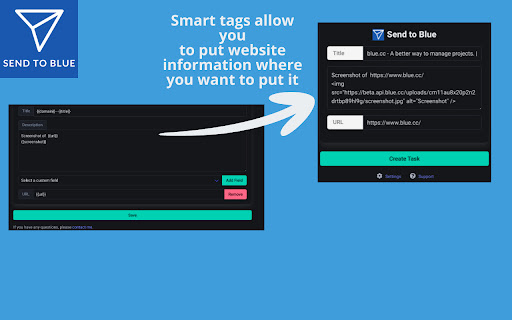
- Smart Tags: Automatically fill in details with {{url}}, {{title}} etc
- Generate screenshots directly in your task
**NEW**
- Added due dates
- Keyboard shortcut and right click context menu for quickly capturing your data in Blue
- Selected text added to the smart tags. After adding {{text}} to the description in options you can simply highlight any text in a webpage and send it to Blue with the icon, right click on shortcut.
- Clear button in the popup in case you just want to add un unrelated todo from your browser
** Coming Soon **
-- Assign to users
-- Add tags
Perfect for anyone who wants a no-fuss way to keep track of online content. Install now and streamline your workflow!
** This chrome extension is NOT associated with the official Blue.cc team. I just love the product and wanted to use the API **

Reviews
Loading reviews...
Permissions (7)
Permissions
activeTabℹ Can access the current tab when you click the extension alarmsℹ Can schedule periodic background tasks contextMenusℹ Can add items to the right-click menu notificationsℹ Can show desktop notifications scriptingℹ Can inject scripts into web pages storageℹ Can store data locally in your browser tabsℹ Can see your open tabs and their URLs
Details
| Version | 1.3.1 |
| Updated | May 21, 2025 |
| Size | 33.68KiB |
| First Seen | Mar 27, 2026 |
More by me



Popular in workflow

Adobe Acrobat: PDF edit, convert, sign tools
by Adobe Inc.
331M
★ 4.40
workflow
331M
★ 4.40
workflow

Chrome Remote Desktop
by Chrome Remote Desktop Release Managers
38M
★ 3.14
workflow
38M
★ 3.14
workflow

Microsoft Single Sign On
by Microsoft
36M
★ 2.27
workflow
36M
★ 2.27
workflow

MetaMask
by metamask
13M
★ 2.68
workflow
13M
★ 2.68
workflow

Microsoft Power Automate
by Microsoft Corporation
10M
★ 1.99
workflow
10M
★ 1.99
workflow
Popular Extensions
Adobe Acrobat: PDF edit, convert, sign tools
by Adobe Inc.
331M
★ 4.40
workflow
331M
★ 4.40
workflow

Grammarly: AI Writing Assistant and Grammar Checker App
by Grammarly
42M
★ 4.50
communication
42M
★ 4.50
communication
Chrome Remote Desktop
by Chrome Remote Desktop Release Managers
38M
★ 3.14
workflow
38M
★ 3.14
workflow
Microsoft Single Sign On
by Microsoft
36M
★ 2.27
workflow
36M
★ 2.27
workflow

Cisco Webex Extension
by cisco.chromestore
23M
★ 2.34
social
23M
★ 2.34
social