Description
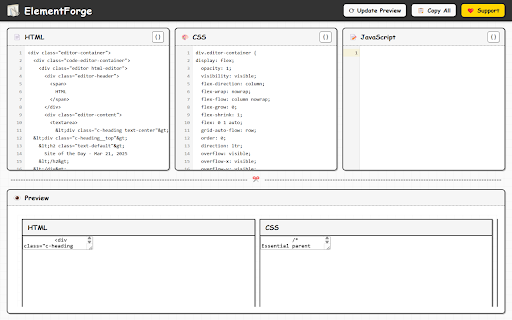
ElementForge is a tool for your Chrome browser. It helps you take pieces of websites—HTML, CSS, and JavaScript code—and use them for your own projects. Think of it like a copy-paste tool, but smarter.
What it does:
* Pick exactly what you need: You can select single parts of a webpage, or groups of parts, very precisely.
* Keep the style and functionality: When you copy, the tool makes sure the look and behavior of the copied part stays the same. It keeps all the style details and associated scripts.
* Change how you copy: You can choose what to include or leave out—like extra code, IDs, or classes.
* Organize the code: The tool makes the HTML, CSS, and JavaScript code easy to read and use again.
* Copy in different ways: You can copy everything together, or HTML, CSS, and JavaScript separately. CSS can also be exported in SCSS format.
* Preview your selection: You can instantly preview the extracted elements to see how they look and function.
* Navigate through elements: The interactive navigation allows you to explore and understand complex element relationships.
* Smart size handling: For very large elements, ElementForge creates minimal versions that still work even if they exceed storage limits.
* Error-proof copying: Even when elements are too large for preview, you can still copy the code successfully.
Who is this for?
* People who build websites: You can learn from good website designs quickly.
* People who design user interfaces: You can easily copy and use parts of website designs.
* JavaScript developers: You can extract and understand script functionality from existing sites.
* Teachers: You can get code examples to show to students.
What you can do with ElementForge:
* Learn from websites: You can understand how complex websites are built.
* Code faster: You can copy working code instead of writing it from scratch.
* Keep designs the same: You can make sure your website looks consistent by copying styles correctly.
* Study interactions: You can examine how JavaScript powers interactive elements.
* Test components: You can preview extracted elements to ensure they work as expected.
Note: When working with large or complex elements, ElementForge will warn you before previewing. Very large elements may cause your browser to slow down or freeze. You can always use the copy feature instead, which works with elements of any size.


Reviews
Loading reviews...
Permissions (5)
Permissions
activeTabℹ Can access the current tab when you click the extension clipboardWriteℹ Can write to your clipboard contextMenusℹ Can add items to the right-click menu scriptingℹ Can inject scripts into web pages storageℹ Can store data locally in your browser
Details
| Version | 1.0.0 |
| Updated | Apr 2, 2025 |
| Size | 2.69MiB |
| First Seen | Mar 21, 2026 |
Popular in developer

Lighthouse
by lighthouse-extension-owners
1M
★ 4.42
developer
1M
★ 4.42
developer

Контур.Плагин
by kontur.extension
1M
★ 3.11
developer
1M
★ 3.11
developer

Similarweb - Website Traffic & SEO Checker
by Similarweb
1M
★ 4.66
developer
1M
★ 4.66
developer

Clear Cache
by Little Void LLC (Ben Bojko)
1M
★ 4.45
developer
1M
★ 4.45
developer

SEO META in 1 CLICK
by Bilal Hadri
900K
★ 4.87
developer
900K
★ 4.87
developer
Popular Extensions

Adobe Acrobat: PDF edit, convert, sign tools
by Adobe Inc.
330M
★ 4.40
workflow
330M
★ 4.40
workflow

Chrome Remote Desktop
by Chrome Remote Desktop Release Managers
38M
★ 3.14
workflow
38M
★ 3.14
workflow

Cisco Webex Extension
by cisco.chromestore
24M
★ 2.34
social
24M
★ 2.34
social

Kami for Google Chrome™
by Kami
17M
★ 4.56
education
17M
★ 4.56
education

Read&Write for Google Chrome™
by Texthelp
17M
★ 3.44
accessibility
17M
★ 3.44
accessibility