
⚠️Not updated in over 2 years
User Count Trend
Loading...
Description
The #1 choice for IT educators worldwide, NetSupport School delivers the tools you need to help maximize the effectiveness of computer-led teaching and now you can utilize the power of NetSupport School in a Google Chromebook environment.
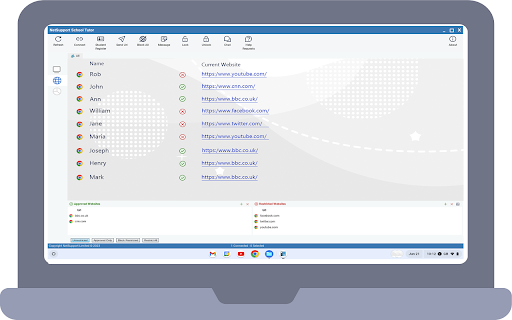
The NetSupport School Tutor App can be installed on or centrally deployed via the Google Admin Console to teacher machines running Chrome OS. The teacher can then connect to each student Chromebook* enabling them to monitor and interact with students quickly and efficiently.
* The NetSupport School Student extension for Google Chrome needs to be available on each student Chromebook.
Key Features when connecting to students from a teacher’s Chrome OS device:
- Flexible choice of connection modes enables the Tutor to quickly connect to the required student devices by Room Name, Username or a general browse of the network. For added convenience direct integration with SIS (Student Information System) using Google Classroom or ClassLink OneRoster is also provided, allowing you to instantly access your SIS classrooms and student accounts at the start of a NetSupport-managed lesson.
- View real-time thumbnails of each student machine in a single view.
- Zoom in to view a larger thumbnail of any selected student Chromebook.
- The teacher can set objectives and expected outcomes for the current lesson.
- Ask students to register at the start of each lesson.
- Lock the student's mouse and keyboard when instructing.
- Send an instant survey or request for feedback to each student and display results in real time.
- The teacher can open a discussion session that all or selected students can join, enter their comments and share with the rest of the class.
- Send an attention-grabbing message or instruction to each student machine.
- Request Help facility - students can send a request for help to the teacher.
- See details of the website that students are currently viewing with the option to quickly add the URL to an approved or restricted websites list.
- Block unauthorized websites.
- Use approved websites only.
- Block all Internet access.
- Launch a website on the student Chromebook.
- Block FTP Access.
CHROME INCOGNITO MODE:
To ensure you retain full visibility of your students' internet use, it is recommended that you ‘disallow’ Incognito Mode in the Chrome OS User Settings via Google Apps for Education.
INSTALLATION and PRE-REQUISITES:
For a teacher to be able to monitor and interact with their students using Google Chromebooks, the NetSupport Connectivity Server (Gateway) must be installed on a Windows Server; the NetSupport School Tutor must be installed on or deployed to the teacher(s) machine(s)*, and the NetSupport School Student extension deployed to the required student Chromebooks.
* In mixed platform classrooms, the NetSupport School Windows Tutor application can also connect to student Chromebooks.
You can evaluate the NetSupport School Tutor for 30 days on up to five student Chromebooks or, when prompted, you can enter your existing NetSupport School license information. If you’re new to NetSupport School or require additional licenses, contact your NetSupport reseller.
Please visit www.netsupportschool.com/chrome for more information.
------------------------------------------------------------------------------------
Latest enhancements in version 15:
Refreshed user inteface;
Performance and operability improvements.




Reviews
Loading reviews...
Permissions (5)
Permissions
alarmsℹ Can schedule periodic background tasks contextMenusℹ Can add items to the right-click menu identityℹ Can use your Google account identity identity.email storageℹ Can store data locally in your browser
Details
| Version | 15.0.0 |
| Updated | Jul 3, 2023 |
| Size | 14.77MiB |
| First Seen | Mar 21, 2026 |
Ad space
More by NetSupport Ltd

Popular Extensions

Adobe Acrobat: PDF edit, convert, sign tools
by Adobe Inc.
330M
★ 4.40
workflow
330M
★ 4.40
workflow

Chrome Remote Desktop
by Chrome Remote Desktop Release Managers
38M
★ 3.14
workflow
38M
★ 3.14
workflow

Cisco Webex Extension
by cisco.chromestore
24M
★ 2.34
social
24M
★ 2.34
social

Kami for Google Chrome™
by Kami
17M
★ 4.56
education
17M
★ 4.56
education

Read&Write for Google Chrome™
by Texthelp
17M
★ 3.44
accessibility
17M
★ 3.44
accessibility