
⚠️Not updated in over a year
User Count Trend
Loading...
Description
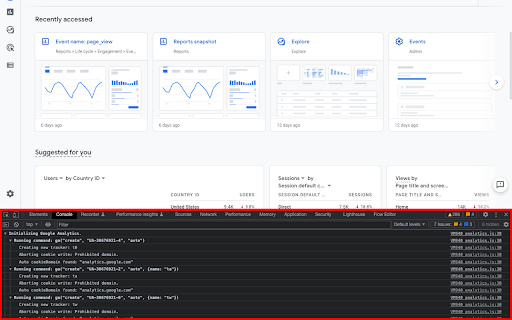
This extension loads the debug version of the Google Analytics Javascript for all sites you browse using Google Chrome. It prints useful information to the Javascript console. These messages include error messages and warnings which can tell you when your analytics tracking code is set up incorrectly. In addition, it provides a detailed breakdown of each tracking beacon sent to Google Analytics.
To use this extension, You need to follow three steps:
1. Turn it on by clicking its icon to the right of the address bar.
2. Open the Chrome Javascript console to see the messages.
On Windows and Linux, press Control-Shift-J.
On Mac, press Command-Option-J.
3. Refresh the page you are on.
By installing this extension, you agree to the Chrome Gallery Terms of Service at https://chrome.google.com/extensions/intl/en/gallery_tos.html
You can ask questions about the plugin and report bugs at analytics-extensions@google.com
New in this version:
- Upgraded to Manifest v3

Reviews
Loading reviews...
Permissions (3)
Permissions
declarativeNetRequestℹ Can block or redirect network requests storageℹ Can store data locally in your browser tabsℹ Can see your open tabs and their URLs
Details
| Version | 3.0 |
| Updated | Dec 30, 2024 |
| Size | 28.41KiB |
| First Seen | Mar 21, 2026 |
Ad space
Popular in developer

Lighthouse
by lighthouse-extension-owners
1M
★ 4.42
developer
1M
★ 4.42
developer

SEO META in 1 CLICK
by Bilal Hadri
900K
★ 4.87
developer
900K
★ 4.87
developer

CRXLauncher
by CRXLauncher
800K
★ 4.57
developer
800K
★ 4.57
developer

Tag Assistant Companion
by Google
600K
★ 3.08
developer
600K
★ 3.08
developer

daily.dev | The homepage developers deserve
by Daily Dev Ltd.
400K
★ 4.81
developer
400K
★ 4.81
developer
Popular Extensions

Cisco Webex Extension
by cisco.chromestore
24M
★ 2.34
social
24M
★ 2.34
social

uBlock Origin
by Raymond Hill (gorhill)
15M
★ 4.70
privacy
15M
★ 4.70
privacy

DuckDuckGo Search & Tracker Protection
by DuckDuckGo
4M
★ 4.24
privacy
4M
★ 4.24
privacy

Microsoft Defender Browser Protection
by Microsoft Corporation
2M
★ 4.15
workflow
2M
★ 4.15
workflow

Pop up blocker for Chrome™ - Poper Blocker
by dingosolutions
2M
★ 4.76
workflow
2M
★ 4.76
workflow