
⚠️Not updated in over 2 years
Description
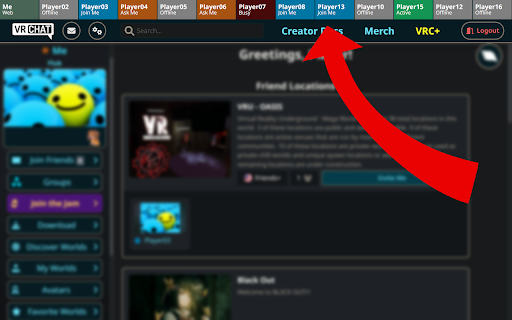
The VRChat Web UI only offers a search function in your friends list to see the status of a specific friend. With this extension you no longer have to search for your friend every time you want to see his status, instead you will get a new status bar at the top of the page with an overview of the players you have specified in the extension options.
To do so, click "★ VIP" on a users profile page or open the extensions options and write down a list of the players you want to appear in the statusbar, using the given form-field. Each line represents one player and must be formatted as follows:
"Player01: usr_player01-user-id"
The statusbar will show the name you defined (Player01) and the status according to the Users ID. You can get a players User-ID by visiting his profile on vrchat.com and copy the last segment of the URL (starting with "usr_").


Reviews
Loading reviews...
Permissions (1)
Permissions
storageℹ Can store data locally in your browser
Details
| Version | 0.0.0.4 |
| Updated | Jun 3, 2023 |
| Size | 4.43MiB |
| First Seen | Mar 21, 2026 |
Popular in social

Cisco Webex Extension
by cisco.chromestore
24M
★ 2.34
social
24M
★ 2.34
social

LINE
by LY Corporation
4M
★ 3.51
social
4M
★ 3.51
social

vidIQ Vision for YouTube
by vidIQ
3M
★ 4.48
social
3M
★ 4.48
social

Emoji Keyboard by JoyPixels®
by JoyPixels Inc
500K
★ 4.26
social
500K
★ 4.26
social

Hypothesis - Web & PDF Annotation
by Hypothesis
300K
★ 4.10
social
300K
★ 4.10
social
Popular Extensions

Adobe Acrobat: PDF edit, convert, sign tools
by Adobe Inc.
330M
★ 4.40
workflow
330M
★ 4.40
workflow

Chrome Remote Desktop
by Chrome Remote Desktop Release Managers
38M
★ 3.14
workflow
38M
★ 3.14
workflow
Cisco Webex Extension
by cisco.chromestore
24M
★ 2.34
social
24M
★ 2.34
social

Kami for Google Chrome™
by Kami
17M
★ 4.56
education
17M
★ 4.56
education

Read&Write for Google Chrome™
by Texthelp
17M
★ 3.44
accessibility
17M
★ 3.44
accessibility