
⚠️Not updated in over a year
User Count Trend
Loading...
Description
Font Analyzer mini 🔍
Discover fonts effortlessly on any webpage! 🌐
Font Analyzer mini is your ultimate tool for quickly identifying and analyzing fonts on websites.
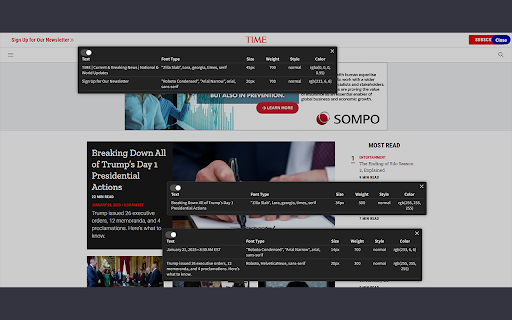
With just a click or a drag, you can instantly view font details such as name, size, weight, style, and color—all in one place! 🎯
Perfect for designers, developers, and typography enthusiasts, this extension is fast, intuitive, and designed to make your workflow smoother. 🚀
📋 Why Choose Font Analyzer mini?
✅ Instant Font Details : Click on any text to instantly see its font name, size, weight, style, and color.
✅ Drag to Explore : Select a specific area to analyze all the fonts and text within that region.
✅ Multiple Popups : Open multiple font analysis popups at the same time, so you can compare results easily.
✅ Dark Mode Support : Enable dark mode for the popups and work comfortably in any lighting environment.
✅ Quick Access : Launch the extension instantly from your browser toolbar or right-click menu.
🛠️ How to Use Font Analyzer mini
1️⃣ Activate the Extension : Click the Font Analyzer mini icon in your browser toolbar.
2️⃣ Click to Analyze : Hover over any text, click, and instantly see detailed font information.
3️⃣ Drag for Area Analysis : Select an area to analyze all the text and font details within it.
4️⃣ View Popups : Check out the font name, size, weight, style, and color in neat and organized popups.
5️⃣ Manage Multiple Popups : Keep multiple popups open for side-by-side comparisons of different sections.
🌟Font Analyzer mini Highlights
✅ All-in-One Font Info : Get font name, size, weight, style, and color with one simple click.
✅ Drag-and-Analyze : Explore multiple text areas effortlessly with drag-to-select functionality.
✅ Multiple Popups : Open independent popups for each analysis, making comparisons a breeze.
✅ Dark Mode Support : Adjust to your preferred style for a more comfortable user experience.
📊 Why Font Analyzer mini?
✨ Simple and Intuitive : Anyone can use it with ease, from beginners to experts.
✨ Accurate Detection : Displays precise font details for any text on a webpage.
✨ Efficient Workflow : Analyze and compare fonts without leaving your browser.
Experience the convenience of Font Analyzer Mini and take your typography game to the next level.
Try it today and see how easy font analysis can be! 🎉


Reviews
Loading reviews...
Permissions (2)
Permissions
activeTabℹ Can access the current tab when you click the extension scriptingℹ Can inject scripts into web pages
Details
| Version | 1.2 |
| Updated | Feb 3, 2025 |
| Size | 21.87KiB |
| First Seen | Mar 21, 2026 |
Ad space
Popular in tools

Monica: All-In-One AI Assist & Smartest AI Agent
by Monica Team
3M
★ 4.89
tools
3M
★ 4.89
tools

WPS浏览器助手:文档在线阅读编辑
by 金山PDF
2M
★ 2.90
tools
2M
★ 2.90
tools

Pie Adblock - A Powerful Free Ad Blocker
by Pie Extensions
2M
★ 4.90
tools
2M
★ 4.90
tools

Ecosia - The search engine that plants trees
by Ecosia GmbH
1M
★ 4.70
tools
1M
★ 4.70
tools

ВПН для YouTube без ограничений в России. Ускорить ютуб на ПК
by Extension
900K
★ 4.70
tools
900K
★ 4.70
tools
Popular Extensions

Adobe Acrobat: PDF edit, convert, sign tools
by Adobe Inc.
330M
★ 4.40
workflow
330M
★ 4.40
workflow

Cisco Webex Extension
by cisco.chromestore
24M
★ 2.34
social
24M
★ 2.34
social

Kami for Google Chrome™
by Kami
17M
★ 4.56
education
17M
★ 4.56
education

uBlock Origin
by Raymond Hill (gorhill)
15M
★ 4.70
privacy
15M
★ 4.70
privacy

Custom Cursor for Chrome™
by BLife Team LLC
5M
★ 4.67
fun
5M
★ 4.67
fun