
⚠️Requests 1 sensitive permission
User Count Trend
Loading...
Description
AEP Web SDK Engineer Toolkit
The ultimate AEP Web SDK debugger. Validate XDM ExperienceEvents, inspect batch failure logs, and get AI-powered
fixes.
Stop guessing what's in your XDM payload. The AEP Web SDK Engineer Toolkit is the essential extension for any digital
analytics engineer, implementer, or developer working with Adobe Experience Platform.
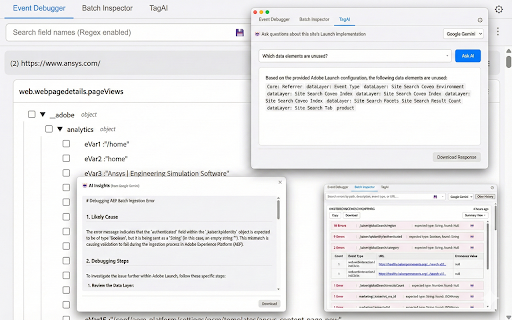
This toolkit provides four powerful tools in one: a real-time Event Debugger (Free), an AI-powered TagAI assistant
(Free Trial), Advanced Schema Validation (Premium), and an API-driven Batch Inspector with AI Insights (Premium) —
designed to save you hours of debugging time.
KEY FEATURES
--- Event Debugger (Free to Use) ---
See your AEP Web SDK events (/interact, /collect) in real-time. This tool is a modern replacement for the classic
Adobe Analytics debugger, built specifically for XDM payloads and the AEP Web SDK.
- Capture All Beacons: Reliably intercepts both fetch and sendBeacon requests.
- Grouped by Page: Events are automatically grouped by the page they fired on for easy analysis.
- Clean & Searchable UI: View XDM payloads in a clean, collapsible tree. Search all field names and values with Regex
support.
- Save & Share Searches: Save your complex search queries to your history for one-click reuse.
--- TagAI: Your Implementation Assistant (Free Trial — 5/week | Premium — 50/day) ---
Have a question about the Launch library for the site you are viewing? Just ask TagAI. No API key required — AI is
built in.
- Chat with your Implementation: Ask questions like "Which rule fires the global page view?" or "How is the ECIDMap
constructed?"
- Context-Aware: TagAI reads the live Adobe Launch (Data Collection) configuration on the page—including Rules, Data
Elements, and Custom Code—to give you accurate, site-specific answers.
- No API Key Needed: Free users get 5 AI requests per week using the built-in Google Gemini proxy. Subscribers get 50
requests per day, plus the option to use their own API key or switch to OpenAI.
- Usage Tracker: A live counter in the popup header shows your remaining AI requests for the current period.
- Export Answers: Copy responses to clipboard, download as Markdown, or save as PDF for documentation and team
sharing.
--- Advanced Schema Validation (Premium) ---
Move beyond simple JSON viewing. Our validation engine automatically checks your live XDM payloads against your
official AEP schema, right in your browser.
- Per-Tab Schema Selection: Select the active schema for each browser tab from a simple dropdown in the popup. Perfect
for multitasking across different projects or sandboxes.
- Automatic Schema Matching: Automatically applies the correct schema if the event's meta:altId matches a schema
you've imported.
- Find Errors Instantly:
- Type Mismatch: Highlights fields sent as the wrong type (e.g., string instead of integer).
- Missing Required Fields: Warns you if a required field (like _id or timestamp) is missing from the payload.
- Unmatched Keys: Flags any fields you're sending that do not exist in your schema, helping you spot typos or
outdated implementations.
- Custom Field Titles: Toggle between friendly schema "Titles" (e.g., "Page Views") and the raw field names (e.g.,
web.webPageDetails.pageViews.value).
- Download Events: Export all captured events for a page to JSON or CSV.
--- Batch Inspector & AI Insights (Premium) ---
Stop guessing why your AEP batch failed. The Batch Inspector connects directly to the AEP API to give you answers.
- One-Click Inspection: The extension automatically finds static Batch IDs in the AEP UI and turns them into clickable
links.
- Fetch Detailed Logs: Click a link to securely pull the actual failed event logs from the AEP API (requires AIO
credentials).
- Smart Summary View: Don't read raw JSON. The inspector summarizes thousands of errors, grouping them by error
message, field path, and the most common invalid values.
- AI-Powered Fixes: Select an error group and let our AI assistant tell you how to fix it. Using your own Google
Gemini or OpenAI API key, the tool analyzes the failed payloads and your website's live Adobe Launch configuration to
provide a clear Likely Cause, Debugging Steps, and a Proposed Solution.
--- Schema Management (Premium) ---
Managing schemas for multiple clients and sandboxes is now simple.
- API Import: Securely connect to your Adobe I/O project, fetch your sandboxes, and import all your ExperienceEvent
schemas with one click.
- Manual Import: Paste JSON or upload a schema file. The tool intelligently merges all standard field groups
(experienceevent-web, experienceevent-device, commerce, search, etc.) automatically.
How to Use
1. Event Debugger:
a. Install the extension, open the popup on a page with the AEP Web SDK, and events will appear.
b. (Premium) Go to Options to import your schemas.
c. (Premium) Select your active schema from the dropdown in the popup to enable validation.
2. TagAI (Free Trial / Premium):
a. Open the extension on any site running Adobe Launch.
b. Switch to the "TagAI" tab.
c. Enter your question about the implementation and click "Ask AI".
d. Free users get 5 requests per week. Subscribe for 50 per day and access to additional AI providers.
3. Batch Inspector (Premium):
a. Go to the extension's Options page > API Import tab.
b. Enter your Adobe I/O credentials (Client ID, Secret, Org ID). These are stored locally and never shared.
c. (Optional) Go to the Settings tab and enter your Google Gemini or OpenAI API key to enable AI Insights.
d. Navigate to a failed batch in the AEP UI and click the (now hyperlinked) Batch ID.
e. The extension popup will open to the Batch Inspector tab with your results.
--- Privacy & Security ---
Your credentials and data are secure.
- Adobe I/O Credentials: Stored only on your local computer using chrome.storage.local. They are never transmitted to
any server except Adobe's.
- AI API Keys (Gemini, OpenAI): Stored only on your local computer. They are sent directly from your browser to Google
or OpenAI when you request an analysis.
- Built-in AI Proxy: When using the built-in AI mode (no personal API key), your questions and Launch configuration
are routed through our secure Google Cloud proxy to Google Gemini. No payload data is stored on the proxy — only an
anonymous usage count and your Chrome profile email (if available) for rate limiting and subscription verification.
- Subscription Verification: Payment status is verified server-side via Stripe to enforce usage tiers securely. No
payment details are accessible to the extension.
- No Unnecessary Data Collection: This extension does not collect or transmit your browsing data, event data, or
credentials to any third-party server beyond the services you explicitly initiate (Adobe APIs, AI providers, and the
built-in proxy for rate-limited AI requests).

Reviews
Loading reviews...
Permissions (8)
Permissions
activeTabℹ Can access the current tab when you click the extension identityℹ Can use your Google account identity identity.email scriptingℹ Can inject scripts into web pages storageℹ Can store data locally in your browser tabsℹ Can see your open tabs and their URLs unlimitedStorage webRequestℹ Can observe and analyze network traffic
Details
| Version | 7.0.0 |
| Updated | Feb 17, 2026 |
| Size | 427KiB |
| First Seen | Mar 21, 2026 |
Ad space
Popular in developer

Lighthouse
by lighthouse-extension-owners
1M
★ 4.42
developer
1M
★ 4.42
developer

SEO META in 1 CLICK
by Bilal Hadri
900K
★ 4.87
developer
900K
★ 4.87
developer

CRXLauncher
by CRXLauncher
800K
★ 4.57
developer
800K
★ 4.57
developer

Tag Assistant Companion
by Google
600K
★ 3.08
developer
600K
★ 3.08
developer

Google Analytics Debugger
by Google Analytics
600K
★ 4.18
developer
600K
★ 4.18
developer
Popular Extensions

Cisco Webex Extension
by cisco.chromestore
24M
★ 2.34
social
24M
★ 2.34
social

Kami for Google Chrome™
by Kami
17M
★ 4.56
education
17M
★ 4.56
education

uBlock Origin
by Raymond Hill (gorhill)
15M
★ 4.70
privacy
15M
★ 4.70
privacy

Custom Cursor for Chrome™
by BLife Team LLC
5M
★ 4.67
fun
5M
★ 4.67
fun

DuckDuckGo Search & Tracker Protection
by DuckDuckGo
4M
★ 4.24
privacy
4M
★ 4.24
privacy