
⚠️Not updated in over 2 years
Description
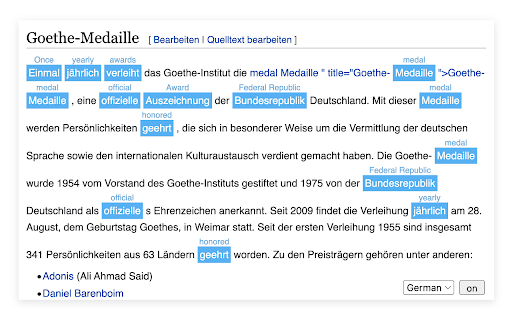
Quickly translate selected text on any web pages. Supports Google Translate API.
Features:
* Translate the selected content, highlight it and show the translation above
* Double click on the translated word to cancel the translation
* You can customize the translation and use it automatically the next time you look up a word
* Select the source language of the current interface in the bottom right corner
* Easily show and hide the translation interface
* Ability to configure the source language for a specific website
* Ability to configure the language used for translation of a specific language
* If the wrong language was selected before, retranslation requires holding down `cmd/ctrl`
* `cmd/ctrl + click` on the translated word to open custom dictionary
Note: Not all websites have been adapted. If there are websites that need to be dealt with separately, please provide feedback or contact the developer.
------------------------
此翻译插件支持以下功能:
* 翻译选中的内容, 高亮并且在上方显示译文
* 在已翻译的单词上双击取消翻译
* 自定义译文, 下次查词时自动使用
* 右下角选择当前界面的源语言
* 轻松显示和隐藏翻译界面
* 可以配置特定网站的源语言
* 可以配置特定语言的翻译所用语言
* 如果之前选错了语言,重新翻译需要按住`cmd`
* 为某种语言配置词典后按住`cmd(mac)/ctrl(win)`点击已翻译的蓝色部分打开词典
注意: 这是个人开发者的作品, 并未对所有网站做适配, 如果有需要单独处理的网站, 请进行反馈或者联系开发者.


Reviews
Loading reviews...
Permissions (2)
Permissions
activeTabℹ Can access the current tab when you click the extension storageℹ Can store data locally in your browser
Details
| Version | 0.1.3 |
| Updated | Sep 14, 2022 |
| Size | 128KiB |
| First Seen | Mar 24, 2026 |
More by haanamomo

Popular in workflow

Adobe Acrobat: PDF edit, convert, sign tools
by Adobe Inc.
331M
★ 4.40
workflow
331M
★ 4.40
workflow

AdBlock — block ads across the web
by AdBlock
62M
★ 4.48
workflow
62M
★ 4.48
workflow

Chrome Remote Desktop
by Chrome Remote Desktop Release Managers
38M
★ 3.14
workflow
38M
★ 3.14
workflow

Microsoft Single Sign On
by Microsoft
36M
★ 2.27
workflow
36M
★ 2.27
workflow

MetaMask
by metamask
13M
★ 2.68
workflow
13M
★ 2.68
workflow
Popular Extensions
Adobe Acrobat: PDF edit, convert, sign tools
by Adobe Inc.
331M
★ 4.40
workflow
331M
★ 4.40
workflow
AdBlock — block ads across the web
by AdBlock
62M
★ 4.48
workflow
62M
★ 4.48
workflow

Grammarly: AI Writing Assistant and Grammar Checker App
by Grammarly
42M
★ 4.50
communication
42M
★ 4.50
communication
Chrome Remote Desktop
by Chrome Remote Desktop Release Managers
38M
★ 3.14
workflow
38M
★ 3.14
workflow
Microsoft Single Sign On
by Microsoft
36M
★ 2.27
workflow
36M
★ 2.27
workflow