
Description
Detailed Description (English)
【UI Builder Coach AI: Your AI-Powered Design Accelerator】
"How can I make this UI look more professional?"
"I need a hint on how to recreate this design in FlutterFlow..."
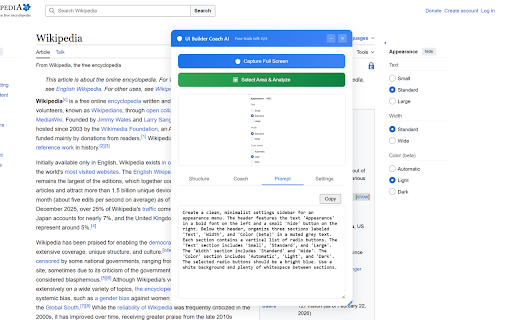
UI Builder Coach AI is the ultimate Chrome extension for developers and designers who want to bridge the gap between "good" and "great." Simply select any area of your screen, and our advanced Gemini AI will analyze the design to provide concrete improvement plans and actionable feedback.
🚀 Key Features
Intuitive Area Selection: Just drag and drop to specify the exact UI components you want to analyze.
Professional Design Review: Get expert feedback on layout, color theory, typography, and accessibility powered by Gemini AI.
FlutterFlow Optimization: Receive structural hints and ready-to-use prompts specifically tailored for FlutterFlow development.
Technical Implementation Tips: Go beyond looks—get practical advice on frontend implementation and UX flow optimization.
Hybrid API System: Start immediately with 3 free daily uses, or plug in your own Gemini API key for unlimited access.
🛠 Perfect For These Scenarios
FlutterFlow Development: When you're stuck on how to structure a specific component or layout.
Polishing Your App: When you want to remove the "amateur" feel and elevate your app's visual quality.
Design Communication: When you need to verbalize design intentions to explain them clearly to team members.
🔒 Privacy & Peace of Mind
Intentional Capture: Screen capture only occurs at the exact moment you trigger an analysis. No background data collection.
Developer-Focused: Built for efficiency—lightweight, ad-free, and designed by a developer for developers.



Reviews
Loading reviews...
Permissions (3)
Permissions
activeTabℹ Can access the current tab when you click the extension contextMenusℹ Can add items to the right-click menu storageℹ Can store data locally in your browser
Details
| Version | 1.0.0 |
| Updated | Feb 25, 2026 |
| Size | 21.92MiB |
| First Seen | Mar 28, 2026 |
More by iamuuid


Popular in developer

TouchEn PC보안 확장
by 라온시큐어
8M
★ 1.33
developer
8M
★ 1.33
developer

React Developer Tools
by Meta
5M
★ 3.95
developer
5M
★ 3.95
developer

WhatFont
by Chengyin Liu
3M
★ 4.01
developer
3M
★ 4.01
developer

Take Webpage Screenshots Entirely - FireShot
by Evgeny Vokilsus
3M
★ 4.79
developer
3M
★ 4.79
developer

Lighthouse
by lighthouse-extension-owners
1M
★ 4.42
developer
1M
★ 4.42
developer
Popular Extensions

Adobe Acrobat: PDF edit, convert, sign tools
by Adobe Inc.
331M
★ 4.40
workflow
331M
★ 4.40
workflow

Grammarly: AI Writing Assistant and Grammar Checker App
by Grammarly
42M
★ 4.50
communication
42M
★ 4.50
communication

Chrome Remote Desktop
by Chrome Remote Desktop Release Managers
38M
★ 3.14
workflow
38M
★ 3.14
workflow

Microsoft Single Sign On
by Microsoft
36M
★ 2.27
workflow
36M
★ 2.27
workflow

Cisco Webex Extension
by cisco.chromestore
23M
★ 2.34
social
23M
★ 2.34
social