
⚠️Not updated in over 2 years ⚠️Requests 2 sensitive permissions
Description
Introducing Chat SearchNSave, a powerful Chrome extension designed to elevate your ChatGPT experience. Enjoy a wide range of features, all designed with your privacy and convenience in mind:
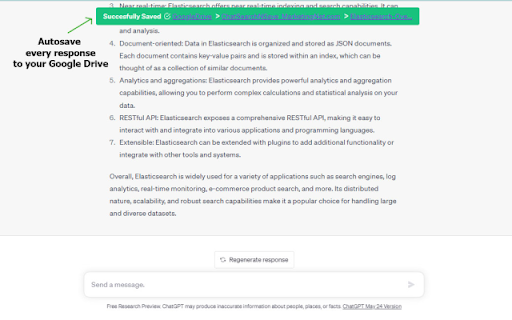
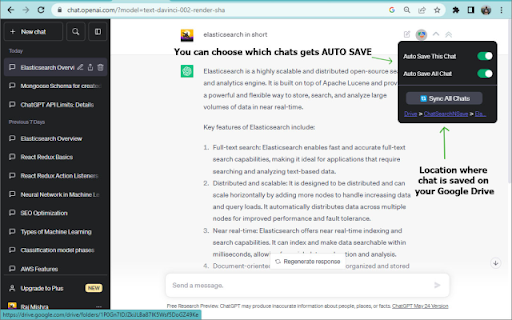
Auto-Save with Advanced Privacy Protection: Chat SearchNSave ensures your chats are effortlessly and securely stored in your Google Drive. Your data stays with you! Also, say goodbye to manual saving! Whether you start a new chat or ask follow-up questions, everything is automatically saved for your convenience. We understand that not every chat needs to be saved, so we've included an option to disable auto-save, giving you full control over what gets stored. Rest assured, your privacy is our top priority.
Advanced Search with Privacy Protection: Have you ever struggled to find a specific response from a chat that took place days ago, but you can't recall the exact question? Chat SearchNSave has got you covered. Our extension enables local search within your browser, allowing you to swiftly search through your saved chats without your data ever leaving your Google Drive. This ensures the utmost privacy while effortlessly locating chats that contain the keyword(s) you seek. Enjoy quick access to your previous conversations while maintaining complete control over your privacy.
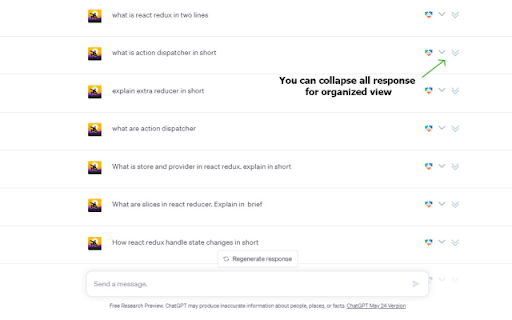
Effortless Navigation: Chat SearchNSave simplifies the task of locating specific questions or responses without the need for endless scrolling. With the click of Collapse All icon, you can get a quick overview of your chat questions without getting bogged down by lengthy responses. For a detailed view, click on Expand All icon to reveal all responses at once. Additionally, you have the flexibility to expand or collapse individual questions, tailoring your chat experience to your preferences. With Chat SearchNSave, enjoy streamlined and efficient navigation, eliminating the need for repetitive scrolling. Stay focused and productive!

Reviews
Loading reviews...
Permissions (8)
Permissions
activeTabℹ Can access the current tab when you click the extension cookiesℹ Can read and modify browser cookies identityℹ Can use your Google account identity scriptingℹ Can inject scripts into web pages storageℹ Can store data locally in your browser tabsℹ Can see your open tabs and their URLs unlimitedStorage webRequestℹ Can observe and analyze network traffic
Details
| Version | 0.1.2 |
| Updated | Aug 3, 2023 |
| Size | 2.75MiB |
| First Seen | Mar 28, 2026 |
Popular in workflow

Adobe Acrobat: PDF edit, convert, sign tools
by Adobe Inc.
331M
★ 4.40
workflow
331M
★ 4.40
workflow

Chrome Remote Desktop
by Chrome Remote Desktop Release Managers
38M
★ 3.14
workflow
38M
★ 3.14
workflow

Microsoft Single Sign On
by Microsoft
36M
★ 2.27
workflow
36M
★ 2.27
workflow

MetaMask
by metamask
13M
★ 2.68
workflow
13M
★ 2.68
workflow

Free VPN for Chrome - VPN Proxy VeePN
by www.veepn.com
12M
★ 4.51
workflow
12M
★ 4.51
workflow
Popular Extensions
Adobe Acrobat: PDF edit, convert, sign tools
by Adobe Inc.
331M
★ 4.40
workflow
331M
★ 4.40
workflow

Grammarly: AI Writing Assistant and Grammar Checker App
by Grammarly
42M
★ 4.50
communication
42M
★ 4.50
communication
Chrome Remote Desktop
by Chrome Remote Desktop Release Managers
38M
★ 3.14
workflow
38M
★ 3.14
workflow
Microsoft Single Sign On
by Microsoft
36M
★ 2.27
workflow
36M
★ 2.27
workflow

Cisco Webex Extension
by cisco.chromestore
23M
★ 2.34
social
23M
★ 2.34
social