
⚠️Not updated in over 2 years
Description
This is Magnifier and ColorPicker in Your Chrome !
Functions :
: COLOR PICKER
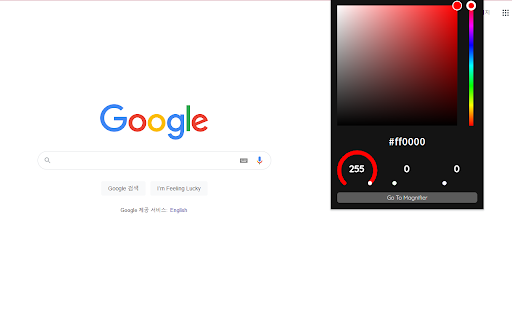
You can select a color on the chrome extension popup.
If you right click the circle in the palette, you can see the color big.
: MAGNIFIER
You can run it by pressing the bottom button of the pop-up window or shortcuts.
When the color is active, you can paste the color code into Ctrl + Alt + V in Vscode Extension.
- left mouse click : add color.
Shortcuts:
: RUN MAGNIFIER
window = ctrl + shift + space
mac = command + shift + space
VScodeExtension in Market place : https://marketplace.visualstudio.com/items?itemName=syi0808.picking

Reviews
Loading reviews...
Permissions (2)
Permissions
activeTabℹ Can access the current tab when you click the extension scriptingℹ Can inject scripts into web pages
Details
| Version | 0.0.1 |
| Updated | Apr 22, 2022 |
| Size | 44.24KiB |
| First Seen | Mar 23, 2026 |
More by Sung Ye In

Popular in developer

Lighthouse
by lighthouse-extension-owners
1M
★ 4.42
developer
1M
★ 4.42
developer

Контур.Плагин
by kontur.extension
1M
★ 3.11
developer
1M
★ 3.11
developer

Similarweb - Website Traffic & SEO Checker
by Similarweb
1M
★ 4.66
developer
1M
★ 4.66
developer

Clear Cache
by Little Void LLC (Ben Bojko)
1M
★ 4.45
developer
1M
★ 4.45
developer

SEO META in 1 CLICK
by Bilal Hadri
900K
★ 4.87
developer
900K
★ 4.87
developer
Popular Extensions

Adobe Acrobat: PDF edit, convert, sign tools
by Adobe Inc.
330M
★ 4.40
workflow
330M
★ 4.40
workflow

Chrome Remote Desktop
by Chrome Remote Desktop Release Managers
38M
★ 3.14
workflow
38M
★ 3.14
workflow

Cisco Webex Extension
by cisco.chromestore
24M
★ 2.34
social
24M
★ 2.34
social

Kami for Google Chrome™
by Kami
17M
★ 4.56
education
17M
★ 4.56
education

Read&Write for Google Chrome™
by Texthelp
17M
★ 3.44
accessibility
17M
★ 3.44
accessibility