
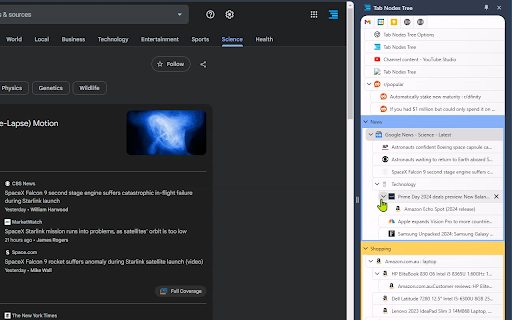
Tab Nodes Tree - Vertical Tree Style Tabs in Side Panel
by Roy Liao
Description


Reviews (5 cached)
Hello, nice extension, clean and easy to use. One question: WHY DOES IT BLOCK MY PASTE OPERATIONS AND ASK ME TO "INSTALL" ANOTHER EXTENSION? In Google sheets, with Tab Nodes Tree enabled, I can copy cells, but cannot paste because your extension intercepts Ctrl-V and context menu paste and puts up a big popup saying (in 36pt text!): >Enable copy, cut, and paste? >To copy, cut, and paste using the Edit menus, install this Google Chrome extension to your browser. >Alternatively, you can always use your keyboard shortcuts: >Ctrl+C Ctrl+X Ctrl+V >for copy for cut for paste Your extension is either dishonest or hacked. [...actually this appears to be a Google restriction that your extension is triggering for reasons you don't state. See update below.] This popup only occurs when I enable and activate your extension. I have no other extensions active, except the stock Drive integration. The popup does not appear if I disable your extension. The problem is clearly in your extension. I will gladly provide you a screenshot if you provide a way to send it. I would love to give you 5 stars, but this is a very serious breach of trust. Please explain. If you cannot, or will not, please remove your extension until you can. Google will not let me post this without giving you 1 star, so I give it only for that reason. Best, -brice UPDATE: this popup is a Google security warning. See links below. So your extension is not hacked, BUT IT IS DOING SOMETHING WRONG or this popup would not appear. Why does your extension want to intercept copy & paste actions? And if this is necessary, WHY DON'T YOU DOCUMENT THESE SECURITY ISSUES? Still a deep deep trust violation on your part. Please explain. https://zapier.com/blog/why-cant-you-copy-and-paste-in-google-docs/ https://grantwinney.com/why-do-i-need-to-install-an-extension-just-to-copy-paste/ UPDATE 2: Now I am truly livid! After uninstalling your extension, the popup won't go away. Something you did has triggered a permanent change in my browser! Thank you! Why did your extension need to intercept copy & paste in the first place? I've been using the right click context menu in Google Sheets for months without ever triggering this popup. Now I can't right click paste because of your sloppy coding. If you can explain the original need for these hooks, I might remove this very angry review. The fact that Google has now marked my browser as a security risk is most likely beyond your control. Whatever permissions your manifest requested should have been clearly stated. The consequences of installing your extension should have been clearly stated. Ignorance is not a defense. After unsuccessfully trying chrome://flags, I'm contemplating a wipe & reinstall of my Chromebook. UPDATE 3: A solution for reverting to the pre-Tab Nodes Tree state, for anyone else bitten by this issue. The second article above mentions the Google Docs Offline extension contains the same workaround as the extension pushed by the popup. This extension doesn't show up if you search the Chrome web store, but the second article links it, and I include the link here below for your convenience. I successfully got rid of the copy & paste popup by uninstalling and reinstalling this Google extension: https://chromewebstore.google.com/detail/google-docs-offline/ghbmnnjooekpmoecnnnilnnbdlolhkhi
Thought this might've been the replacement for Tabs Outliner (the best there is) I've been searching for. Unfortunately you can't save tabs/windows to then reopen later and you can't see all your windows in the extension, you can only see the tabs in the window currently in focus... What is the point of this extension even...
Why is this not always open?
Amazing extension, but on Bazzite running the latest Thorium browser release, tab trees do not persist. If I boot into windows, it all works fine, but not on my primary OS. Very unfortunate, because I find this style of tab interface to be indispensable for my research/productivity projects.
Very smooth, good experience so far, except: The reason I deduct 2 stars is that it does not show the loading spinner at the same time as the tab indicators in the top bar. Seems to start showing the spinner 3-4-5 seconds later. It can be very annoying when browsing a website, because you don't get feedback straight away that your click on a link was registered and you are navigating to a new page. Another issue is that if you have a lot of tabs open and are focused on the last one (so at the bottom of the screen), when opening a new tab the list doesn't scroll automatically to it.
Permissions (6)
Permissions
Details
| Version | 1.6.3 |
| Updated | May 13, 2025 |
| Size | 2.45MiB |
| First Seen | Mar 29, 2026 |
Popular in functionality




Popular Extensions




