
Read aloud with auto language detection
v0.0.1.0 Updated Apr 21, 2024 64.23KiB
⚠️Not updated in over a year
Description
This extension helps you read websites aloud by using Google Chrome text-to-speech engine.
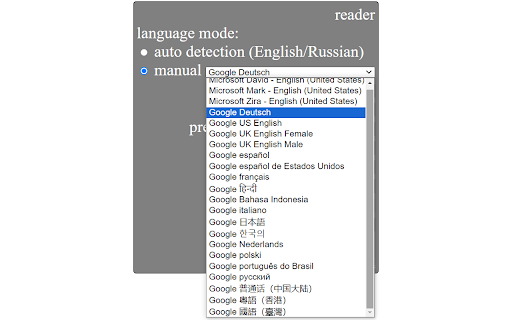
It can automatically detect the language of the current sentence (currently supported for English and Russian). Also, you can manually choose any language among supported by Google Chrome text-to-speech engine: English, Deutsch, Español, Español de Estados Unidos, Français, हिन्दी, Bahasa Indonesia, Italiano, 日本語, 한국의, Nederlands, Polski, Português do Brasil, Русский, 普通话(中国大陆), 粤語 (香港), 國語 (臺灣).
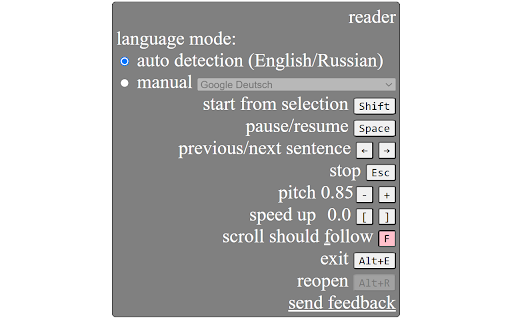
You can conveniently control the extension using keyboard shortcuts: go to previous/next sentence, start/pause, change speed etc.
When you listen, the current sentence is always highlighted (selected) on the webpage. There is also a convenient option of auto-scrolling to follow the current sentence.
How to use:
Quick start: select any part of a sentence on a web page where you want to start reading and press Alt+R (or click the extension icon). Extension widget will appear and will start reading. Mouse over the widget to see all the options and keyboard shortcuts. Most commonly you will use Shift to start from current selection, Esc to stop, Space to pause/resume, left and right arrows to go to previous/next sentence.
Enjoy reading aloud!
Reviews (2 cached)
★☆☆☆☆2023-03-31
Chris Vydas
Does nothing
★☆☆☆☆2022-02-06
Faisal
Waste of time avoid cant even do a simple task it calms it can
Permissions (3)
Permissions
activeTabℹ Can access the current tab when you click the extension scriptingℹ Can inject scripts into web pages storageℹ Can store data locally in your browser
Details
| Version | 0.0.1.0 |
| Updated | Apr 21, 2024 |
| Size | 64.23KiB |
| First Seen | Mar 26, 2026 |
Popular in workflow

Adobe Acrobat: PDF edit, convert, sign tools
by Adobe Inc.
330M
★ 4.40
workflow
330M
★ 4.40
workflow

Chrome Remote Desktop
by Chrome Remote Desktop Release Managers
38M
★ 3.14
workflow
38M
★ 3.14
workflow

MetaMask
by metamask
13M
★ 2.68
workflow
13M
★ 2.68
workflow

Microsoft Power Automate
by Microsoft Corporation
10M
★ 1.99
workflow
10M
★ 1.99
workflow

Screencastify - Screen Video Recorder
by castify-ext-dev
9M
★ 3.95
workflow
9M
★ 3.95
workflow
Popular Extensions
Adobe Acrobat: PDF edit, convert, sign tools
by Adobe Inc.
330M
★ 4.40
workflow
330M
★ 4.40
workflow
Chrome Remote Desktop
by Chrome Remote Desktop Release Managers
38M
★ 3.14
workflow
38M
★ 3.14
workflow

Cisco Webex Extension
by cisco.chromestore
24M
★ 2.34
social
24M
★ 2.34
social

Kami for Google Chrome™
by Kami
17M
★ 4.56
education
17M
★ 4.56
education

Read&Write for Google Chrome™
by Texthelp
17M
★ 3.44
accessibility
17M
★ 3.44
accessibility