
⚠️Requests 1 sensitive permission
Description
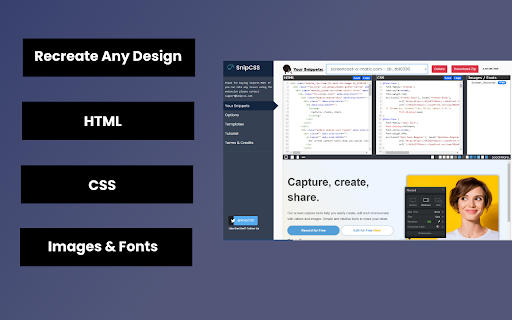
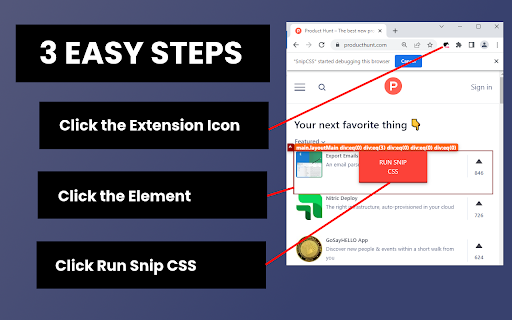
SnipCSS extracts all CSS styles associated with any portion of a webpage. It works on all websites, and after a few clicks you get the CSS, HTML and Images associated with the section of the website you are trying to recreate.
ANY COOL DESIGN YOU SEE ON THE WEB CAN BE YOUR PERSONAL TEMPLATE FOR QUICK PROTOTYPING!
========================================
If you tried to do the same by copying/pasting by hand it would probably take 20 minutes, but with SnipCSS you can select and get all styles including ones with media queries in under a minute. I even use it on sections of websites I created myself in other projects, so I can get a quick reusable HTML/CSS component to plug into my new project.
Unlike other CSS extractor extensions that use "Computed Styles", SnipCSS uses the Chrome DevTools protocol. Just like when you use devtools you see a list of associated styles, SnipCSS reconstructs that list for each element in the subtree of the DOM snippet.
All images, fonts and everything else needed for the design is downloaded, and you can easily export all the files into a zip file.
PRO VERSION LAUNCHED!
========================================
Get CSS from multiple resolutions or multiple elements using the Pro Version! Also advanced features like no-conflict CSS classes, scoping, removing unnecessary attributes/classes, and creating a sub-selection of items have been added for Pro members.
Version 1.7.0 adds the ability to turn your snippets into React/Vue templates by using ChatGPT.
The template version of a snippet injects Lorem Ipsum data into the html so copyrighted images/text are automatically replaced. You can also use Stable Diffusion to replace images in the HTML. Generative AI features require a free SnipCSS account.
TAILWIND CONVERSION!
========================================
Version 1.9.0 adds the ability to convert all HTML/CSS into valid Tailwind, including with media queries and pseudo selectors.
Just visit SnipCSS.com and sign up if you're interested in unlocking these advanced features.
Reviews (7 cached)
★☆☆☆☆2025-04-07
William Stokes
Does not work. CSS copying is difficult and you have to use a paid software if you want it to work well
★☆☆☆☆2024-10-26
Rizean
Broken most likely by Chrome update. Error: Extension context invalidated
★☆☆☆☆2023-12-05
Yehuda Melamed
Doesn't work at all!
★☆☆☆☆2023-09-25
Mihail Marian
Doesn't work at all. Either throws an error, or it doesn't let me snip and says that it's doing it.
★☆☆☆☆2021-10-02
Jeff Payne (Jeff8j)
Didnt work it copied the element but the css didnt work at all
★☆☆☆☆2021-02-25
Alfredo Luco
It does not work. The icon dissapeared from the toolbar right after the bubble advice. Chrome 88.0.4324.182 over Ubuntu 20.04
★★★☆☆2024-07-26
Dave Land
EXTREMELY finicky. EXTREMELY hard to use. I could only get it to MOSTLY work by deactivating ALL OTHER EXTENSIONS. BUT: It does what it says on the tin, which is apparently VERY hard to do, so ★★★☆☆.
Permissions (6)
Permissions
activeTabℹ Can access the current tab when you click the extension debuggerℹ Can use Chrome's debugging protocol on other tabs scriptingℹ Can inject scripts into web pages storageℹ Can store data locally in your browser tabsℹ Can see your open tabs and their URLs unlimitedStorage
Details
| Version | 2.0.3 |
| Updated | Dec 22, 2025 |
| Size | 13.11MiB |
| First Seen | Mar 25, 2026 |
More by Productive Mark LLC


Popular in developer

TouchEn PC보안 확장
by 라온시큐어
8M
★ 1.33
developer
8M
★ 1.33
developer

React Developer Tools
by Meta
5M
★ 3.95
developer
5M
★ 3.95
developer

WhatFont
by Chengyin Liu
3M
★ 4.01
developer
3M
★ 4.01
developer

Lighthouse
by lighthouse-extension-owners
1M
★ 4.42
developer
1M
★ 4.42
developer

Контур.Плагин
by kontur.extension
1M
★ 3.11
developer
1M
★ 3.11
developer
Popular Extensions

Adobe Acrobat: PDF edit, convert, sign tools
by Adobe Inc.
331M
★ 4.40
workflow
331M
★ 4.40
workflow

Grammarly: AI Writing Assistant and Grammar Checker App
by Grammarly
42M
★ 4.50
communication
42M
★ 4.50
communication

Chrome Remote Desktop
by Chrome Remote Desktop Release Managers
38M
★ 3.14
workflow
38M
★ 3.14
workflow

Microsoft Single Sign On
by Microsoft
36M
★ 2.27
workflow
36M
★ 2.27
workflow

Cisco Webex Extension
by cisco.chromestore
23M
★ 2.34
social
23M
★ 2.34
social