d3coder icon

d3coder

by Izzy

v5.1.1 Updated Nov 11, 2022 108KiB
CWS
10K
Users
★ 4.05
37 reviews
#3785
of 141.5K
developer
#325 of 12.4K
⚠️Not updated in over 2 years

Description

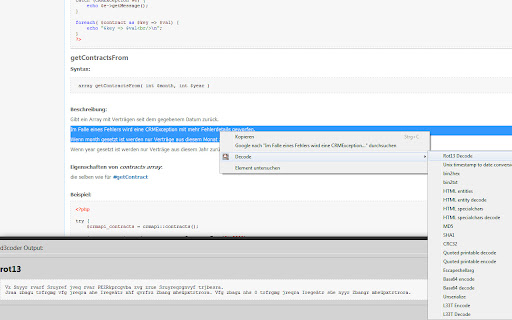
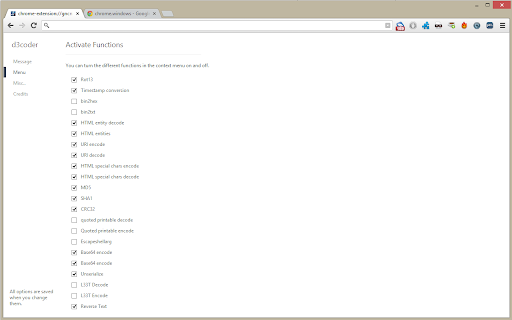
This extension enables you to encode and decode selected text via the context menu. This reduces the time you spend on looking up values and gives you more time to concentrate on the important things of development. The context menu this extension enables is customizable through the options page. To get there either click on the item or go to Wrench -> Tools -> Extensions -> d3coder options. Via the popup you are able to choose between four message types: alert the result, adding a DIV-element to the bottom of the page, via console.log() or replacing the selected text on the page. You can also deactivate functions(e.g. if you don't need them and want to free the space they use). The current version has implemented the following en-/decoding functions: - Unix Timestamp - rot13 - base64 - CRC32/MD5/SHA1 hashing - bin2hex - bin2txt - HTML entity - HTML specialchars - URI encode - Quoted printables - Escapeshellarg - (PHP) Unserialize - "L33T"-speak - reverse
d3coder screenshot 1d3coder screenshot 2d3coder screenshot 3d3coder screenshot 4

Reviews (5 cached)

★★☆☆☆2017-09-20

It does the job, however, it breaks some websites (ex: listmoz.com)

★★☆☆☆2015-08-27
Pedram Azimaie

When you cannot save/copy decode result. this extension is useless.

★★☆☆☆2015-04-19
Confused Brit

Good enough for rot13, but translations from base64 end up with gibberish ocluding half the message

★★★☆☆2016-12-13
Mr. Lance E Sloan (UMich)

It works in a lot of cases, but I've just noticed while working with quoted-printable text that it doesn't do that very well. For example, the string "=E2=80=94" should decode to "—", but this extension shows "—". Also, "=E2=80=99" should decode to "’", but it gave "’" again. It doesn't handle the "=" linebreaks correctly, either. The decoded text includes a lot of equal signs in them.

★★★☆☆2013-07-19
Arsène von Wyss

Great extension, but unfortunately the one decoder I used is buggy: the quoted-printable decoder doesn't decode the line continuations ("= " at line end) correctly.

Permissions (5)

Permissions

activeTab Can access the current tab when you click the extension clipboardWrite Can write to your clipboard contextMenus Can add items to the right-click menu scripting Can inject scripts into web pages storage Can store data locally in your browser

Details

Version 5.1.1
Updated Nov 11, 2022
Size 108KiB
First Seen Mar 28, 2026



