
⚠️Not updated in over a year ⚠️Very few reviews for its user base
Description
The extension enables scanning documents on web pages and directly save them as attachments or images in web apps like Gmail, Outlook and Salesforce.
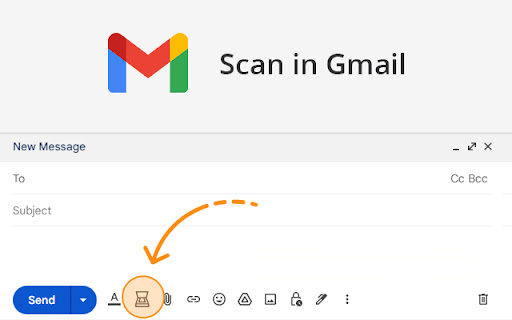
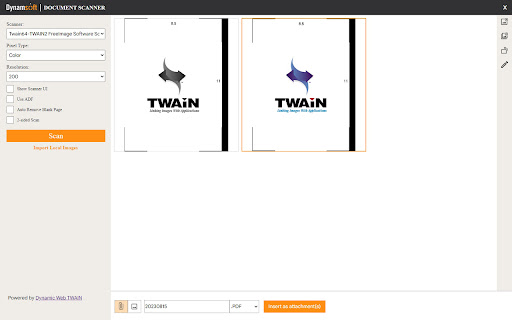
A scanner modal will appear after pressing the scanner icon added by the extension in the toolbar of supported web apps.
1. Is the Document Scanner available for free?
It is free for personal use. If you want to use it for commercial purposes, please contact us at sales@dynamsoft.com.
2. On which platforms and browsers does the Document Scanner Extension operate?
Supported Platforms: Windows, macOS, and Linux.
Supported Browsers: Chrome and Edge.
Supported Web Apps: Gmail, Outlook and Salesforce.
3. Which file formats are supported by the extension for saving as attachments?
The extension supports saving attachments in multiple-page PDF and JPG formats.
Dynamic Web TWAIN is used to provide the ability to scan documents via scanners. You can learn about how to use Dynamic Web TWAIN to add document scanning to your web application by reading the docs: https://www.dynamsoft.com/web-twain/docs/introduction/index.html


Reviews (1 cached)
★★★☆☆2025-11-06
Atish Bhardwaj
hOW TO Use it
Permissions (3)
Permissions
activeTabℹ Can access the current tab when you click the extension scriptingℹ Can inject scripts into web pages storageℹ Can store data locally in your browser
Details
| Version | 2.1.1111 |
| Updated | Nov 13, 2024 |
| Size | 1.31MiB |
| First Seen | Mar 24, 2026 |
Popular in workflow

Adobe Acrobat: PDF edit, convert, sign tools
by Adobe Inc.
330M
★ 4.40
workflow
330M
★ 4.40
workflow

Chrome Remote Desktop
by Chrome Remote Desktop Release Managers
38M
★ 3.14
workflow
38M
★ 3.14
workflow

Microsoft Power Automate
by Microsoft Corporation
10M
★ 1.99
workflow
10M
★ 1.99
workflow

Screencastify - Screen Video Recorder
by castify-ext-dev
9M
★ 3.95
workflow
9M
★ 3.95
workflow

iCloud Bookmarks
by Apple Inc.
7M
★ 3.38
workflow
7M
★ 3.38
workflow
Popular Extensions
Adobe Acrobat: PDF edit, convert, sign tools
by Adobe Inc.
330M
★ 4.40
workflow
330M
★ 4.40
workflow
Chrome Remote Desktop
by Chrome Remote Desktop Release Managers
38M
★ 3.14
workflow
38M
★ 3.14
workflow

Cisco Webex Extension
by cisco.chromestore
24M
★ 2.34
social
24M
★ 2.34
social

Kami for Google Chrome™
by Kami
17M
★ 4.56
education
17M
★ 4.56
education

Read&Write for Google Chrome™
by Texthelp
17M
★ 3.44
accessibility
17M
★ 3.44
accessibility