
✅Highly rated ✅Recently updated
Description
Enhance your audio experience with Volume Booster! This powerful browser extension allows you to boost sound levels up to 600%, ensuring crystal-clear audio whether you're watching videos, listening to music, or taking online calls.
Why Choose Volume Booster?
🔊 Boost Volume Up to 600% – Amplify sound beyond your device’s default limits, perfect for low-volume videos or music.
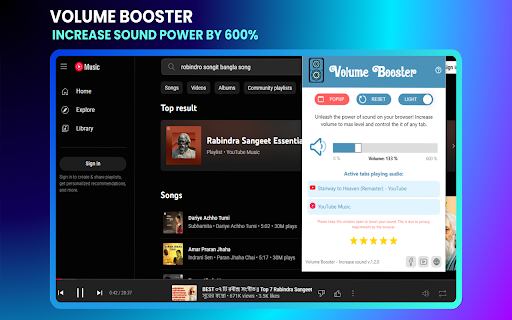
🎛 Easy One-Click Control – Simple and intuitive interface with a smooth volume slider for precise adjustments.
🎨 Dark & Light Mode – Customize the extension’s appearance to match your browser theme for a comfortable experience.
🔄 Instant Reset Button – Easily revert to default volume settings anytime with a single click.
🌐 Works on Any Website – Boost sound on YouTube, Netflix, Spotify, online meetings (Zoom, Google Meet), and more.
⚡ Lightweight & Fast – No unnecessary bloat, ensuring fast performance with minimal resource usage.
🔒 Safe & Secure – Does not require intrusive permissions or collect user data, ensuring your privacy is protected.
How It Works
Using Volume Booster – Increase Sound is as simple as adjusting a volume slider. Follow these quick steps to start boosting your audio:
Install the Extension – Add Volume Booster to your browser with a single click.
Enable Volume Boost – Click on the extension icon in your toolbar and adjust the volume slider to increase the sound.
Enjoy Louder Audio – Experience enhanced sound on videos, music, podcasts, and calls.
Reset Anytime – Click the reset button to instantly restore your browser’s original sound settings, not working for popup.
With real-time volume control, you can easily fine-tune your audio levels, ensuring an optimal sound experience whether you need a slight boost or a significant amplification.
V1.2.0
- Adding Dark & Light Mode
- Add Reset and popup Button
- Set Dark & Light Mode
V1.1.9
- Boost Volume Up to 600%


Reviews (1 cached)
★★★☆☆2025-02-09
喵Otokonoko
After the update 12.0, I cannot enter full screen normally and need to use f11 to enter full screen
Permissions (4)
Permissions
offscreen storageℹ Can store data locally in your browser tabCaptureℹ Can capture tab audio/video tabsℹ Can see your open tabs and their URLs
Details
| Version | 1.2.6 |
| Updated | Mar 6, 2026 |
| Size | 131KiB |
| First Seen | Mar 24, 2026 |
More by CodeHemu

Popular in accessibility

Read&Write for Google Chrome™
by Texthelp
17M
★ 3.44
accessibility
17M
★ 3.44
accessibility

360 Internet Protection
by qihoosafe
17M
★ 4.54
accessibility
17M
★ 4.54
accessibility

Volume Master
by Peta Sittek
6M
★ 4.81
accessibility
6M
★ 4.81
accessibility

네이버 동영상 플러그인
by NAVER Corp.
5M
★ 1.42
accessibility
5M
★ 1.42
accessibility

SYTools
by wasaby
4M
★ 3.16
accessibility
4M
★ 3.16
accessibility
Popular Extensions

Adobe Acrobat: PDF edit, convert, sign tools
by Adobe Inc.
330M
★ 4.40
workflow
330M
★ 4.40
workflow

Chrome Remote Desktop
by Chrome Remote Desktop Release Managers
38M
★ 3.14
workflow
38M
★ 3.14
workflow

Cisco Webex Extension
by cisco.chromestore
24M
★ 2.34
social
24M
★ 2.34
social

Kami for Google Chrome™
by Kami
17M
★ 4.56
education
17M
★ 4.56
education
Read&Write for Google Chrome™
by Texthelp
17M
★ 3.44
accessibility
17M
★ 3.44
accessibility