
⚠️Not updated in over 2 years
Description
# Chrome/Edge extension to allow chatting with Maximo using OpenAI.
This is a client-only tool. Means you have to provide your own Open API key.
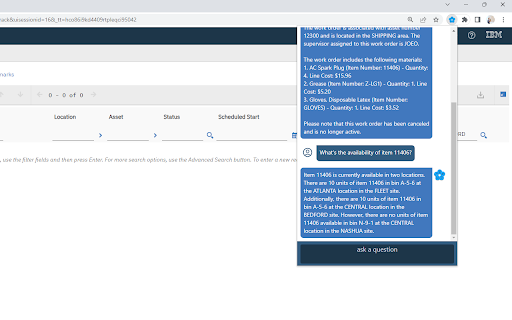
Based on questions from the user, OpenAI will determine whether to query Maximo to get the information and use that to answer the question.
The tool comes with some basic queries which can be used with an out-of-the-box Maximo demo instance. You can plug it into your Maximo and these basic queries will most likely work immediately. You can modify or define new queries so that it can access to data specific to your need.
Before using the tool, you need to open the Options page of the extension (by right click to the Extension icon, then choose Options) to set it up:
- Provide your own OpenAI API Key
- Provide either an Maximo API key or username/password. This is used by the tool to query Maximo via REST api. If you don't provide the credentials, you'll have to login to Maximo before using the tool so that the browser has a valid session.
This is an experimental tool. If you have any questions or feedback, please feel free to reach out to my [email](viet@relia.app) or send me a message on [LinkedIn](https://www.linkedin.com/in/viettranit/)


Reviews
Loading reviews...
Permissions (1)
Permissions
storageℹ Can store data locally in your browser
Details
| Version | 1.0.1 |
| Updated | Jul 20, 2023 |
| Size | 1.17MiB |
| First Seen | Mar 24, 2026 |
More by Viet Tran

Popular in workflow

Adobe Acrobat: PDF edit, convert, sign tools
by Adobe Inc.
331M
★ 4.40
workflow
331M
★ 4.40
workflow

Chrome Remote Desktop
by Chrome Remote Desktop Release Managers
38M
★ 3.14
workflow
38M
★ 3.14
workflow

Microsoft Single Sign On
by Microsoft
36M
★ 2.27
workflow
36M
★ 2.27
workflow

MetaMask
by metamask
13M
★ 2.68
workflow
13M
★ 2.68
workflow

Free VPN for Chrome - VPN Proxy VeePN
by www.veepn.com
12M
★ 4.51
workflow
12M
★ 4.51
workflow
Popular Extensions
Adobe Acrobat: PDF edit, convert, sign tools
by Adobe Inc.
331M
★ 4.40
workflow
331M
★ 4.40
workflow

Grammarly: AI Writing Assistant and Grammar Checker App
by Grammarly
42M
★ 4.50
communication
42M
★ 4.50
communication
Chrome Remote Desktop
by Chrome Remote Desktop Release Managers
38M
★ 3.14
workflow
38M
★ 3.14
workflow
Microsoft Single Sign On
by Microsoft
36M
★ 2.27
workflow
36M
★ 2.27
workflow

Cisco Webex Extension
by cisco.chromestore
23M
★ 2.34
social
23M
★ 2.34
social