
⚠️Not updated in over 2 years
Description
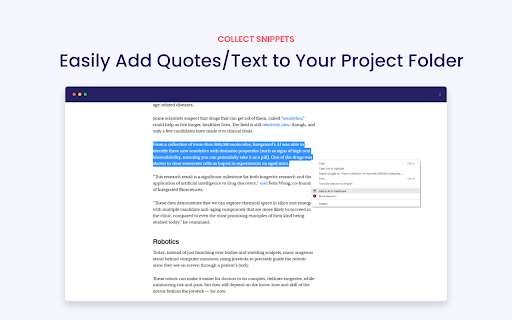
The WhitePaperGPT Chrome extension revolutionizes the way users gather and utilize information from the internet by offering a seamless and efficient solution for creating white papers. With the extension installed, users can effortlessly collect relevant sources from various online platforms, such as websites, articles, and research papers. By simply clicking a button, the extension saves these sources and allows users to organize them into individual projects for easy management and retrieval.
See our demo to learn how to easily create white papers: https://s3.us-east-2.amazonaws.com/whitepapergpt.com/public/whitepapergpt_demo.mp4
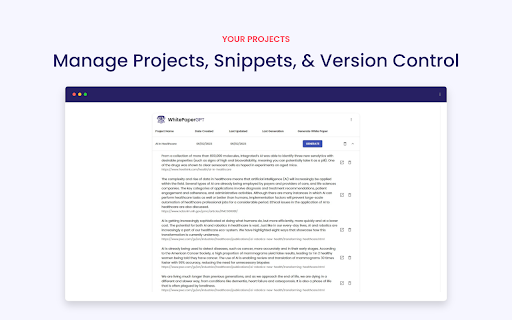
The project management feature of WhitePaperGPT empowers users to stay organized throughout their research process. Users can create multiple projects, each tailored to a specific topic or subject area. Within each project, they can add, edit, and categorize their collected sources, making it simple to locate and reference information later. The extension's intuitive interface enables users to seamlessly navigate between projects and effortlessly switch between different sources, ensuring a streamlined experience for efficient white paper creation.
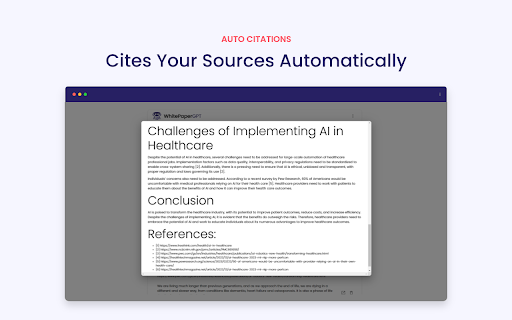
Once users have gathered and organized their sources within a project, WhitePaperGPT takes the automation process one step further by transforming these sources into professionally formatted white papers. By simply submitting their collection of sources, the extension utilizes advanced natural language processing and machine learning algorithms to analyze and synthesize the information, generating a cohesive and well-structured white paper. This saves users valuable time and effort that would otherwise be spent on manually crafting and formatting the document. With WhitePaperGPT, users can focus on the content and let the extension handle the arduous task of creating a polished white paper from their collected sources.
Getting started:
- Create an account by click "view projects"
- Create a new project
- Right-click on any content on any site and add to project
- When you're ready click on "Generate" to generate a white paper using the saved content.
With PRO, regenerate as many times as you'd like all version will be saved
Visit https://www.whitepapergpt.com/ to sign up for updates.


Reviews
Loading reviews...
Permissions (4)
Permissions
clipboardWriteℹ Can write to your clipboard contextMenusℹ Can add items to the right-click menu storageℹ Can store data locally in your browser unlimitedStorage
Details
| Version | 0.0.0.7 |
| Updated | Sep 27, 2023 |
| Size | 3.12MiB |
| First Seen | Mar 24, 2026 |
Popular in workflow

Adobe Acrobat: PDF edit, convert, sign tools
by Adobe Inc.
330M
★ 4.40
workflow
330M
★ 4.40
workflow

Chrome Remote Desktop
by Chrome Remote Desktop Release Managers
38M
★ 3.14
workflow
38M
★ 3.14
workflow

Microsoft Power Automate
by Microsoft Corporation
10M
★ 1.99
workflow
10M
★ 1.99
workflow

Screencastify - Screen Video Recorder
by castify-ext-dev
9M
★ 3.95
workflow
9M
★ 3.95
workflow

iCloud Bookmarks
by Apple Inc.
7M
★ 3.38
workflow
7M
★ 3.38
workflow
Popular Extensions
Adobe Acrobat: PDF edit, convert, sign tools
by Adobe Inc.
330M
★ 4.40
workflow
330M
★ 4.40
workflow
Chrome Remote Desktop
by Chrome Remote Desktop Release Managers
38M
★ 3.14
workflow
38M
★ 3.14
workflow

Cisco Webex Extension
by cisco.chromestore
24M
★ 2.34
social
24M
★ 2.34
social

Kami for Google Chrome™
by Kami
17M
★ 4.56
education
17M
★ 4.56
education

Read&Write for Google Chrome™
by Texthelp
17M
★ 3.44
accessibility
17M
★ 3.44
accessibility