
⚠️Not updated in over a year
Description
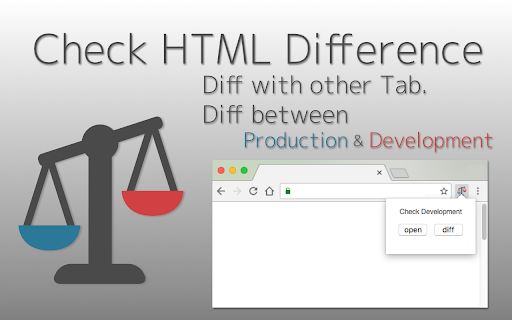
HTML Diff Check Tool is chrome addon for checking difference between tabs or between Production and Development.
You can check HTML diff with other tab.
You can open the URL of production and development server each other with pre-register pairs of those URLs. Also, you can check HTML diff of them.
[usecase]
- To check the difference between a testing and production environment before/after deployment.
- When your co-worker asks you to check a testing environment which he/she updated.
[How to use]
1. In the settings register the combination of a testing and production environment domain (including a subdomain).
2. Turn on the "balance scale" icon or select from context menu at the web page where you want to check a testing or production environment.
3. Click the "open" button then a testing or production environment domain will be opened.
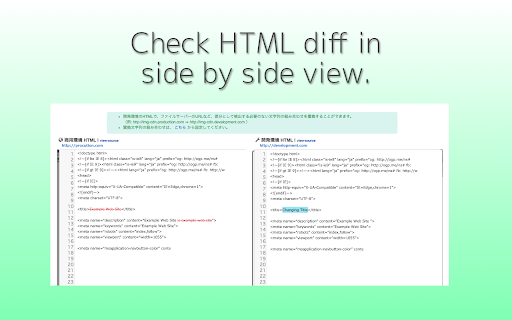
4. Click the "diff" button so you can check the difference between the HTML sources.
[about privacy]
- The registered domains, URLs or HTML sources are not sent to third parties.
- According to correspond to manifest v3, analyzed via Google Analytics is stopped.
[release note]
-v.3.0.0
correspond to manifest v3
-v.2.2.0
Add to context menus.
-v.2.0.0
Add function for checking diff with other tab.
-v.1.6.0
Add a comment box (Google form) Link
-v.1.5.0
Change UI design a little.
-v.1.4.0
Change Wrap Lines Function is added.
ShortCutKey is also added. Alt + Down (Go to next diff) / Alt + Up (Go to prev diff) / Alt + w (Change Wrap Lines)
Bug fix.
-v.1.3.0
Nex/Prev Diff and Search Functions are added.
-v.1.2.0
-v.1.1.0
bug fix
-v.1.0.0
Add alert when it could not access to target url.
-v.0.2.0
You can also use in incognito mode.
Fix bug and strings.
- v.0.1.11
You can also check HTML diff include JavaScript rendered HTML. Change option for that, if you need.
Reviews (3 cached)
★☆☆☆☆2021-02-09
Scott Silliman
I couldn't this to work. all I get is an alert with chinese text in it and a checkbox asking whether to disable further alerts from this extension. when trying to open or diff. perhaps this works, but some instructions please?? totally willing to re-rate if I had instructions.
★☆☆☆☆2019-11-20
chris clark
didn't work for me, every page I attempted to use had the message "This page is not supported."
★★☆☆☆2023-02-22
Igor Akkerman
Appears to compare the HTML code line by line, as if you put two text editors side by side. Expectation was a smart DOM comparison. Also didn't regognize inserted lines. Downloading the HTML and comparing using any text compare tool did a far better job for me.
Permissions (4)
Permissions
contextMenusℹ Can add items to the right-click menu scriptingℹ Can inject scripts into web pages storageℹ Can store data locally in your browser tabsℹ Can see your open tabs and their URLs
Details
| Version | 3.0.0 |
| Updated | Jun 24, 2024 |
| Size | 1.46MiB |
| First Seen | Mar 26, 2026 |
More by scott



Popular in developer

TouchEn PC보안 확장
by 라온시큐어
8M
★ 1.33
developer
8M
★ 1.33
developer

React Developer Tools
by Meta
5M
★ 3.95
developer
5M
★ 3.95
developer

WhatFont
by Chengyin Liu
3M
★ 4.01
developer
3M
★ 4.01
developer

Take Webpage Screenshots Entirely - FireShot
by Evgeny Vokilsus
3M
★ 4.79
developer
3M
★ 4.79
developer

Lighthouse
by lighthouse-extension-owners
1M
★ 4.42
developer
1M
★ 4.42
developer
Popular Extensions

Adobe Acrobat: PDF edit, convert, sign tools
by Adobe Inc.
331M
★ 4.40
workflow
331M
★ 4.40
workflow

Grammarly: AI Writing Assistant and Grammar Checker App
by Grammarly
42M
★ 4.50
communication
42M
★ 4.50
communication

Chrome Remote Desktop
by Chrome Remote Desktop Release Managers
38M
★ 3.14
workflow
38M
★ 3.14
workflow

Microsoft Single Sign On
by Microsoft
36M
★ 2.27
workflow
36M
★ 2.27
workflow

Cisco Webex Extension
by cisco.chromestore
23M
★ 2.34
social
23M
★ 2.34
social