
⚠️Not updated in over a year ⚠️Below average rating
Description
Never forget to revisit an important website again with the Reminder Chrome extension. Easily manage your to-read list of websites, prioritize links, and receive timely notifications right in your browser.
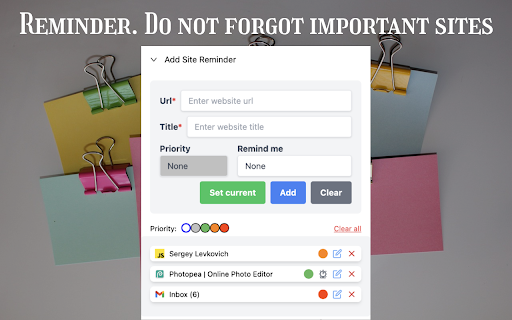
Do you often come across websites or articles that you want to read but don't have the time for at that moment? Reminder is your perfect solution. This intuitive Chrome extension lets you save URLs in a single click, categorize them by priority, and even set reminders for when it’s time to go back to them.
KEY FEATURES:
- Quick Save: Bookmark any webpage with just one click.
- Set Reminders: Choose a specific time to get notified about saved web pages.
- Prioritize: Organize your links with customizable priority levels, making it easy to manage your browsing goals.
- One-Click Clear: Conveniently clear your list once you've completed your tasks.
WHY YOU'LL LOVE REMINDER:
- Keep track of interesting websites without cluttering your bookmarks bar.
- Stay organized and productive by prioritizing your reading or browsing schedule.
- Get timely notifications that ensure you never miss out on important information.
Whether for research, reading or simply keeping track of interesting content, Reminder makes web management effortless and efficient. Try it today and boost your productivity!


Reviews
Loading reviews...
Permissions (5)
Permissions
alarmsℹ Can schedule periodic background tasks notificationsℹ Can show desktop notifications storageℹ Can store data locally in your browser tabsℹ Can see your open tabs and their URLs unlimitedStorage
Details
| Version | 2.0.0 |
| Updated | Sep 24, 2024 |
| Size | 8.71MiB |
| First Seen | Mar 29, 2026 |
More by Siarhei Liaukovich

Popular in workflow

Adobe Acrobat: PDF edit, convert, sign tools
by Adobe Inc.
331M
★ 4.40
workflow
331M
★ 4.40
workflow

Chrome Remote Desktop
by Chrome Remote Desktop Release Managers
38M
★ 3.14
workflow
38M
★ 3.14
workflow

Microsoft Single Sign On
by Microsoft
36M
★ 2.27
workflow
36M
★ 2.27
workflow

MetaMask
by metamask
13M
★ 2.68
workflow
13M
★ 2.68
workflow

Free VPN for Chrome - VPN Proxy VeePN
by www.veepn.com
12M
★ 4.51
workflow
12M
★ 4.51
workflow
Popular Extensions
Adobe Acrobat: PDF edit, convert, sign tools
by Adobe Inc.
331M
★ 4.40
workflow
331M
★ 4.40
workflow

Grammarly: AI Writing Assistant and Grammar Checker App
by Grammarly
42M
★ 4.50
communication
42M
★ 4.50
communication
Chrome Remote Desktop
by Chrome Remote Desktop Release Managers
38M
★ 3.14
workflow
38M
★ 3.14
workflow
Microsoft Single Sign On
by Microsoft
36M
★ 2.27
workflow
36M
★ 2.27
workflow

Cisco Webex Extension
by cisco.chromestore
23M
★ 2.34
social
23M
★ 2.34
social