
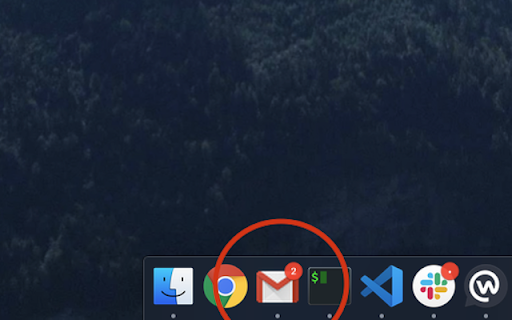
Gmail app badge notification
v1.2.3 Updated Jan 18, 2025 35.74KiB
⚠️Not updated in over a year
Description
Setup:
1. Install the extension
2. Add Gmail as an app. You can do so by following this guide: https://support.google.com/chrome_webstore/answer/3060053?hl=en - make sure to select the option "open as a window".
3. Open the newly installed app.
Usage instructions (including custom settings):
https://github.com/aberonni/gmail-app-badge-notification?tab=readme-ov-file#usage
Troubleshooting:
https://github.com/aberonni/gmail-app-badge-notification#Troubleshooting
Reporting issues:
https://github.com/aberonni/gmail-app-badge-notification/issues
Reviews (3 cached)
★★☆☆☆2024-10-02
Lucas BENEDETTO
It works but it's not efficient at all. The extension queries a RSS feed every second.
★★☆☆☆2024-08-15
Yevgeniy Podolyan
Seems like it shows unread e-mails not just from Primary but also from Promotions. Thus, it is useles for me as I only want primary mailbox but it shows 99+ all the time.
★★☆☆☆2023-03-23
Vittorio Causarano
Not working on mac os Ventura
Permissions (3)
Permissions
alarmsℹ Can schedule periodic background tasks contextMenusℹ Can add items to the right-click menu storageℹ Can store data locally in your browser
Details
| Version | 1.2.3 |
| Updated | Jan 18, 2025 |
| Size | 35.74KiB |
| First Seen | Mar 28, 2026 |
More by Domenico Gemoli


Popular in workflow

Adobe Acrobat: PDF edit, convert, sign tools
by Adobe Inc.
331M
★ 4.40
workflow
331M
★ 4.40
workflow

Chrome Remote Desktop
by Chrome Remote Desktop Release Managers
38M
★ 3.14
workflow
38M
★ 3.14
workflow

Microsoft Single Sign On
by Microsoft
36M
★ 2.27
workflow
36M
★ 2.27
workflow

MetaMask
by metamask
13M
★ 2.68
workflow
13M
★ 2.68
workflow

Microsoft Power Automate
by Microsoft Corporation
10M
★ 1.99
workflow
10M
★ 1.99
workflow
Popular Extensions
Adobe Acrobat: PDF edit, convert, sign tools
by Adobe Inc.
331M
★ 4.40
workflow
331M
★ 4.40
workflow

Grammarly: AI Writing Assistant and Grammar Checker App
by Grammarly
42M
★ 4.50
communication
42M
★ 4.50
communication
Chrome Remote Desktop
by Chrome Remote Desktop Release Managers
38M
★ 3.14
workflow
38M
★ 3.14
workflow
Microsoft Single Sign On
by Microsoft
36M
★ 2.27
workflow
36M
★ 2.27
workflow

Cisco Webex Extension
by cisco.chromestore
23M
★ 2.34
social
23M
★ 2.34
social