
⚠️Not updated in over a year
Description
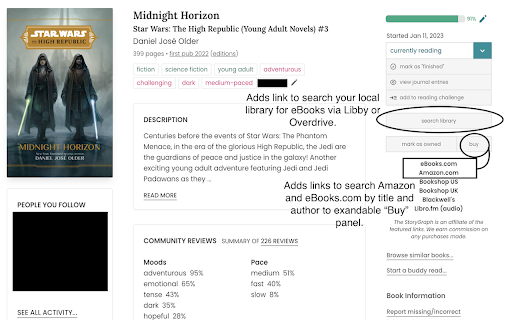
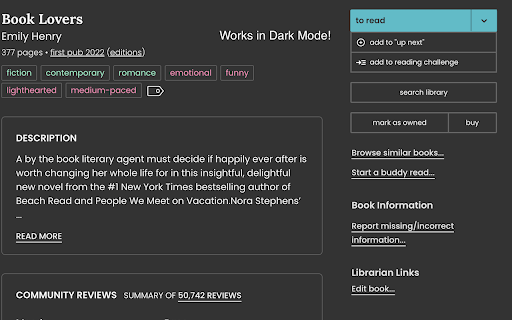
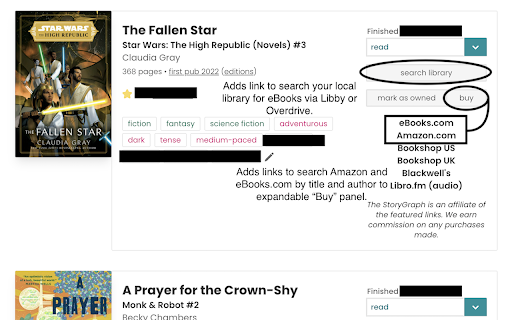
This extension was created for users of The StoryGraph who want to enhance their reading tracking experience. The extension adds some features to the website, including direct links to search for ebooks and audiobooks from your local library through the Libby or Overdrive platform and links to search for books to purchase through Amazon and eBooks.com,
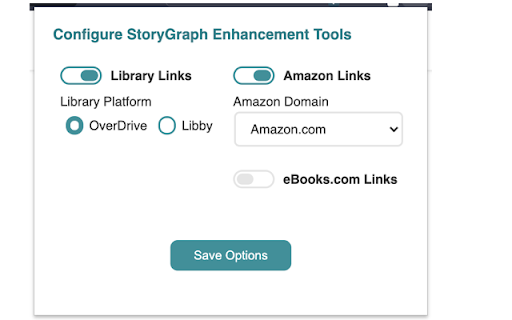
Each type of link (library, Amazon, eBooks.com) can be turned on or off through the options panel. Users can choose either Overdrive or Libby as the library platform. Overdrive does not need any configuration from the user. To use Libby, you need is your library's name on the platform. Log into Libby, go to the Search menu, and find your library's name in the URL bar. To use this extension, add it to Chrome, then click on the icon in the extensions menu--enter your library's name in the settings menu that appears.
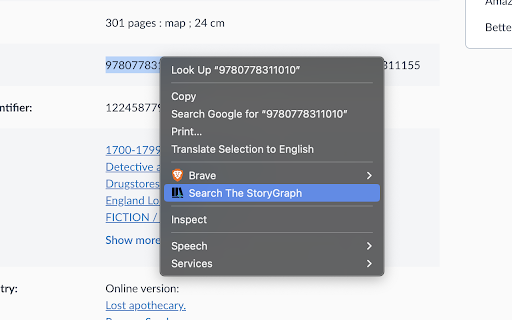
This extension also now adds a context menu item, Search The StoryGraph, that appears when text is selected on any web page. When clicked, it opens up a new tab with search result in The StoryGraph for the selected text. It works on any type of text: titles, author names, keywords, and ISBNs.
This extension is not endorsed by, directly affiliated with, maintained, authorized, or sponsored by The StoryGraph or its developer team.
Reviews
Loading reviews...
Permissions (2)
Permissions
contextMenusℹ Can add items to the right-click menu storageℹ Can store data locally in your browser
Details
| Version | 4.2.0 |
| Updated | Feb 20, 2025 |
| Size | 341KiB |
| First Seen | Mar 28, 2026 |
Popular in workflow

Adobe Acrobat: PDF edit, convert, sign tools
by Adobe Inc.
331M
★ 4.40
workflow
331M
★ 4.40
workflow

Chrome Remote Desktop
by Chrome Remote Desktop Release Managers
38M
★ 3.14
workflow
38M
★ 3.14
workflow

Microsoft Single Sign On
by Microsoft
36M
★ 2.27
workflow
36M
★ 2.27
workflow

MetaMask
by metamask
13M
★ 2.68
workflow
13M
★ 2.68
workflow

Free VPN for Chrome - VPN Proxy VeePN
by www.veepn.com
12M
★ 4.51
workflow
12M
★ 4.51
workflow
Popular Extensions
Adobe Acrobat: PDF edit, convert, sign tools
by Adobe Inc.
331M
★ 4.40
workflow
331M
★ 4.40
workflow

Grammarly: AI Writing Assistant and Grammar Checker App
by Grammarly
42M
★ 4.50
communication
42M
★ 4.50
communication
Chrome Remote Desktop
by Chrome Remote Desktop Release Managers
38M
★ 3.14
workflow
38M
★ 3.14
workflow
Microsoft Single Sign On
by Microsoft
36M
★ 2.27
workflow
36M
★ 2.27
workflow

Cisco Webex Extension
by cisco.chromestore
23M
★ 2.34
social
23M
★ 2.34
social