
⚠️Not updated in over 2 years
Description
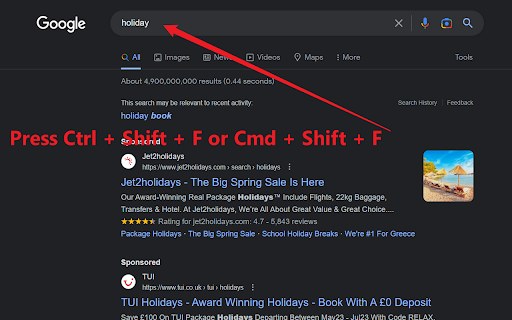
Focus On Search: Swiftly Cycle Through Search Fields with a Single Hotkey! (Ctrl + Shift + F)
Discover the ultimate productivity booster with Focus On Search, a lightweight Chrome extension that lets you seamlessly switch between Search fields on any webpage. Say goodbye to time-consuming manual navigation and let the magic of Input Navigator simplify your browsing experience.
Key Features:
🔍 Autofocus on the First Search Input Field: Just press the hotkey (Ctrl + Shift + F), and the extension will automatically focus on the first Search input field, making it easy for you to start typing right away.
🔄 Effortlessly Cycle Through Input Fields: With the same hotkey, you can quickly navigate between all input fields on a webpage in a loop, ensuring smooth and efficient browsing.
📝 Select Text in Input Fields: When focusing on an input field with pre-existing text, the app will select the entire text, allowing you to easily replace or edit the content.
Why Install Focus On Search?
🚀 Boost Productivity: Speed up your browsing and data entry tasks, saving you valuable time and energy.
✅ User-Friendly: No complicated setup or configuration required - just install and start using the hotkey immediately.
💼 Perfect for Work & Personal Use: Focus On Search is a versatile tool, ideal for everyday browsing, form-filling, data entry, or administrative tasks.
Get Focus On Search now and experience effortless navigation through input fields on any webpage!"

Reviews
Loading reviews...
Permissions (2)
Permissions
activeTabℹ Can access the current tab when you click the extension scriptingℹ Can inject scripts into web pages
Details
| Version | 1.0 |
| Updated | Apr 3, 2023 |
| Size | 30.72KiB |
| First Seen | Mar 27, 2026 |
Popular in workflow

Adobe Acrobat: PDF edit, convert, sign tools
by Adobe Inc.
331M
★ 4.40
workflow
331M
★ 4.40
workflow

Chrome Remote Desktop
by Chrome Remote Desktop Release Managers
38M
★ 3.14
workflow
38M
★ 3.14
workflow

Microsoft Single Sign On
by Microsoft
36M
★ 2.27
workflow
36M
★ 2.27
workflow

MetaMask
by metamask
13M
★ 2.68
workflow
13M
★ 2.68
workflow

Microsoft Power Automate
by Microsoft Corporation
10M
★ 1.99
workflow
10M
★ 1.99
workflow
Popular Extensions
Adobe Acrobat: PDF edit, convert, sign tools
by Adobe Inc.
331M
★ 4.40
workflow
331M
★ 4.40
workflow

Grammarly: AI Writing Assistant and Grammar Checker App
by Grammarly
42M
★ 4.50
communication
42M
★ 4.50
communication
Chrome Remote Desktop
by Chrome Remote Desktop Release Managers
38M
★ 3.14
workflow
38M
★ 3.14
workflow
Microsoft Single Sign On
by Microsoft
36M
★ 2.27
workflow
36M
★ 2.27
workflow

Cisco Webex Extension
by cisco.chromestore
23M
★ 2.34
social
23M
★ 2.34
social