
Auto Pan by Window Position
v1.14.5 Updated Mar 19, 2026 21.49KiB
✅Recently updated
Description
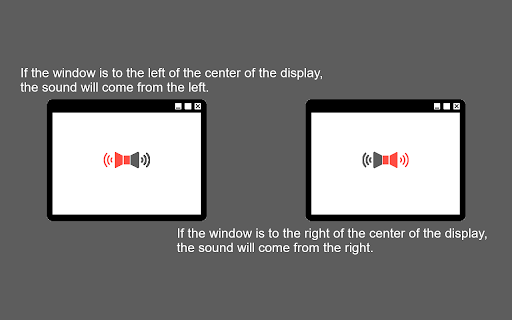
This Chrome extension automatically pans the audio of media elements (`<video>` and `<audio>`) to the left or right channels based on the horizontal position of the browser window relative to the center of the display.
## Features
- Automatic Audio Panning: Hear audio from the direction where your browser window is located. If the window is on the left side of the screen, the audio will pan to the left speaker/headphone, and vice versa.
- Adjustable Pan Rate: Control the intensity of the panning effect.
- Vertical Panning Support (PannerNode): By default, it uses standard stereo panning. You can enable vertical panning to also affect audio based on vertical window position and simulate distance.
- Multi-Monitor Support: You can configure the panning to be calculated relative to:
- The single display the window is currently on.
- The primary display (if you use multiple monitors).
- The aggregate center of all connected displays.
## Usage
Once installed, the extension works automatically in the background. It will attach to any `<video>` and `<audio>` tags on the web pages you visit and adjust the audio panning based on the window's position.
### Settings
Click on the extension icon in the toolbar to open the popup and configure:
- Enable/Disable: Toggle the auto-pan functionality.
- Pan Rate: Increase or decrease how strongly the audio leans to one side.
- Vertical Panning (PannerNode): Use an advanced vertical spatialization model instead of simple stereo panning.
- Multi-Monitor: Calculate pan position relative to the primary display.
- Multi-Monitor (All): Calculate pan position relative to the entire bounds of all combined displays.

Reviews
Loading reviews...
Permissions (2)
Permissions
storageℹ Can store data locally in your browser system.display
Details
| Version | 1.14.5 |
| Updated | Mar 19, 2026 |
| Size | 21.49KiB |
| First Seen | Mar 27, 2026 |
More by Simple and Tiny Utilities

YouTube Live Stream Latency Mitigator
by Simple and Tiny Utilities
6K
★ 4.50
accessibility
6K
★ 4.50
accessibility

Subscription Feed Filter for YouTube
by Simple and Tiny Utilities
2K
★ 4.67
functionality
2K
★ 4.67
functionality

YouTube Volume Control
by Simple and Tiny Utilities
239
★ 5.00
functionality
239
★ 5.00
functionality

Pin YouTube Control
by Simple and Tiny Utilities
148
★ 5.00
functionality
148
★ 5.00
functionality

YouTube Playback Quality Control
by Simple and Tiny Utilities
142
★ 4.33
functionality
142
★ 4.33
functionality
Popular in accessibility

Read&Write for Google Chrome™
by Texthelp
17M
★ 3.44
accessibility
17M
★ 3.44
accessibility

360 Internet Protection
by qihoosafe
17M
★ 4.54
accessibility
17M
★ 4.54
accessibility

Screenshot reader™
by Texthelp
7M
★ 2.57
accessibility
7M
★ 2.57
accessibility

OrbitNote
by Texthelp
7M
★ 2.95
accessibility
7M
★ 2.95
accessibility

Volume Master
by Peta Sittek
6M
★ 4.81
accessibility
6M
★ 4.81
accessibility
Popular Extensions

Adobe Acrobat: PDF edit, convert, sign tools
by Adobe Inc.
331M
★ 4.40
workflow
331M
★ 4.40
workflow

AdBlock — block ads across the web
by AdBlock
62M
★ 4.48
workflow
62M
★ 4.48
workflow

Grammarly: AI Writing Assistant and Grammar Checker App
by Grammarly
42M
★ 4.50
communication
42M
★ 4.50
communication

Chrome Remote Desktop
by Chrome Remote Desktop Release Managers
38M
★ 3.14
workflow
38M
★ 3.14
workflow

Microsoft Single Sign On
by Microsoft
36M
★ 2.27
workflow
36M
★ 2.27
workflow