
User Count Trend
Loading...
Description
This AI tool is designed to enhance your English skills, employing advanced AI technologies including Text to Speech (TTS) and Large Language Model (LLM) to facilitate your learning.
Its user-friendly and highly customizable nature makes it ideal not only for English learners but also for professionals and scholars who need to read specialized English materials. Additionally, it can be used to learn other languages, significantly boosting your efficiency in both work and study.
## How to config
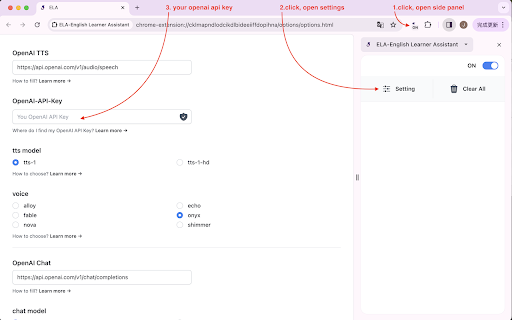
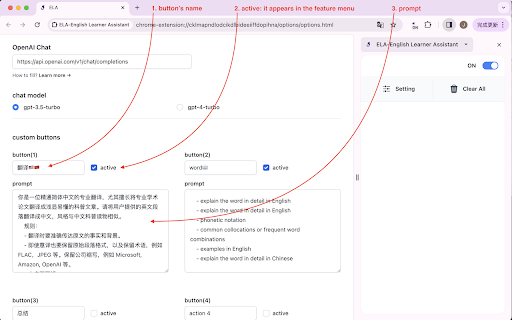
Open "Settings" and enter your OpenAI-API-Key, select a voice model, and set up custom buttons.
## How to use
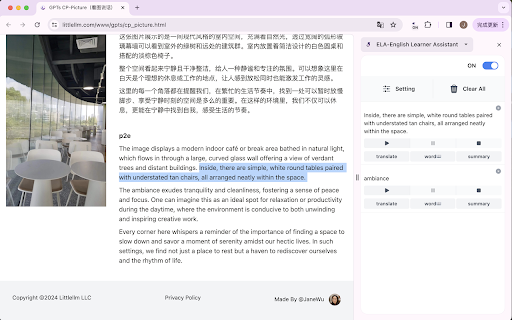
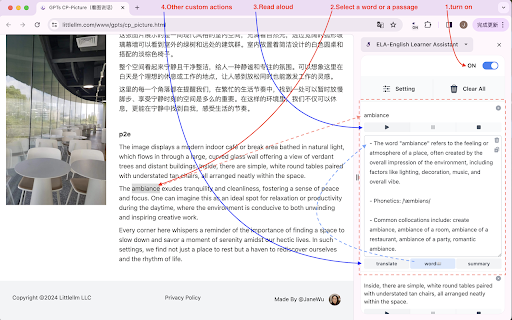
1. Open the side panel, turn on the switch at the top right corner.
2. Select the text paragraph you want to process. The text will appear in the side panel.
3. Click the [Play] button below the text to start reading aloud.
4. Use the [Translate to Chinese] and [Look up words] buttons to access these specific functions.
## Description of button functions
- On/OFF: on, the content selected on the webpage will appear in the side panel.
- Setting: Parameter settings. You can specify the AI model for sound and language in the settings.
- Clear all: Clear all contents in the side panel.
- Play: Play/Continue playing/Replay
- Pause: Pause
- Stop: Stop playback. After stopped, clicking play again will regenerate the sound and play it.
- Translate: Translate English into Chinese.
- word:Look up words
- Custom functions
## shortcut to Open/Close the side panel
"windows": "Ctrl+Shift+S"
"mac": "Command+Shift+S"
"chromeos": "Ctrl+Shift+S"
"linux": "Ctrl+Shift+S"
p.s. After closing the sidebar, all content currently on the sidebar will be deleted.
## update
0.4.5(2025 - 01 - 21)
### New Features
- **Audio Download**: Download generated audio as MP3 files with one click
### Improvements
- Enhanced code quality and security
- Fixed XSS vulnerabilities
- Improved error handling
### Bug Fixes
- Fixed Service Worker registration issues
- Fixed various encoding and configuration errors
0.4.4(2025 - 01 - 19) :
Code Refactoring: Complete code refactoring and comprehensive test coverage (265 test cases)
Improvements: Created shared storage module, improved error handling, fixed sidepanel parameter update issues
Update: Disabled debug mode, updated supported models (gpt-4o, gpt-4o-mini)
0.4.3(2025 - 01 - 10) :
Build System: Upgraded Parcel bundler from v1 to v2
Feature: Added automatic version synchronization script
Fix: Fixed build script execution order
0.4.2(2025 - 12 - 28) :
- update: models
0.4.1(2024 - 7 - 31) :
- add: llm model gpt-4o-mini
- remove: llm model gpt-3.5-turbo
0.4.0(2024 - 5 - 19) :
- add: Loop playback
- add: edit the original content
0.3.2(2024 - 5 - 14) :
- add model gpt-4o
## How to find us
github: https://github.com/janewu77/ela-extension

Reviews
Loading reviews...
Permissions (2)
Permissions
sidePanel storageℹ Can store data locally in your browser
Details
| Version | 0.4.5 |
| Updated | Jan 22, 2026 |
| Size | 156KiB |
| First Seen | Mar 22, 2026 |
Ad space
Popular in education

Kami for Google Chrome™
by Kami
17M
★ 4.56
education
17M
★ 4.56
education

Language Reactor
by Dioco
2M
★ 4.20
education
2M
★ 4.20
education

GPTZero: AI Detection & Writing Replay
by chrome-extension-publisher
400K
★ 4.57
education
400K
★ 4.57
education

You Shall Not Pass by Jim Tyler
by JamesTyler
400K
★ 1.44
education
400K
★ 1.44
education

Education Pro Browser Extension MV3
by Ativion
300K
★ 0.00
education
300K
★ 0.00
education
Popular Extensions

Adobe Acrobat: PDF edit, convert, sign tools
by Adobe Inc.
330M
★ 4.40
workflow
330M
★ 4.40
workflow

Cisco Webex Extension
by cisco.chromestore
24M
★ 2.34
social
24M
★ 2.34
social
Kami for Google Chrome™
by Kami
17M
★ 4.56
education
17M
★ 4.56
education

uBlock Origin
by Raymond Hill (gorhill)
15M
★ 4.70
privacy
15M
★ 4.70
privacy

Custom Cursor for Chrome™
by BLife Team LLC
5M
★ 4.67
fun
5M
★ 4.67
fun