
Swashbuckle Swagger UI Autofill Helper
v1.1 Updated Jun 14, 2022 6.01KiB
⚠️Not updated in over 2 years
Description
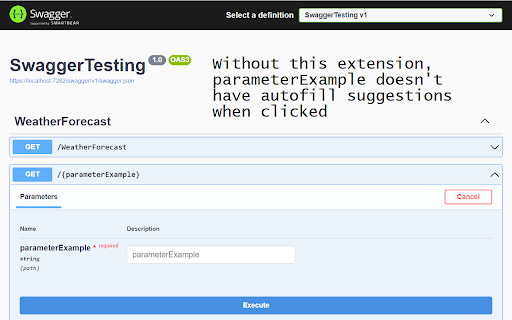
At some point, Swashbuckle's generated Swagger UI changed to have a new look. When it did, the parameter inputs also lost their name attributes, which is what autofill is keyed off of in Google Chrome, so autofill stopped working in the Swagger UI. This extension dynamically adds that attribute back to those parameter inputs, so Chrome's autofill can work once again.
Using this extension is simple; just click the extension's button once you're on the generated Swagger page. As long as that tab stays on the Swagger page, it will continue to work. If you refresh the page or navigate away and back again, you'll have to click the button again to turn it back on for that page. You can tell if it's working for a tab when there's a checkmark in the icon. No checkmark, no autofill.

Reviews
Loading reviews...
Permissions (2)
Permissions
activeTabℹ Can access the current tab when you click the extension scriptingℹ Can inject scripts into web pages
Details
| Version | 1.1 |
| Updated | Jun 14, 2022 |
| Size | 6.01KiB |
| First Seen | Mar 21, 2026 |
Popular in developer

Lighthouse
by lighthouse-extension-owners
1M
★ 4.42
developer
1M
★ 4.42
developer

Контур.Плагин
by kontur.extension
1M
★ 3.11
developer
1M
★ 3.11
developer

Similarweb - Website Traffic & SEO Checker
by Similarweb
1M
★ 4.66
developer
1M
★ 4.66
developer

Clear Cache
by Little Void LLC (Ben Bojko)
1M
★ 4.45
developer
1M
★ 4.45
developer

SEO META in 1 CLICK
by Bilal Hadri
900K
★ 4.87
developer
900K
★ 4.87
developer
Popular Extensions

Adobe Acrobat: PDF edit, convert, sign tools
by Adobe Inc.
330M
★ 4.40
workflow
330M
★ 4.40
workflow

Chrome Remote Desktop
by Chrome Remote Desktop Release Managers
38M
★ 3.14
workflow
38M
★ 3.14
workflow

Cisco Webex Extension
by cisco.chromestore
24M
★ 2.34
social
24M
★ 2.34
social

Kami for Google Chrome™
by Kami
17M
★ 4.56
education
17M
★ 4.56
education

Read&Write for Google Chrome™
by Texthelp
17M
★ 3.44
accessibility
17M
★ 3.44
accessibility