WifiTransfer - Instant wireless file transfer icon

WifiTransfer - Instant wireless file transfer

by Notable Group

v1.1.0 Updated Oct 21, 2014 532KiB
CWS
9K
Users
★ 2.85
174 reviews
#3812
of 92.9K
Other
Category
⚠️Not updated in over 2 years ⚠️Below average rating

Description

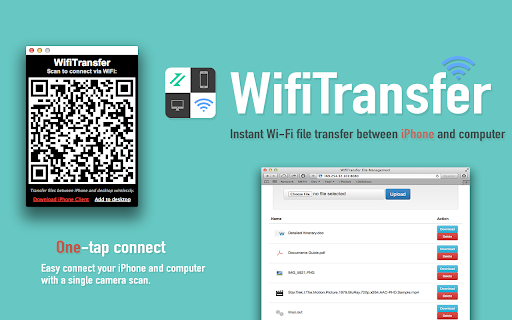
The easiest way to transfer files between iPhones or with computers! WifiTransfer enables fast wireless file transfer between iPhones or with computers with a simple scan. ► Up to 10MB/s wireless transfer with only one single scan WifiTransfer enables simple and ultra fast file transfer between iPhones over Wi-Fi networks. Without any additional setup, just a QRCode scan will do. ► Manage iPhone files from desktop (locally or remotely) In addition to transfer files between iPhone/iPad, you can also remotely manage files on your iPhone right from your desktop computer. Supported browsers: Safari, Chrome, FireFox, Internet Explorer ► Import files from various sources You can import files either from other apps, over the internet, from local photo library or from Dropbox. ► Multiple File types support The transferred items are classified automatically into 6 categories according to their type with database based search method. JPEG, PNG, MOV, MP4, MP3, WAV, CAF, PDF Docs(.pdf), Text(.txt), RTF(.rtf), MS Word(.doc, .docx), MS Excel (.xls, .xlsx), MS PowerPoint(.ppt, .pptx), Pages(.pages), Numbers(.numbers), Keynote(.keynote), HTML(.html, .htm) and more. ► Responsive feedback If you have any suggestion or recommendation about new features, please contact us: notablefeedback@gmail.com * How to use (iPhone and Computer) 1) Make sure that the iPhone and the computer are connected to the same local network or the same Wi-Fi network. 2) Open WifiTransfer desktop client and scan the QRCode with the iPhone client, connection will get established immediately. 3) Download or upload files.
WifiTransfer - Instant wireless file transfer screenshot 1WifiTransfer - Instant wireless file transfer screenshot 2WifiTransfer - Instant wireless file transfer screenshot 3WifiTransfer - Instant wireless file transfer screenshot 4

Reviews (36 cached)

★☆☆☆☆2022-07-19
Paul Durham

This app requires a companion iPhone app to function, and that app no longer exists. This app is therefore useless and should be removed from the store.

★☆☆☆☆2017-11-20
Mitesh Parmar

no use at all

★☆☆☆☆2017-10-20
Chirag Gupta

ONLY FOR IPHONE

★☆☆☆☆2017-09-09
First Last

If you aren't Apple-ized, skip this. Uses uri protocol 'connect://', which is not supported by android cellphones nor by desktop computers. Connect is just a system shortcut inside iPhone. Genius hackers might be able to add recognition inside non-Apple clients, but still would need a wifi subsystem of some kind. This app isn't as it appears.

★☆☆☆☆2017-08-22
Pramod Takkar

Fake app.Do not install

★☆☆☆☆2017-07-05
Lorenz Villero

did not work

★☆☆☆☆2017-05-14
No 1

fraud

★☆☆☆☆2017-05-11
Nihar Mishra

Only for iphone???

★☆☆☆☆2017-01-31
Srđan G

Doesn't work on iPhone

★☆☆☆☆2016-10-16
Brian Maguire

failed to mention it was for i phone only

★☆☆☆☆2016-09-16
Hugh Howlett

want to share files between chromebook and PC. doesn't work.

★☆☆☆☆2016-08-30
Rick Erb

Fraud, only after installing got to know it is for iPad/iPhone. Sucks, giving lowest star for deceiving people

★☆☆☆☆2016-06-08
Sheray Nichole

deceit

★☆☆☆☆2016-02-04
Damian Ibarra

doesnt work

★☆☆☆☆2015-12-13
Heidi B

Doesn't work at all

★☆☆☆☆2015-11-16
Nabeel Omar

totally fake

★☆☆☆☆2015-11-11
Ray Bullen

Doesn't work with android phones, so about as useful as a chocolate teapot.

★☆☆☆☆2015-10-04
Douglas Anson

iphone only, useless for android

★☆☆☆☆2015-09-16
Wally Hiatt

fraud

★☆☆☆☆2015-09-04
Chetan K

Wrong description

★☆☆☆☆2015-07-10
S. C.

Wth an app on Chrome Store to share files from a trustful Chromebook to a spying CrApple ??? I do not get it. I would net let any CrApple device access my files, as Apple is a spy for NSA and CIA (Apple secretly sells customers information to those agencies...)

★☆☆☆☆2015-05-08
HARUSH S KENGAL

i cannot connect

★☆☆☆☆2015-05-06
Arun Kumar

hated

★☆☆☆☆2015-04-25
Marla Simstad

Misleading description for this app. Very sorry to see this developer trying to pull the wool over our eyes.

★☆☆☆☆2015-04-12
david w pinkston

wanted to share file on local network with linux computers and chromebook. nothing happens on either end.

★☆☆☆☆2015-03-17

worthless, iphone use only. why is it in the chrome store ??????

★☆☆☆☆2015-03-04
Suman Das

Please make it for android and windows phone u know also that everyone can't afford to buy iphone... Thank You......

★☆☆☆☆2015-01-29
Imad Wazir

no good

★☆☆☆☆2015-01-11
Ali Thrush

Did not work for me (on Chrome OS with iPhone 4s). Says "this is not a standard file URL. Transfer process cancelled"

★☆☆☆☆2015-01-07
j8av8r

Doesn't work on IPhone. No Support what-so-ever so don't even know how to use it. No Website. The QR scan it produces does not work. On IPhone it does not see any files except the photos/videos. Great idea. Useless.

★☆☆☆☆2014-12-27
Hrishikesh H. Shinde

not at all helpful.

★☆☆☆☆2014-12-08
Vipul Sandhir

Doesn't work for my android phone,when i scan the QR code, the prompt says can't open the link, fix it!!

★☆☆☆☆2014-12-03
Steve Spillers

The description you first see when you look at this app's page doesn't mention it's for iphone/ipad. I added it to use with my android and the qr scan says the url link is invalid. Is there something else I need to do? I'd be happy to change my review if it can be fixed.

★★☆☆☆2016-06-06
MOHANRAJ A BIT

Fraud, only after installing got to know it is for iPad/iPhone.

★★☆☆☆2016-01-25
Princess Napigkit

this app need to improove right....

★★★☆☆2016-09-06
Black Iya

ok

Permissions (2)

Permissions

system.networkwebview

Details

Version 1.1.0
Updated Oct 21, 2014
Size 532KiB
First Seen Mar 27, 2026