
⚠️Not updated in over 2 years
Description
Website testing made easier: BugShot for Redmine makes reporting bugs straightforward and convenient. Thanks to a minimal workflow, BugShot for Redmine helps save valuable time when testing websites.
PREPARATION:
Just add BugShot for Redmine to your Chrome Extensions, and check "Enable REST web service" once in the Redmine settings under API.
THIS IS HOW IT WORKS:
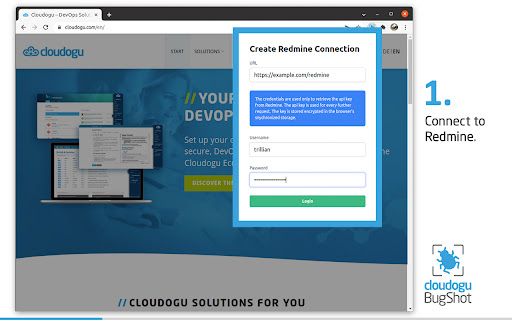
Enter the url of your Redmine and log in with your account. Username and password have to be entered only once, because BugShot reads the Api Key of the user from Redmine with this data and stores it encrypted. BugShot then uses the Api Key for further communication with Redmine.
Create a reference ticket with the parameters of the website to be tested and the default template is already created in Redmine for each error found. Of course, additional tickets can be created or existing tickets can be used as reference.
Detected bugs can now be captured using the BugShot button or shortcut (Windows/Linux Shift+Ctrl+S and Mac Shift+Command+S) and the generated screenshot can be commented directly using the paint and label function.
Now just fill in the subject and description of the error and submit it.
The created ticket can then be viewed in Redmine. Benefit: URL and browser resolution will no longer be forgotten in the future, because Bugshot automatically attaches this information to the ticket.
ABOUT CLOUDOGU
At Cloudogu we believe in good software development through innovation, open source, agility, DevOps and community.
Our team of approximately 50 members enjoy sharing their knowledge and new insights in our community, blog, training and consulting - Whether on-site in the heart of Brunswick, Germany or remotely. Our topics are DevOps, GitOps, Agile, Security and technologies like Kubernetes and Docker. It all comes together in our open source projects, the Cloudogu EcoSystem and SCM-Manager.


Reviews
Loading reviews...
Permissions (3)
Permissions
activeTabℹ Can access the current tab when you click the extension notificationsℹ Can show desktop notifications storageℹ Can store data locally in your browser
Details
| Version | 0.4.0 |
| Updated | Aug 4, 2022 |
| Size | 527KiB |
| First Seen | Mar 27, 2026 |
Popular in developer

TouchEn PC보안 확장
by 라온시큐어
8M
★ 1.33
developer
8M
★ 1.33
developer

React Developer Tools
by Meta
5M
★ 3.95
developer
5M
★ 3.95
developer

WhatFont
by Chengyin Liu
3M
★ 4.01
developer
3M
★ 4.01
developer

Take Webpage Screenshots Entirely - FireShot
by Evgeny Vokilsus
3M
★ 4.79
developer
3M
★ 4.79
developer

Wappalyzer - Technology profiler
by Wappalyzer
3M
★ 4.56
developer
3M
★ 4.56
developer
Popular Extensions

Adobe Acrobat: PDF edit, convert, sign tools
by Adobe Inc.
331M
★ 4.40
workflow
331M
★ 4.40
workflow

Grammarly: AI Writing Assistant and Grammar Checker App
by Grammarly
42M
★ 4.50
communication
42M
★ 4.50
communication

Chrome Remote Desktop
by Chrome Remote Desktop Release Managers
38M
★ 3.14
workflow
38M
★ 3.14
workflow

Microsoft Single Sign On
by Microsoft
36M
★ 2.27
workflow
36M
★ 2.27
workflow

Cisco Webex Extension
by cisco.chromestore
23M
★ 2.34
social
23M
★ 2.34
social