Controls for Youtube icon

Controls for Youtube

by rehfeldchris

v1.37 Updated Aug 12, 2024 57.99KiB
CWS
9K
Users
★ 4.58
128 reviews
#3812
of 92.9K
workflow
#1124 of 14.3K
⚠️Not updated in over a year Highly rated

Description

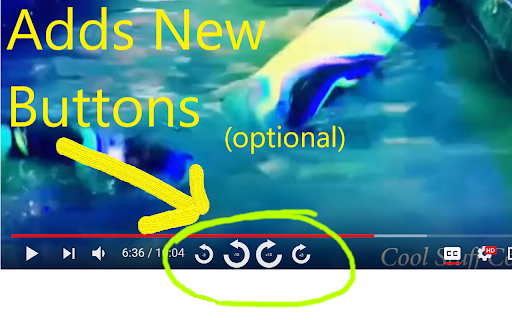
Quickly seek Youtube video playback forwards and backwards by either 3 or 15 seconds. ==================================== What This Extension Does ==================================== This tiny and efficient extension helps you easily seek forwards and backwards in Youtube™ videos. If you ever watch long videos and want to seek backwards a little bit so you can see something again, but get frustrated trying to drag that tiny slider just the right amount, this extension is for you! This extension will add keyboard shortcuts which let you quickly seek ahead or back by either 3 or 15 seconds (configurable). Additionally, it can also optionally add new buttons to the player which you can click to seek ahead or back. ==================================== Usage ==================================== 1) Load any web page that contains a YT-video 2) Click the video to make it play 3) The extension will automatically detect the video and add the new seek buttons to it 4) To seek forwards or backwards, you can either click the buttons, or use the Keyboard Controls *Note - like many other extensions, any webpages you loaded before installing the extension must be reloaded before the extension will work. List of Keycombos http://rehfeld.us/browser-extensions/controls-for-youtube/keyboard-controls For example, it's really easy to hold your ctrl key and then press your left arrow key twice to quickly go back 6 seconds! You can configure how far ahead and back each key takes you via the extension config page. Also, if you don't like the buttons that get added to the player, you can disable some or all of them. To see the config page, click the extension icon on the top-right of your browser, then select "options", just like on any other extension. Alternatively, goto the chrome://extensions url, click the "Details" btn for this extension, then click "Extension Options". TIP: You can skip through some advertisements by just fast forwarding! Try using the "Seek forward to end" keycombo. You can also rewind the ad, if you like. TIP2: You can modify the seek duration when you click a seek button using the mouse: ctrl + click will be half the normal duration, shift + click will be double, and shift + ctrl + click will be 5x. Non-Obvious Feature: Note that the keyboard controls work properly even when you're on a non-youtube.com website which embeds the YT-video into their webpage. When using keycombos, you don't need to give the video "mouse focus" by clicking on it, which allows you to freely interact with the parent web page without worrying about losing mouse focus due to clicking something else. This can be handy, for example, if you've scrolled to the bottom of the page to read comments, and suddenly wish to rewind or pause the video without having to scroll back to the top - just use the keys. While native YT-videos do have their own keycombos to pause the video (the space bar), it only works on non-youtube.com pages when the video currently has mouse focus. This extension offers its own pause control (Ctrl + SpaceBar) which works without the video needing focus. The same goes for all the keycombos - they all work without needing the player to have focus! The browser tab does need focus, however. Limitation: -The GUI buttons can only be added to the player if there's enough width - small players may not be wide enough. If you maximize the player, they should show up, or you can always just use the keyboard controls. ==================================== Legal ==================================== Youtube™ is a registered trademark. This extension was developed independently, by someone who is not related or affiliated with them, without any help or endorsement from them. ==================================== Privacy ==================================== http://rehfeld.us/browser-extensions/controls-for-youtube/privacy-policy ==================================== Changelog ==================================== http://rehfeld.us/browser-extensions/controls-for-youtube/changelog
Controls for Youtube screenshot 1Controls for Youtube screenshot 2

Reviews (14 cached)

★☆☆☆☆2024-08-08
Tom Pitt

Stopped working. Will update to 5 starts when it starts working.

★☆☆☆☆2020-11-07
TNT The cool video maker

idk how to start kinemaster because there isnt a file to start the app!

★☆☆☆☆2020-08-09
Christian Seidlitz

before the last update of youtube, this would have been a 5* review, but it suddenly stopped working at all. just as it wasnt working a short while before that, when a video had the new sections thingy active. sad. plz fix!

★☆☆☆☆2020-08-03
Asu

Dont work anymore

★☆☆☆☆2020-08-03
Charan Teja

Few days it worked fine. But now controls are not coming on youtube window i uninstalled and reinstalled chrome but still controls are not showing on screen

★★☆☆☆2025-05-14
-Krism-

Doesn't really work well with youtube's ctrl+arrow to skip to the next chapter, making this extension pretty useless now If we could disable the "skip to next chapter" function, it would be great

★★☆☆☆2020-04-16
dis guys

Just recently I noticed that after pausing a video that when I restarted the video it would play slower than normal with the audio being distorted into a lower register. It turns out that it was this extension causing that to happen. I am assuming this was caused by a Chrome update. I am using a Linux based distro.

★★★☆☆2025-12-06
themaster1124

Can you add an option to Change the Colour of the Buttons? I can't See because of the White Video Screens

★★★☆☆2024-08-08
Don

This suddenly does not work anymore. Please update.

★★★☆☆2024-02-27
Rudra Somani

Please add an option to remove the seek animation when we press it because the animation is a bit distracting.

★★★☆☆2019-05-24
Lucas Sequeira

is nice, but when I click the like button, it loses focus of the player :(

★★★☆☆2019-05-01
Austin Craig

Would love for the keys to be configurable. I would like to use this feature with one hand using one key instead of doing a whole ctrl + command shortcut, similar to YouTubes 'J' 'K' 'L' defaults. Having the option for a 3 second skip is extremely helpful.

★★★☆☆2018-11-01
Dan Nissenbaum

A critical extension for people doing serious work with videos (such as my purpose - research). The absence of rapid, easy scrolling in time back and forward in a video simply prevents use of videos in research. This extension solves this problem. Thanks for writing it! Serious problem uncovered, so I had to drop my review to 3 stars. This extension hijacks the "Ctrl + Shift + Arrow" combination on ALL web pages, even ones that have no YouTube video playing. This prevents use of these keyboard shortcuts in editor panes, so there's no way to use the keyboard shortcut to select an entire word, for example. There is no way to configure the keyboard shortcuts in this extension, so unfortunately I must disable the extension for normal daily use of Chrome (outside of watching a YouTube video).

★★★☆☆2017-12-05
A Land

This extension is running on every web page, and is causing conflicts on certain sites. Please update permissions so that it ONLY runs on youtube. Otherwise it works well.

Permissions (1)

Permissions

storage Can store data locally in your browser

Details

Version 1.37
Updated Aug 12, 2024
Size 57.99KiB
First Seen Mar 27, 2026

