Dimensions Inspect | Gridman icon

Dimensions Inspect | Gridman

by Fenvox LLC

v2.3.3 Updated Aug 3, 2024 816KiB
CWS
10K
Users
★ 4.03
90 reviews
#3393
of 127.8K
developer
#286 of 11.2K
⚠️Not updated in over a year

Description

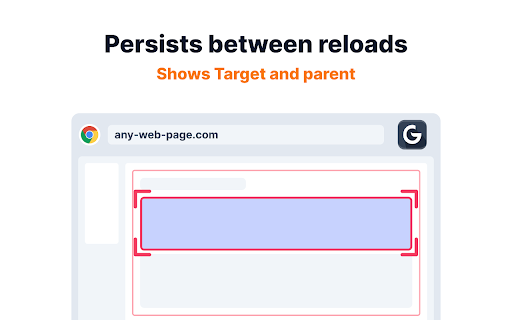
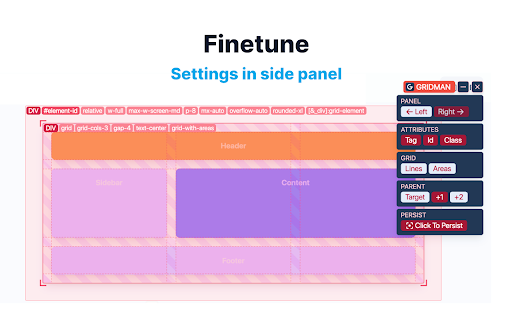
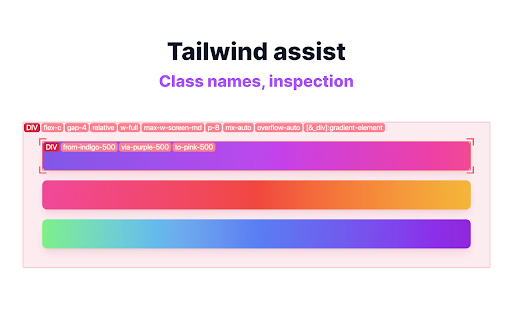
Gridman is the must-have Chrome extension for every front-end developer. This toolkit is crafted to boost your productivity and enhance your coding experience. DOM INSPECTION Instantly inspect DOM elements. Just hover to reveal details of the target and its parent elements, simplifying your analysis and debugging process. PERSISTENT Gridman uniquely persists between host reloads. Click on an element, and maintain your insights even after a page refresh, saving you valuable time and effort. TAILWIND Tailwind developers, rejoice! Easily inspect class sets and see how Tailwind CSS is bringing your designs to life. LAYOUTS Whether you're working with CSS Grid or Flexbox, Gridman displays rows, columns, paddings, margins, and more. Understand and manipulate complex layouts with ease. ANYWHERE Simply click the extension icon to activate this toolkit on any webpage. HOVER Unveil the intricacies of the DOM structure with a mere mouse hover. Visualize and understand how elements are nested and related. JOIN With Gridman you're not just using a tool; you're upgrading your entire development process. Download now and experience a revolution in your front-end development journey! REVIEW Your experience with Gridman matters to me deeply. If you've found it helpful, I'd be incredibly grateful if you could take a moment to share your thoughts in a review. Your feedback not only helps to improve but also assists fellow developers in discovering the benefits of this extension. Thank you for your support and for being a vital part of Gridman supporters! NOT WORKING If something didn't work as expected, I kindly request that you consider reaching out with any questions or issues you might have. I understand that each review, whether positive or negative, offers me an opportunity to learn and improve. However, I also believe in the importance of understanding and resolving any issues through communication. Please feel free to ask me anything at: https://fenvox.com/gridman#ask-section. I'm always here to assist you! LOCAL FILES You are trying it towards local file like 'file:///...' - but nothing shows up? > ANSWER: Gridman , like any chrome extension, will not work on local files. Chrome is not allowing it due to security reasons. And it is correct. You can imagine implications if any chrome extension would be able to access file system on your computer. To use Gridman on local files i'd recommend a tiny http-server which you can get here https://www.npmjs.com/package/http-server
Dimensions Inspect | Gridman screenshot 1Dimensions Inspect | Gridman screenshot 2Dimensions Inspect | Gridman screenshot 3Dimensions Inspect | Gridman screenshot 4Dimensions Inspect | Gridman screenshot 5

Reviews (14 cached)

★☆☆☆☆2024-01-10
jayasaivenkatesh gopi

not working

★☆☆☆☆2023-12-29
Jamie Ridding

Was a nice tool for website development, but a recent update has started breaking flexbox/grid styles on every webpage I visit. Does so by injecting the full Tailwind stylesheet into every single webpage you visit. Spent four hours trying to hunt down the reason many webpages with flexboxes/grids didn't display properly, turning off this extension fixed the problem immediately. Removed from my browser until this is fixed.

★☆☆☆☆2017-12-08

Does not work with devtools responsive mode on (which should not be an issue), doesnt work at all if working with frameworks like Angular or React.

★☆☆☆☆2017-10-19
Nicole costa fonseca

this doesn't work

★☆☆☆☆2017-10-05
Xian Brock

This doesn't work at all when you have the dev tools in device/responsive mode so you can't test how your grid looks at different screen sizes. Since this is on mouse-over only, there is no option to always show grids so you can actually work on them without constantly having to keep your mouse hovered over the grid. As an aside, I'm reasonably certain that all of the 5 star reviews for this extension are fake.

★★☆☆☆2023-01-13
Louis Shine

sounds cool. not responding. no guidness. wasted my time.

★★☆☆☆2017-12-04
Bryce Barbara

Fairly useless due to not being able to do anything more than show the name of the grid columns/rows.

★★☆☆☆2017-11-28
Ronald van Middendorp

As said by others; it only shows grid on hovering, which is not very useful. Also, without the names of the grid-areas it is pretty useless for investigating on an existing site. No data in grid, grid not shown. Good effort, but still needs a lot of work.

★★☆☆☆2017-10-15
Glen Ihrig

First it does not display grid lines if the grid cell is empty. Second grid lines only show when mouse hovers over grid content. These shortcomings make it too difficult to use for grid development. And finally, the large number of (evidently) fake 5 star reviews make me wonder if I've installed some kind of malware :-(

★★★☆☆2024-04-10
Dirk A

offers useful features, but I've had some issues with performance. Hoping for future updates to address this.

★★★☆☆2024-03-29
Suzanne Mackenzie

Not working with my personal website. Hoping for updates to address these issues.

★★★☆☆2018-11-23
SiriusGD

I am having all sorts of issues with Chrome not responding to grid changes. I installed the flag and it seems to make no difference. Your product did absolutely nothing on my chrome browser. I'm not sure why chrome is giving me so many problems developing with grid. I don't have issues with firefox and very few with safari but chrome is a nightmare. (I had to rate it to post this so I put a neutral rating)

★★★☆☆2017-10-20
Diamonds

Very useful for development with grid, although with a few glaring issues. First, it only shows grids when you're hovering over an element so it can be a bit of a pain to switch between inspecting and writing, also it breaks on nested grids past the first one, making it nearly useless on more complicated layouts. Still the best tool I've found so far for working with Grid, but I can't wait for something better

★★★☆☆2017-10-18
Jacob Dubail

doesn't seem to display auto-filled rows properly.

Permissions (3)

Permissions

activeTab Can access the current tab when you click the extension contextMenus Can add items to the right-click menu storage Can store data locally in your browser

Details

Version 2.3.3
Updated Aug 3, 2024
Size 816KiB
First Seen Mar 28, 2026



