
⚠️Not updated in over 2 years
Description
Develop WebXR experiences efficiently and effectively on Meta Quest with Immersive Web Emulator.
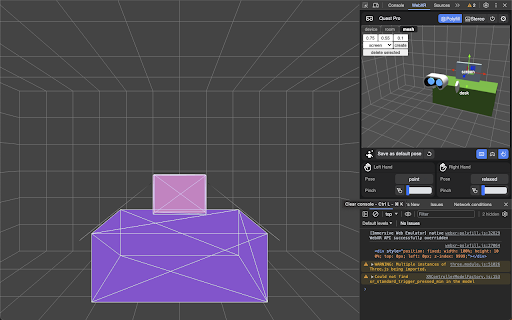
This browser extension provides a user-friendly interface and is capable of simulating all Meta Quest headsets, enabling developers to easily test and iterate their WebXR experiences without a physical XR device.
Key Features
- Interactive 3D viewport to easily transform manipulation of the VR headset and the controllers
- Simulate controller input, binary input (buttons), and analog input (trigger, grip, joysticks)
- Simulate hand input, including built-in hand poses and pinch gesture control
- Keyboard action mapping for added efficiency
- Keyboard input relay
The extension is built on top of the WebExtensions API, and implements the newly introduced Chrome Extension Manifest V3, which means that it will operate with enhanced security and performance on most Chromium-based desktop browsers.
How to Use It
- Download the extension from this page.
- Navigate to a WebXR app, such as this Three.js example: https://threejs.org/examples/webxr_xr_dragging The app will detect WebXR support as if you are visiting from the specified Meta Quest device, and let you enter immersive (AR/VR) mode.
- Launch the desktop browser’s developer tool panel, and navigate to the “WebXR” tab to control the emulated device.
Developer Resources
- Learn more about Immersive Web Emulator:
https://developer.oculus.com/blog/webxr-development-immersive-web-emulator/
- Find detailed instructions on using Immersive Web Emulator:
https://github.com/meta-quest/immersive-web-emulator#immersive-web-emulator-usage


Reviews (2 cached)
★☆☆☆☆2023-04-12
Miguel Angelo Gaspar Pinto
Tried to use it and received a big bug. Tried in chrome and on edge both had bugs. Sent a message to their git with bug details
★★☆☆☆2025-06-10
Kevin Meeks
It mostly works for its basic intentions, but it could definitely use a review process. Most of the inputs simply don't work, buttons are unintuitive and many simply do nothing, the UI is extremely bloated, doesn't follow responsive web design, and looks like a first draft at best. For anyone experiencing similar frustrations with this extension - a good way to fix the issues is to just override the CSS and JS files associated with this extension and change the UI to your own liking.
Permissions (2)
Permissions
scriptingℹ Can inject scripts into web pages storageℹ Can store data locally in your browser
Details
| Version | 1.5.0 |
| Updated | Dec 21, 2023 |
| Size | 700KiB |
| First Seen | Mar 28, 2026 |
More by Meta


Popular in developer

TouchEn PC보안 확장
by 라온시큐어
8M
★ 1.33
developer
8M
★ 1.33
developer

React Developer Tools
by Meta
5M
★ 3.95
developer
5M
★ 3.95
developer

WhatFont
by Chengyin Liu
3M
★ 4.01
developer
3M
★ 4.01
developer

Take Webpage Screenshots Entirely - FireShot
by Evgeny Vokilsus
3M
★ 4.79
developer
3M
★ 4.79
developer

Lighthouse
by lighthouse-extension-owners
1M
★ 4.42
developer
1M
★ 4.42
developer
Popular Extensions

Adobe Acrobat: PDF edit, convert, sign tools
by Adobe Inc.
331M
★ 4.40
workflow
331M
★ 4.40
workflow

Grammarly: AI Writing Assistant and Grammar Checker App
by Grammarly
42M
★ 4.50
communication
42M
★ 4.50
communication

Chrome Remote Desktop
by Chrome Remote Desktop Release Managers
38M
★ 3.14
workflow
38M
★ 3.14
workflow

Microsoft Single Sign On
by Microsoft
36M
★ 2.27
workflow
36M
★ 2.27
workflow

Cisco Webex Extension
by cisco.chromestore
23M
★ 2.34
social
23M
★ 2.34
social