
Symbol Typer - Write Math and Symbols Easily
Chrome Web Store v0.71 Updated Oct 3, 2023 18.19KiB
User Count Trend
Loading...
Description
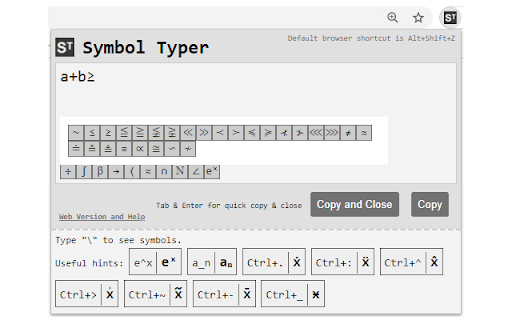
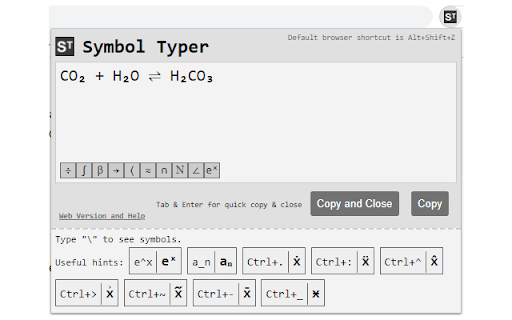
Using Symbol Typer, you can easily type mathematical symbols in plain text.
Simply open the extension and start typing: e^x will turn into eˣ,\alpha will become α, and many other symbols are available.
- Math? Easy! A\cup B = C → A∪B=C
- Chemistry? No problem! H_2 O → H₂O
- Physics? We got your back! H(t)|\Psi(t)\ket → H(t)|Ψ(t)〉
To activate the extension press Alt+Shift+Z in your browser or set a shortcut of your own in Chrome->Settings->Extensions->Menu->Keyboard Shortcuts.
No permissions are required for Symbol Typer to work! This extension is lightweight, quick and easy.
New in version 0.71:
-- New symbol buttons
New in version 0.70:
-- New symbols including \llbracket, \rrbracket (⟦,⟧)

Reviews
Loading reviews...
Details
| Version | 0.71 |
| Updated | Oct 3, 2023 |
| Size | 18.19KiB |
| First Seen | Mar 21, 2026 |
Ad space
Popular in tools

WPS浏览器助手:文档在线阅读编辑
by 金山PDF
2M
★ 2.90
tools

ВПН для YouTube без ограничений в России. Ускорить ютуб на ПК
by Extension
900K
★ 4.70
tools

Glasp Web Highlighter: PDF & Web Highlight
by Glasp
500K
★ 4.48
tools

Popup Blocker Pro
by Popup Blocker Pro
300K
★ 4.29
tools

Suiet | Sui Wallet
by Oasis Digital Holdings Limited
200K
★ 4.98
tools
Popular Extensions

Cisco Webex Extension
by cisco.chromestore
24M
★ 2.34
social

uBlock Origin
by Raymond Hill (gorhill)
15M
★ 4.70
privacy

DuckDuckGo Search & Tracker Protection
by DuckDuckGo
4M
★ 4.24
privacy

Microsoft Defender Browser Protection
by Microsoft Corporation
2M
★ 4.15
workflow

Pop up blocker for Chrome™ - Poper Blocker
by dingosolutions
2M
★ 4.76
workflow