
⚠️Not updated in over 2 years ✅Highly rated
User Count Trend
Loading...
Description
When you control your time on distracting websites, you’ll find you have far more time to focus on the things that matter most.
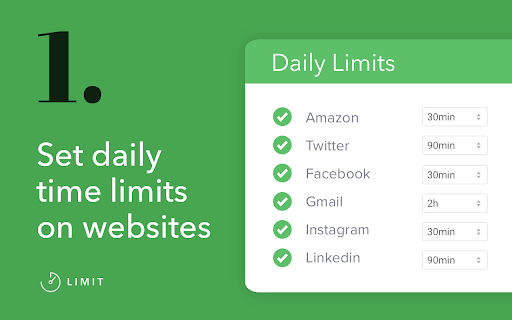
To use Limit, simply enter the websites you find distracting and choose a daily time limit. For example, you could limit yourself to ten minutes a day on Facebook, or half an hour a day on Duolingo.
When you approach your limit, Limit gently notifies you your time is almost up, so you can wrap up. And when you've reached your limit, you'll be directed to Freedom's calming Green Screen when you try to visit a limited website.
- You can add or delete any website from the list of sites
- Your time limit for each site is configurable, from 5 to 500 minutes
- Limit comes pre-seeded with 10 distracting sites
Limit is a product of Freedom Labs, where we develop new tools to help you balance your relationship with technology. Like our other extensions, Limit is highly privacy-conscious. None of your data is sent anywhere (the cloud, our servers, etc.) It remains secure on your own device. Learn more about Freedom here: https://freedom.to
We hope you find Limit to be a simple and useful tool for developing healthier online habits and routines.
Please note: Limit 1.0.3 is third release with Manifest 3 compatibility. You may experience slight differences in behavior due to the significant changes required to comply with Manifest V3. Please send us your feedback at support@freedom.to and we'll continue to improve Limit. Thank you!
Release notes - 1.0.3:
🐞 Fixes a bug with our countdown timer notifications


Reviews
Loading reviews...
Permissions (5)
Permissions
alarmsℹ Can schedule periodic background tasks idleℹ Can detect when you're away from the computer notificationsℹ Can show desktop notifications storageℹ Can store data locally in your browser tabsℹ Can see your open tabs and their URLs
Details
| Version | 1.0.3 |
| Updated | Oct 3, 2023 |
| Size | 649KiB |
| First Seen | Mar 21, 2026 |
Ad space
Popular in tools

WPS浏览器助手:文档在线阅读编辑
by 金山PDF
2M
★ 2.90
tools
2M
★ 2.90
tools

ВПН для YouTube без ограничений в России. Ускорить ютуб на ПК
by Extension
900K
★ 4.70
tools
900K
★ 4.70
tools

Glasp Web Highlighter: PDF & Web Highlight
by Glasp
500K
★ 4.48
tools
500K
★ 4.48
tools

Popup Blocker Pro
by Popup Blocker Pro
300K
★ 4.29
tools
300K
★ 4.29
tools

Suiet | Sui Wallet
by Oasis Digital Holdings Limited
200K
★ 4.98
tools
200K
★ 4.98
tools
Popular Extensions

Cisco Webex Extension
by cisco.chromestore
24M
★ 2.34
social
24M
★ 2.34
social

uBlock Origin
by Raymond Hill (gorhill)
15M
★ 4.70
privacy
15M
★ 4.70
privacy

DuckDuckGo Search & Tracker Protection
by DuckDuckGo
4M
★ 4.24
privacy
4M
★ 4.24
privacy

Microsoft Defender Browser Protection
by Microsoft Corporation
2M
★ 4.15
workflow
2M
★ 4.15
workflow

Pop up blocker for Chrome™ - Poper Blocker
by dingosolutions
2M
★ 4.76
workflow
2M
★ 4.76
workflow