
User Count Trend
Loading...
Description
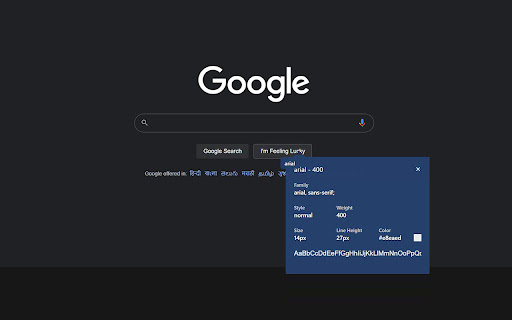
Now you can easily identify any font on the page using Font Finder.
Whatfont extension is a perfect for developer, graphic designers and for everyone who wants to identify the font details.
This font finder extension for chrome browser gives you information about font name, family, weight, color and more.
✅ What this extension detects:
1. Font Family
2. Font Size
3. Font Weight
4. Line Height
5. Font Style
6. RGB Color Code
✅ How To Use :
1. Click on the “Add to chrome” button to install it
2. Tap on “Whatfont Plus” icon, this will enable the extension
3. Click the mouse pointer on any word for which you want to get font details
4. After clicking the word you will get all the font details
Version 2.1.1 changes:
- New UI design
- Improved usability


Reviews
Loading reviews...
Permissions (5)
Permissions
activeTabgcmnotificationsstorageunlimitedStorage
Details
| Version | 2.1.11 |
| Updated | Sep 2, 2023 |
| Size | 35.68KiB |
| First Seen | Mar 21, 2026 |
Ad space
Popular in workflow

Microsoft Defender Browser Protection
by Microsoft Corporation
2M
★ 4.15
workflow

Pop up blocker for Chrome™ - Poper Blocker
by dingosolutions
2M
★ 4.76
workflow

Keep Awake
by extensions@chromium.org
1M
★ 4.00
workflow

Tab Resize - split screen layouts
by Peter Shin
1M
★ 4.31
workflow

eID Chrome Extension
by e-Contract.be BV
800K
★ 1.65
workflow
Popular Extensions

uBlock Origin
by Raymond Hill (gorhill)
15M
★ 4.70
privacy

DuckDuckGo Search & Tracker Protection
by DuckDuckGo
4M
★ 4.24
privacy
Microsoft Defender Browser Protection
by Microsoft Corporation
2M
★ 4.15
workflow
Pop up blocker for Chrome™ - Poper Blocker
by dingosolutions
2M
★ 4.76
workflow

WPS浏览器助手:文档在线阅读编辑
by 金山PDF
2M
★ 2.90
tools