
⚠️Not updated in over 2 years
Description
This extension provides a button at the top-right of Chrome that links to any pages.
Regarding upgrade: you now have version 1.7 because Chrome requires a manifest change before June 2024. The new system uses different storage, so your homepage url has been deleted. You just need to re-add it (via right-click > options).
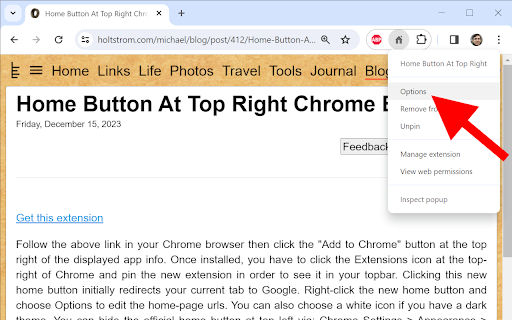
Regarding new installs: you have to click the Extensions icon at the top-right of Chrome and pin the new extension in order to see it in your top-bar. Clicking this new home button initially redirects your current tab to Google. Right-click the new home button and choose Options to edit the home-page urls. You can also choose a white icon if you have a dark theme. You can hide the official home button at top left via: Chrome Settings > Appearance > Show home button > Disabled.
This extension only uses the storage permission to remember your settings. This extension never monitors your activity. It only redirects your tabs when requested. The source code is very simple and is posted here https://holtstrom.com/michael/blog/post/412/Home-Button-At-Top-Right-Chrome-Extension.html, so you can inspect it for yourself. Use the "Feedback" button at the top of that article if you want to ask any questions. Be sure to include contact info if you want a reply.
This extension will always be free and will never have ads.
Some people want to link to a local url like "file:///C:/MyFolder/MyFile.html". As described at the above link, Chrome 118 and later removed the ability to redirect to local files. You can enable local navigation for this extension in your windows registry as shown below.
Computer\HKEY_LOCAL_MACHINE\SOFTWARE\Policies\Google\Chrome
ExtensionSettings = { "bfejcgpdahgpmgadhgdadfiekmhgnifm": { "file_url_navigation_allowed": true}}



Reviews (7 cached)
★☆☆☆☆2025-12-25
Andrei
Что за бред??? This page has been blocked by Opera ERR_BLOCKED_BY_CLIENT
★☆☆☆☆2024-11-23
Gary Hobbs
Where is the home button, it disappears right after added???
★☆☆☆☆2014-02-21
William
It works- but slowed my ChromeBook down, completely!
★★☆☆☆2019-01-10
Thomas von der Elbe
Unfortunately a middle click doesn't work. On the original home button it does work.
★★☆☆☆2017-06-19
Mariusz B.
You cannot click this button by the scroll and open new web page. Stupid.
★★★☆☆2025-06-11
Felina Faerlaingal
Since a week or so, the button sometimes will not appear where it should when I launch opera gx. Instead my extensions icons are shoved to the side, and there is an empty spot. If I click any of the extension button, the home page button returns, but the bug can happen again.
★★★☆☆2015-12-18
Linux Mangaka
It's nice to have this icon with download icon & decorate it like firefox. But the ram consume is too absurd.
Permissions (1)
Permissions
storageℹ Can store data locally in your browser
Details
| Version | 1.7 |
| Updated | Dec 17, 2023 |
| Size | 9.2KiB |
| First Seen | Mar 29, 2026 |
Popular in accessibility

Read&Write for Google Chrome™
by Texthelp
17M
★ 3.44
accessibility
17M
★ 3.44
accessibility

360 Internet Protection
by qihoosafe
17M
★ 4.54
accessibility
17M
★ 4.54
accessibility

Screenshot reader™
by Texthelp
7M
★ 2.57
accessibility
7M
★ 2.57
accessibility

OrbitNote
by Texthelp
7M
★ 2.95
accessibility
7M
★ 2.95
accessibility

Volume Master
by Peta Sittek
6M
★ 4.81
accessibility
6M
★ 4.81
accessibility
Popular Extensions

Adobe Acrobat: PDF edit, convert, sign tools
by Adobe Inc.
331M
★ 4.40
workflow
331M
★ 4.40
workflow

Grammarly: AI Writing Assistant and Grammar Checker App
by Grammarly
42M
★ 4.50
communication
42M
★ 4.50
communication

Chrome Remote Desktop
by Chrome Remote Desktop Release Managers
38M
★ 3.14
workflow
38M
★ 3.14
workflow

Microsoft Single Sign On
by Microsoft
36M
★ 2.27
workflow
36M
★ 2.27
workflow

Cisco Webex Extension
by cisco.chromestore
23M
★ 2.34
social
23M
★ 2.34
social