
⚠️Not updated in over 2 years
Description
This extension allows you to quickly look up and input Japanese kanji characters into input fields on any website, or copy a character into clipboard.
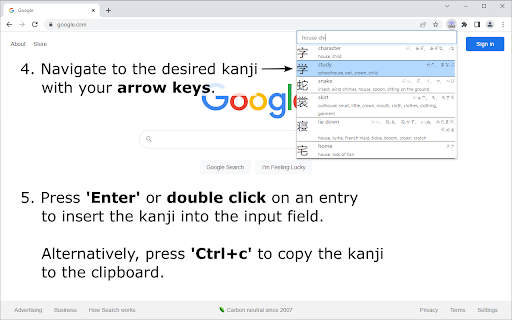
To search for a character, enter the character's keyword or a combination of its component names into the search bar, based on terms as presented in the well-known textbook series "Remembering the Kanji" by James Heisig. Fuzzy search functionality also allows you to enter only part of a keyword, or only a subset of a kanji's components, and then browse the list of matching results to find the desired kanji.
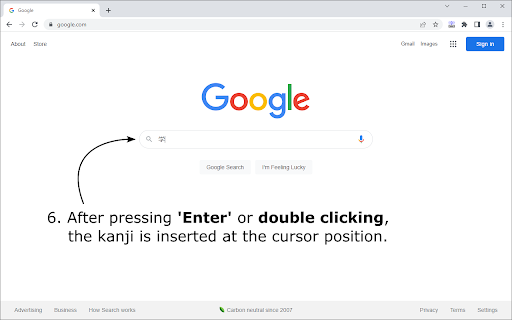
To select a kanji character, navigate to it by pressing the 'Up' and 'Down' arrow keys, or by clicking on it's entry once. Press 'Enter' to insert the selected kanji into a field on a website at the current cursor position, or press 'Ctrl+c' to copy it into your clipboard. A double click on any entry, directly inserts the respective kanji into the input field.
The keyboard shortcut 'Ctrl+Space' to open the extension popup can be changed in Google Chrome's extension management tab.


Reviews
Loading reviews...
Permissions (2)
Permissions
activeTabℹ Can access the current tab when you click the extension scriptingℹ Can inject scripts into web pages
Details
| Version | 1.1.0 |
| Updated | May 30, 2022 |
| Size | 292KiB |
| First Seen | Mar 26, 2026 |
Popular in workflow

Adobe Acrobat: PDF edit, convert, sign tools
by Adobe Inc.
331M
★ 4.40
workflow
331M
★ 4.40
workflow

Chrome Remote Desktop
by Chrome Remote Desktop Release Managers
38M
★ 3.14
workflow
38M
★ 3.14
workflow

Microsoft Single Sign On
by Microsoft
36M
★ 2.27
workflow
36M
★ 2.27
workflow

MetaMask
by metamask
13M
★ 2.68
workflow
13M
★ 2.68
workflow

Microsoft Power Automate
by Microsoft Corporation
10M
★ 1.99
workflow
10M
★ 1.99
workflow
Popular Extensions
Adobe Acrobat: PDF edit, convert, sign tools
by Adobe Inc.
331M
★ 4.40
workflow
331M
★ 4.40
workflow

Grammarly: AI Writing Assistant and Grammar Checker App
by Grammarly
42M
★ 4.50
communication
42M
★ 4.50
communication
Chrome Remote Desktop
by Chrome Remote Desktop Release Managers
38M
★ 3.14
workflow
38M
★ 3.14
workflow
Microsoft Single Sign On
by Microsoft
36M
★ 2.27
workflow
36M
★ 2.27
workflow

Cisco Webex Extension
by cisco.chromestore
23M
★ 2.34
social
23M
★ 2.34
social