
⚠️Not updated in over 2 years
Description
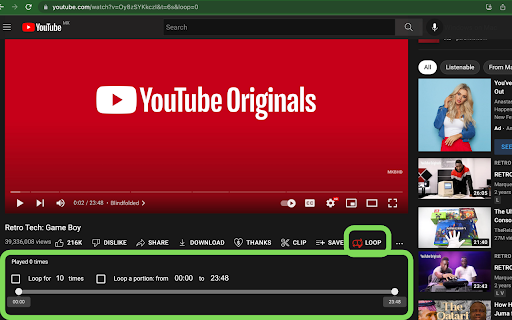
⬇️ Easy to set up ⬇️:
1. Install and pin 📌 the extension.
2. Press the loop button ➰ behind the video to turn on/off auto-play.
3. Or click the keyboard shortcut 'P' to start the loop.
4. Set "&loop=10" in the URL to start the loop 10 times.
5. Set "&start=00:10&end=01:00" to start loop from 10s to 1 min.
✨ Features ✨
1. Default auto-loop on every video. ➿
2. Set loop in a portion/range.
3. Set a value in the URL for the times you want to replay 🔂 the video.
4. Continue to play a whole playlist for loop number of times. ♾
Press one button, to play a video/playlist and set it to repeat itself infinitely.
Reviews (5 cached)
★☆☆☆☆2026-03-15
Catubig Klahrinz
Doesnt work
★☆☆☆☆2024-08-09
Lou Sherwood
It used to be great but it stopped working two days ago! I hope you can fix it
★☆☆☆☆2024-08-08
{'Matthew':' Software Developer'}
it doesn't work.
★☆☆☆☆2024-04-25
John Forger
Loop word now writes with red color. Deleted.
★★☆☆☆2024-01-13
Top Hat Fiddle
The directions say to click some sort of symbol 'behind the video.' What does 'behind the video' mean?? I used to use the old Looper, but its security certificate is outdated, and now this doesn't seem to work either....
Permissions (1)
Permissions
storageℹ Can store data locally in your browser
Details
| Version | 2.0.2 |
| Updated | Feb 18, 2023 |
| Size | 108KiB |
| First Seen | Mar 27, 2026 |
Popular in workflow

Adobe Acrobat: PDF edit, convert, sign tools
by Adobe Inc.
331M
★ 4.40
workflow
331M
★ 4.40
workflow

Chrome Remote Desktop
by Chrome Remote Desktop Release Managers
38M
★ 3.14
workflow
38M
★ 3.14
workflow

Microsoft Single Sign On
by Microsoft
36M
★ 2.27
workflow
36M
★ 2.27
workflow

MetaMask
by metamask
13M
★ 2.68
workflow
13M
★ 2.68
workflow

Microsoft Power Automate
by Microsoft Corporation
10M
★ 1.99
workflow
10M
★ 1.99
workflow
Popular Extensions
Adobe Acrobat: PDF edit, convert, sign tools
by Adobe Inc.
331M
★ 4.40
workflow
331M
★ 4.40
workflow

Grammarly: AI Writing Assistant and Grammar Checker App
by Grammarly
42M
★ 4.50
communication
42M
★ 4.50
communication
Chrome Remote Desktop
by Chrome Remote Desktop Release Managers
38M
★ 3.14
workflow
38M
★ 3.14
workflow
Microsoft Single Sign On
by Microsoft
36M
★ 2.27
workflow
36M
★ 2.27
workflow

Cisco Webex Extension
by cisco.chromestore
23M
★ 2.34
social
23M
★ 2.34
social