
⚠️Below average rating
Description
This Chrome Extension was developed to fill the need for automatic time tracking of assigned tasks, and solve the inaccurate recollection of task time for Workfront (previously AtTask) time sheets.
This is a 30 day trial for your company so please share this with co-workers. Email if you need time extension or feature requests.
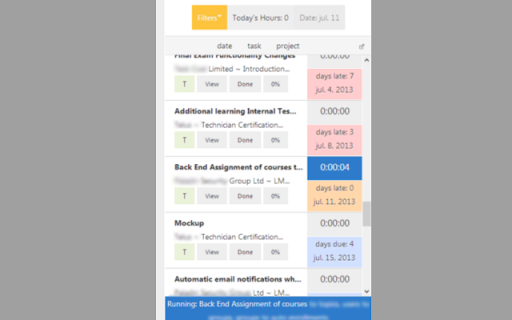
+ You are able to toggle a the start and stop of a task or select another task to stop and start the new task.
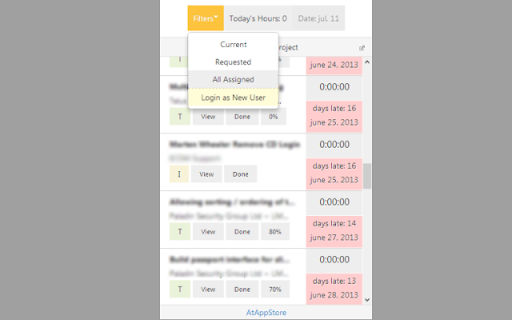
+ You may choose from 4 filter options, Current tasks, Requested Tasks, Team Tasks, and all Assigned tasks.
+ The tasks listed show project and task names, that allow you to mouse over to see their full text, due dates, and days till and pass completion highlighted in an appropriate take action color.
+ You can complete an Workfront task when your done.
+ See total hours tracked to make sure your work day has been accounted for.
+ Daily the tool will reset tracked time for a new day of tracking.
+ Track percentage of a task completed.
+ Set assigned hour types to tasks.
+ Many more productive features to come!
Due to the ease of the Stopwatch for Workfront, your productivity and time tracking accuracy will benefit yourself and everyone in your business.
* Also available as a Web App for additional browsers!
http://store.atappstore.com/product/stopwatch/
* Click "Send Feedback" from the Details Tab or email me at stopwatchforattask@gmail.com for any questions.
Stopwatch App Provided by AtAppStore Inc.
Version 5.7 by Tobias Contreras
Upgraded API v20
Last Updated: 8/29/2025

Reviews
Loading reviews...
Permissions (1)
Permissions
notificationsℹ Can show desktop notifications
Details
| Version | 5.7 |
| Updated | Sep 1, 2025 |
| Size | 1.46MiB |
| First Seen | Mar 27, 2026 |
Popular in workflow

Adobe Acrobat: PDF edit, convert, sign tools
by Adobe Inc.
331M
★ 4.40
workflow
331M
★ 4.40
workflow

Chrome Remote Desktop
by Chrome Remote Desktop Release Managers
38M
★ 3.14
workflow
38M
★ 3.14
workflow

Microsoft Single Sign On
by Microsoft
36M
★ 2.27
workflow
36M
★ 2.27
workflow

MetaMask
by metamask
13M
★ 2.68
workflow
13M
★ 2.68
workflow

Microsoft Power Automate
by Microsoft Corporation
10M
★ 1.99
workflow
10M
★ 1.99
workflow
Popular Extensions
Adobe Acrobat: PDF edit, convert, sign tools
by Adobe Inc.
331M
★ 4.40
workflow
331M
★ 4.40
workflow

Grammarly: AI Writing Assistant and Grammar Checker App
by Grammarly
42M
★ 4.50
communication
42M
★ 4.50
communication
Chrome Remote Desktop
by Chrome Remote Desktop Release Managers
38M
★ 3.14
workflow
38M
★ 3.14
workflow
Microsoft Single Sign On
by Microsoft
36M
★ 2.27
workflow
36M
★ 2.27
workflow

Cisco Webex Extension
by cisco.chromestore
23M
★ 2.34
social
23M
★ 2.34
social