
Page Pacer - read faster, stay focused
v2.1 Updated May 23, 2025 220KiB
User Count Trend
Loading...
Description
Read Faster and Stay Focused with the Page Pacer! 🧠
How It Works:
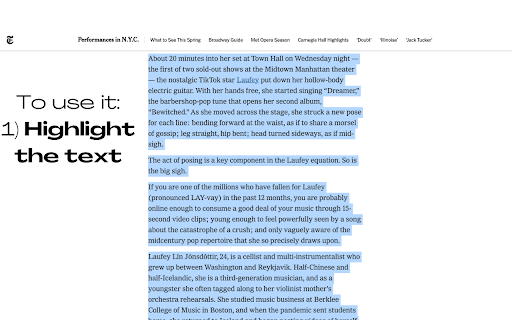
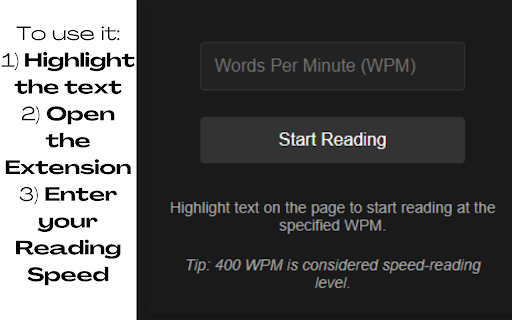
1) Select the text you want to read. 📖
2) Input your desired reading speed (WPM). ⏱️
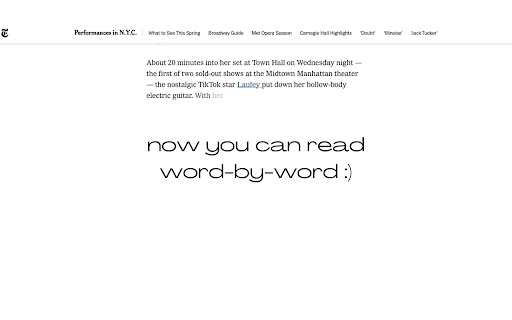
3) Click "Start Reading" and watch as Page Pacer guides you through the text at a steady, efficient pace. ⚡
Reducing unnecessary eye movements is crucial for improving reading speed because it minimizes the time and effort spent on scanning and refocusing across the text. Typically, your eyes jump around the page, a process known as saccadic movement, which can slow down the overall reading process. By reducing these movements, you can focus more directly on the content, leading to quicker comprehension and less cognitive strain.
Page Pacer 2.0 UPDATE:
🚀 Major Upgrade Alert! 🚀
NEW Premium Experience:
Uncapped reading speeds up to 3000 WPM for PRO users
Unlimited daily usage with PRO subscription
Custom themes for personalized reading
Improved Free Plan:
Clearer FREE vs PRO feature indicators
1 free use per day
Basic reading pace control up to 250 WPM
Progress tracking with visual history
Enhanced UI:
Modern, sleek interface with intuitive controls
Better visibility of remaining free usage time
Premium upgrade prompts when limits are reached
Limited Time Offer:
25% OFF Premium - Only $4.99/month!
Try our 7-day Free Trial and experience the full power of Page Pacer 2.0!
Version 1.4 UPDATE:
*Updated Slider UI
*Track your progress!
Version 1.3 UPDATE:
PAGE PACER PRO!!! Highlight any text and read with Page Pacer!
Now compatible with: PDF Files, DOCX Files, PowerPoint .pptx Files, and anything you can highlight!!
Version 1.1.1 UPDATE:
New Features:
* Auto-scroll
* Smooth scroll to top when reading
Reviews
Loading reviews...
Permissions (4)
Permissions
activeTabℹ Can access the current tab when you click the extension contextMenusℹ Can add items to the right-click menu notificationsℹ Can show desktop notifications storageℹ Can store data locally in your browser
Details
| Version | 2.1 |
| Updated | May 23, 2025 |
| Size | 220KiB |
| First Seen | Mar 21, 2026 |
Ad space
Popular in education

Kami for Google Chrome™
by Kami
17M
★ 4.56
education
17M
★ 4.56
education

GPTZero: AI Detection & Writing Replay
by chrome-extension-publisher
400K
★ 4.57
education
400K
★ 4.57
education

Education Pro Browser Extension MV3
by Ativion
300K
★ 0.00
education
300K
★ 0.00
education

Passei Direto – Ferramentas de Estudo
by pd.services
100K
★ 3.73
education
100K
★ 3.73
education

Wayground AI
by Wayground (formerly Quizizz)
100K
★ 3.69
education
100K
★ 3.69
education
Popular Extensions

Cisco Webex Extension
by cisco.chromestore
24M
★ 2.34
social
24M
★ 2.34
social
Kami for Google Chrome™
by Kami
17M
★ 4.56
education
17M
★ 4.56
education

uBlock Origin
by Raymond Hill (gorhill)
15M
★ 4.70
privacy
15M
★ 4.70
privacy

Custom Cursor for Chrome™
by BLife Team LLC
5M
★ 4.67
fun
5M
★ 4.67
fun

DuckDuckGo Search & Tracker Protection
by DuckDuckGo
4M
★ 4.24
privacy
4M
★ 4.24
privacy