
⚠️Not updated in over a year ⚠️Very few reviews for its user base
User Count Trend
Loading...
Description
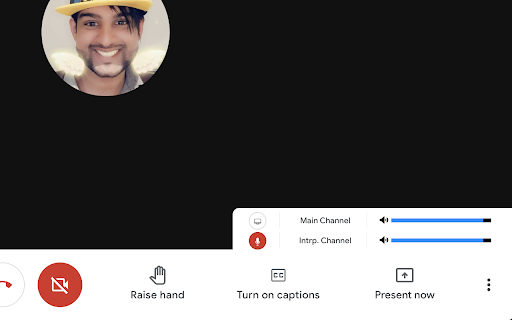
This tool allows listeners and interpreters to open a secondary interpretation meeting within the Google Meet and provides them with controls to make listening and interpreting easier. Currently, it only works in Google Meet and not Live Streams.
Without this extension, users have to open Google Meet in two different windows, both meetings at 100% volume.
How it works
- Interpreter or Organizer creates a separate Google Meet link for interpretation and share's the link to the people who will be listening in.
- Users (both interpreters and listeners) join the main meeting, and then activate the extension, paste the provided link and begin.
- Users will gain access to volume controls for both channels, as well as a mini-view of the interpreting meeting (in case there is content shared specifically in their language).
- All users joining the interpreting channel will be automatically muted and have their videos turned off. Only the interpreter get's an additional control to toggle their mic. However, uses can still use keyboard shortcuts within the mini-view to access their mic, video and chat functions. Search "Google Meet Keyboard Shortcuts" for more details.
- Interpreters / Organizers can also still share their screens from within the interpreting channel.
This project is open source, so if you'd like to add anything, request features, or more, please consult me at the project repository on Github:
https://github.com/TheAxZim/Meet-Simultaneous-Interpretation


Reviews
Loading reviews...
Permissions (4)
Permissions
activeTabℹ Can access the current tab when you click the extension declarativeNetRequestℹ Can block or redirect network requests scriptingℹ Can inject scripts into web pages storageℹ Can store data locally in your browser
Details
| Version | 1.0.7 |
| Updated | Jun 14, 2024 |
| Size | 34.71KiB |
| First Seen | Mar 21, 2026 |
Ad space
Popular in social

Cisco Webex Extension
by cisco.chromestore
24M
★ 2.34
social
24M
★ 2.34
social

Hypothesis - Web & PDF Annotation
by Hypothesis
300K
★ 4.10
social
300K
★ 4.10
social

IG Follower Export Tool - IG Tools
by igextension
200K
★ 4.92
social
200K
★ 4.92
social

Residential VPN | Tuxler
by tuxlervpn.com
200K
★ 4.01
social
200K
★ 4.01
social

Truffle
by Truffle
100K
★ 4.31
social
100K
★ 4.31
social
Popular Extensions
Cisco Webex Extension
by cisco.chromestore
24M
★ 2.34
social
24M
★ 2.34
social

Kami for Google Chrome™
by Kami
17M
★ 4.56
education
17M
★ 4.56
education

uBlock Origin
by Raymond Hill (gorhill)
15M
★ 4.70
privacy
15M
★ 4.70
privacy

Custom Cursor for Chrome™
by BLife Team LLC
5M
★ 4.67
fun
5M
★ 4.67
fun

DuckDuckGo Search & Tracker Protection
by DuckDuckGo
4M
★ 4.24
privacy
4M
★ 4.24
privacy