
⚠️Not updated in over 2 years
User Count Trend
Loading...
Description
Update to version 1.2.5 (Fixed bugs, edited imdb search URL and added new search engines).
Following search engines has been added as default:
#Wikipedia English, Español and Norwegian – Knowledge
#Amazon Global and UK – Commerce
#AliExpress Global – Commerce
#Ebay Global – Commerce
#Finn.no – Norwegian Commerce
#Gulesider.no – Norwegian Search tools
#Proff.no – Norwegian Search tools
#IMOB – Movies
#Linkedin – Social
#Facebook – Social
#X - Twitter – Social
#Youtube – Social
#Google Search
#Gmail – Personal and business
#Cisco – Community
#Stackoverflow – Community
This extension provides the user a quick way to search for selected text in multiple search engens. Supports grouping engines, own search URL, search in incognito, dark mode, search everywhere and more.
How to use it?
Right-click on the highlighted text and select (Search "word" for) from the context menu. It’ll open search results in the current tab active, in the new tab or incognito. Based in your settings on the selected search engines.
How to open in new tab?
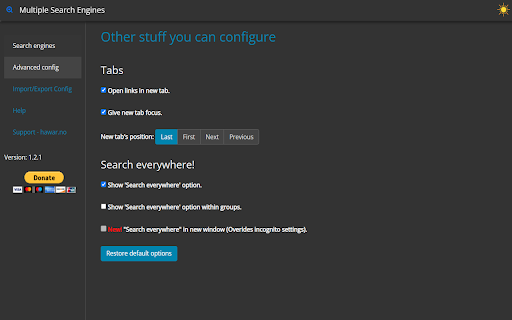
From option page click on "Advanced config", or from context menu (right-click menu) choose last one "Options", will open option page. Then select "Open links in new tab".
How to Search everywhere?
From option page click on "Advanced config", to activate it. You can select all 3 options.
* Show 'Search everywhere' option.
* Show 'Search everywhere' option within groups.
* New! "Search everywhere" in new window (Overrides incognito settings).
How to import or export settings?
From option page click on "Import/Export Config".
How to create a Search URL of your own?
From option page click on "Create own Search URL", to show you step by step how to create it.
How do I edit the Search Engines' list?
From option page click on "Edit the Search Engines", to find out how to edit it.
Super easy to use! If you have any problems, issues, or questions how to use it, feel free to contact me or visit https://hawar.no/2023/02/multiple-search-engines/
Enjoy!




Reviews
Loading reviews...
Permissions (2)
Permissions
contextMenusℹ Can add items to the right-click menu storageℹ Can store data locally in your browser
Details
| Version | 1.2.5 |
| Updated | Oct 31, 2023 |
| Size | 297KiB |
| First Seen | Mar 21, 2026 |
Ad space
Popular in tools

Monica: All-In-One AI Assist & Smartest AI Agent
by Monica Team
3M
★ 4.89
tools
3M
★ 4.89
tools

WPS浏览器助手:文档在线阅读编辑
by 金山PDF
2M
★ 2.90
tools
2M
★ 2.90
tools

Pie Adblock - A Powerful Free Ad Blocker
by Pie Extensions
2M
★ 4.90
tools
2M
★ 4.90
tools

ВПН для YouTube без ограничений в России. Ускорить ютуб на ПК
by Extension
900K
★ 4.70
tools
900K
★ 4.70
tools

Britannica School Insights
by Encyclopædia Britannica
800K
★ 3.15
tools
800K
★ 3.15
tools
Popular Extensions

Cisco Webex Extension
by cisco.chromestore
24M
★ 2.34
social
24M
★ 2.34
social

Kami for Google Chrome™
by Kami
17M
★ 4.56
education
17M
★ 4.56
education

uBlock Origin
by Raymond Hill (gorhill)
15M
★ 4.70
privacy
15M
★ 4.70
privacy

Custom Cursor for Chrome™
by BLife Team LLC
5M
★ 4.67
fun
5M
★ 4.67
fun

DuckDuckGo Search & Tracker Protection
by DuckDuckGo
4M
★ 4.24
privacy
4M
★ 4.24
privacy