
User Count Trend
Loading...
Description
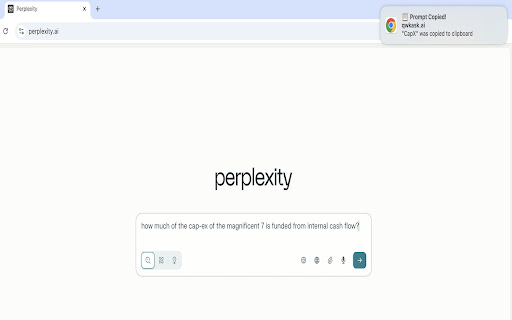
QwkAsk Tab Manager — reuse provider tabs & paste prompts
Speed up your AI workflow. When you click a QwkAsk prompt link, this extension:
- Reuses an existing tab for the target provider (no more duplicate tabs)
- Pastes the prompt into the provider's composer/search box
- Keeps your current chat when possible (no forced "new chat")
- Falls back to the clipboard if pasting isn't possible, so you can just ⌘/Ctrl‑V
- Closes the intermediate /c tab quickly so you stay focused
Works automatically with popular AI assistants and search engines when you open QwkAsk embeddings. If the extension isn't installed, your normal clipboard redirect still works.
How it works:
1. You click a QwkAsk embedding
2. QwkAsk copies the prompt and hands off to this extension
3. The extension finds (or opens) the right provider tab, focuses it, and injects/pastes the prompt
4. If injection isn't possible on that page, the prompt stays on your clipboard as a safe fallback
Why you'll like it:
- No tab clutter: reuse the tab you already have open
- No lost context: we avoid starting a new conversation when a site allows it
- Fast: closes the temporary redirect tab automatically
Permissions we request (and why):
- tabs – find and focus an existing provider tab, or open one when needed
- scripting – run a small script to paste text into the site's composer box
- clipboardWrite – keep the prompt on your clipboard as a fallback
- activeTab – standard MV3 needs
Privacy:
- No data leaves your device
- The extension does not send analytics, logs, or prompts to our servers
- QwkAsk (the website) may record that you clicked a prompt link (for routing/reliability). That's separate from this extension
Troubleshooting:
- Make sure you're signed in to each provider
- If another extension also modifies the composer, disable it and try again
- If you see the prompt on your clipboard but not in the box, just paste manually (⌘/Ctrl‑V) — that's the designed fallback
Support: support@qwkask.ai
This extension is not affiliated with any third-party AI service providers.

Reviews
Loading reviews...
Permissions (4)
Permissions
activeTabℹ Can access the current tab when you click the extension clipboardWriteℹ Can write to your clipboard scriptingℹ Can inject scripts into web pages tabsℹ Can see your open tabs and their URLs
Details
| Version | 0.3.1 |
| Updated | Oct 6, 2025 |
| Size | 71.77KiB |
| First Seen | Mar 21, 2026 |
Ad space
Popular in tools

Monica: All-In-One AI Assist & Smartest AI Agent
by Monica Team
3M
★ 4.89
tools
3M
★ 4.89
tools

WPS浏览器助手:文档在线阅读编辑
by 金山PDF
2M
★ 2.90
tools
2M
★ 2.90
tools

Pie Adblock - A Powerful Free Ad Blocker
by Pie Extensions
2M
★ 4.90
tools
2M
★ 4.90
tools

ВПН для YouTube без ограничений в России. Ускорить ютуб на ПК
by Extension
900K
★ 4.70
tools
900K
★ 4.70
tools

Britannica School Insights
by Encyclopædia Britannica
800K
★ 3.15
tools
800K
★ 3.15
tools
Popular Extensions

Cisco Webex Extension
by cisco.chromestore
24M
★ 2.34
social
24M
★ 2.34
social

Kami for Google Chrome™
by Kami
17M
★ 4.56
education
17M
★ 4.56
education

uBlock Origin
by Raymond Hill (gorhill)
15M
★ 4.70
privacy
15M
★ 4.70
privacy

Custom Cursor for Chrome™
by BLife Team LLC
5M
★ 4.67
fun
5M
★ 4.67
fun

DuckDuckGo Search & Tracker Protection
by DuckDuckGo
4M
★ 4.24
privacy
4M
★ 4.24
privacy