
⚠️Requests 2 sensitive permissions
User Count Trend
Loading...
Description
This extension duplicates some of the behavior of an old Firefox extension that is no longer maintained, Load Tabs Progressively.
Load Background Tabs Lazily places newly created background tabs in a line and allows only a specific number to load, while blocking the rest. A tab is removed from the line once it has finished loading. The first blocked tab in the line is then allowed to load. This extension was designed for users with slow internet connections that routinely open multiple background tabs at the same time. It also helps users that open many background tabs at once by not overwhelming their browser or CPU.
Only background tabs with http(s) URLs are added to the line. Middle click (or Ctrl click) a link, bookmark, or bookmark folder to create background tabs.
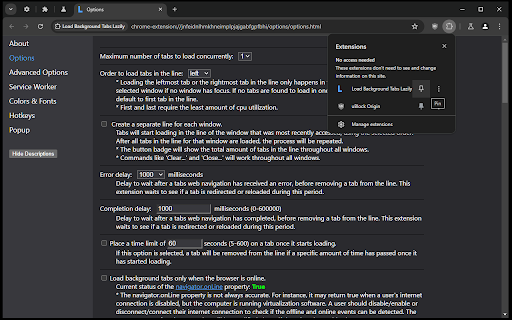
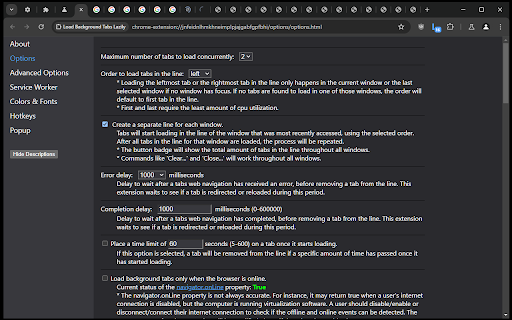
Various commands or settings for this extension may be accessed in its Options page or toolbar button popup. The toolbar button may be pinned by clicking the 'Extensions' button that looks like a puzzle piece on the toolbar.
Permissions used:
▸ non-optional: 'contextMenus', 'declarativeNetRequest' (Block content on any page), 'storage', 'tabs' (Read your browsing history)*, 'webNavigation' (Read your browsing history)
▸ optional: '<all_urls>' (Read and change all your data on all websites), 'browsingData', 'downloads' (Manage your downloads), 'nativeMessaging' (Communicate with cooperating native applications), 'tabGroups' (View and manage your tab groups), 'webRequest'
* The 'tabs' permission allows this extension to view the the url, pendingUrl, title, and favIconUrl properties of a tab.
Reviews
Loading reviews...
Permissions (10)
Permissions
browsingDataℹ Can delete browsing history and data contextMenusℹ Can add items to the right-click menu declarativeNetRequestℹ Can block or redirect network requests downloadsℹ Can manage and monitor downloads nativeMessagingℹ Can communicate with programs on your computer storageℹ Can store data locally in your browser tabGroupsℹ Can organize tabs into groups tabsℹ Can see your open tabs and their URLs webNavigationℹ Can monitor navigation events webRequestℹ Can observe and analyze network traffic
Details
| Version | 6.6 |
| Updated | Feb 5, 2026 |
| Size | 81.29KiB |
| First Seen | Mar 21, 2026 |
Ad space
Popular in tools

Monica: All-In-One AI Assist & Smartest AI Agent
by Monica Team
3M
★ 4.89
tools
3M
★ 4.89
tools

WPS浏览器助手:文档在线阅读编辑
by 金山PDF
2M
★ 2.90
tools
2M
★ 2.90
tools

Pie Adblock - A Powerful Free Ad Blocker
by Pie Extensions
2M
★ 4.90
tools
2M
★ 4.90
tools

ВПН для YouTube без ограничений в России. Ускорить ютуб на ПК
by Extension
900K
★ 4.70
tools
900K
★ 4.70
tools

Glasp Web Highlighter: PDF & Web Highlight
by Glasp
500K
★ 4.48
tools
500K
★ 4.48
tools
Popular Extensions

Cisco Webex Extension
by cisco.chromestore
24M
★ 2.34
social
24M
★ 2.34
social

uBlock Origin
by Raymond Hill (gorhill)
15M
★ 4.70
privacy
15M
★ 4.70
privacy

Custom Cursor for Chrome™
by BLife Team LLC
5M
★ 4.67
fun
5M
★ 4.67
fun

DuckDuckGo Search & Tracker Protection
by DuckDuckGo
4M
★ 4.24
privacy
4M
★ 4.24
privacy
Monica: All-In-One AI Assist & Smartest AI Agent
by Monica Team
3M
★ 4.89
tools
3M
★ 4.89
tools