
✅Recently updated
User Count Trend
Loading...
Description
# Tab Manager
Tab Manager is a Chrome Manifest V3 extension for keeping tab-heavy sessions under control from a side panel. It combines focus tools, memory-saving actions, domain grouping, snapshots, and archive into one workflow.
## What It Does
- `Focus Mode`: freezes every non-whitelist tab so you can keep only the domains that matter active.
- `Suspend Idle Tabs`: discards tabs that have been idle longer than your configured threshold.
- `Auto Group by Domain`: keeps same-domain tabs together and updates grouping for newly opened tabs.
- `Group by Domain`: manually groups tabs in the current window.
- `Ungroup Tabs`: removes all current tab groups.
- `Close Duplicates`: closes tabs with the same normalized URL.
- `Save Current Tabs`: stores the current session as a restorable snapshot.
- `Archive Idle Tabs`: moves idle tabs out of the window into the archive list.
- `Archive Restore`: restores archived tabs back into Chrome from the side panel.
## UI Overview
### Side Panel
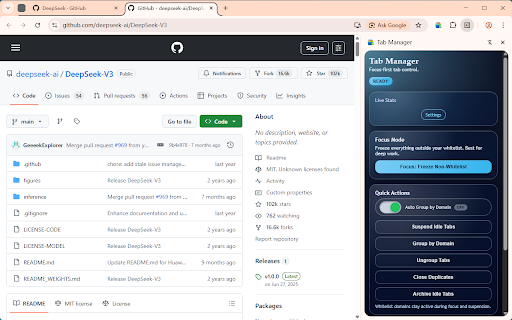
The extension uses Chrome's side panel instead of a popup. The panel includes:
- `Live Stats`: current tab count and group count.
- `Focus Mode`: one-click freeze action for non-whitelist tabs.
- `Quick Actions`: suspend, group, ungroup, dedupe, and archive actions.
- `Auto Group by Domain`: a toggle switch with visible `On` / `Off` state.
- `Snapshots`: save, restore, and delete snapshot entries.
- `Archive`: restore archived tab batches.
### Settings Page
The settings page includes:
- `Focus Mode`: enable focus mode during background scans.
- `Idle Suspension`: set idle time and quick presets (`Light`, `Balanced`, `Aggressive`).
- `Auto-group tabs by domain`: background grouping for new or updated tabs.
- `Include pinned tabs`: allow pinned tabs to be included in group/suspend flows.
- `Auto Archive`: automatically archive tabs after a longer idle threshold.
- `Whitelist Domains`: domains that should stay active during focus, suspend, and archive flows.
## How To Use
### Open the Extension
1. Reload the extension from `chrome://extensions` after code changes.
2. Click the extension icon.
3. If Chrome does not open the side panel automatically, use Chrome's side panel UI or right-click the extension icon and choose the side panel option.
### Everyday Workflow
1. Add a few domains to `Whitelist Domains` in settings.
2. Turn on `Auto-group tabs by domain` if you want new tabs to join existing domain groups.
3. Use `Focus: Freeze Non-Whitelist` when you want an immediate focus pass.
4. Use `Suspend Idle Tabs` to reclaim memory without closing tabs.
5. Use `Save Current Tabs` before a context switch.
6. Use `Archive Idle Tabs` when you want a cleaner window, not just suspended tabs.
### Snapshots
- Click `Save Current Tabs` to capture the current session.
- Click `Restore` to reopen the saved tabs.
- Click `Delete` to remove a snapshot from storage.
### Archive
- Click `Archive Idle Tabs` to move qualifying idle tabs into archive storage.
- Archived tabs are removed from the current window.
- Click `Restore` in the archive list to reopen them.
## Behavior Notes
- Focus mode and idle suspension use `chrome.tabs.discard`, so tabs stay in Chrome and reload when revisited.
- Archive removes tabs from the window instead of discarding them.
- Auto-group works per window and attempts to add new same-domain tabs into existing matching groups.
- If a grouped tab navigates to a different domain, it is removed from the old group.
- System pages such as `chrome://` are ignored.
## Permissions
- `storage`: saves settings, snapshots, and archives.
- `tabs`: reads and manages tab state.
- `tabGroups`: creates and removes tab groups.
- `alarms`: runs periodic background scans.
- `sidePanel`: provides the side panel UI.

Reviews
Loading reviews...
Permissions (5)
Permissions
alarmsℹ Can schedule periodic background tasks sidePanel storageℹ Can store data locally in your browser tabGroupsℹ Can organize tabs into groups tabsℹ Can see your open tabs and their URLs
Details
| Version | 0.1.0 |
| Updated | Mar 21, 2026 |
| Size | 89.25KiB |
| First Seen | Mar 21, 2026 |
Ad space
More by Seiri


Popular in tools

Monica: All-In-One AI Assist & Smartest AI Agent
by Monica Team
3M
★ 4.89
tools
3M
★ 4.89
tools

WPS浏览器助手:文档在线阅读编辑
by 金山PDF
2M
★ 2.90
tools
2M
★ 2.90
tools

Pie Adblock - A Powerful Free Ad Blocker
by Pie Extensions
2M
★ 4.90
tools
2M
★ 4.90
tools

ВПН для YouTube без ограничений в России. Ускорить ютуб на ПК
by Extension
900K
★ 4.70
tools
900K
★ 4.70
tools

Glasp Web Highlighter: PDF & Web Highlight
by Glasp
500K
★ 4.48
tools
500K
★ 4.48
tools
Popular Extensions

Cisco Webex Extension
by cisco.chromestore
24M
★ 2.34
social
24M
★ 2.34
social

uBlock Origin
by Raymond Hill (gorhill)
15M
★ 4.70
privacy
15M
★ 4.70
privacy

Custom Cursor for Chrome™
by BLife Team LLC
5M
★ 4.67
fun
5M
★ 4.67
fun

DuckDuckGo Search & Tracker Protection
by DuckDuckGo
4M
★ 4.24
privacy
4M
★ 4.24
privacy
Monica: All-In-One AI Assist & Smartest AI Agent
by Monica Team
3M
★ 4.89
tools
3M
★ 4.89
tools