
PriceDropCatch - Price Tracker for Amazon, Walmart, eBay and More
v1.1 Updated Mar 18, 2026 77.88KiB
✅Recently updated
User Count Trend
Loading...
Description
PriceDropCatch is a free Chrome extension that lets you track product prices across your favorite online stores. Add any product with a single click, watch prices over time on a clear chart, set a target price, and get a desktop notification the moment the price drops. No sign-up, no email, no account—everything is stored locally in your browser.
━━━ WHAT YOU CAN DO ━━━
• TRACK WITH ONE CLICK
When you're on a product page (Amazon, Walmart, eBay, and more), click the "Track Price" button added by the extension. The product is saved to your personal dashboard immediately. No forms, no login.
• SEE PRICE HISTORY
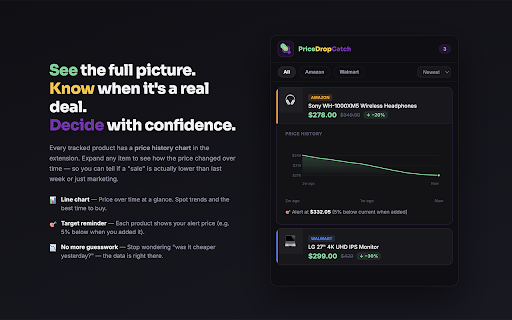
Every tracked item has a price history chart. Expand a product in your list to see how the price changed over time—so you can tell if a "sale" is really lower than last week or just marketing. The chart shows high, low, and trend at a glance.
• SET A TARGET PRICE
Set a target price (for example, 5% below the price when you added the item). When the current price hits your target, you get an instant desktop notification. Click the notification to open the product page and buy.
• ONE DASHBOARD FOR EVERYTHING
Open the extension popup to see all your tracked products in one place: current price, original price, how much you'd save, and a quick link to the product. Filter by store or sort by newest, and expand any item to view its price history chart.
• INSTANT PRICE DROP ALERTS
The extension checks prices in the background. When a price drops and meets your target (or drops by a meaningful amount), you get a desktop notification with the product name, new price, and how much you save. Click to go straight to the product page.
━━━ PRIVACY & SIMPLICITY ━━━
• No account required — You don't sign up or give an email. Install the extension and start tracking.
• Data stays on your device — Your list of products and settings are stored locally in Chrome. We don't send your data to our servers.
• No ads inside the extension — The popup and dashboard are clean and focused on your tracked items.
━━━ HOW IT WORKS ━━━
1. Install the extension and open any product page on a supported store.
2. Click "Track Price" (and optionally set a target price or percent-off).
3. The product appears in your extension popup. You can open the popup anytime to see current prices and price history.
4. When a price drops to your target (or you get a significant drop), you receive a desktop notification.
5. Click the notification to open the product page and complete your purchase.
You can remove items from your list anytime. There are no subscriptions or hidden fees—the extension is free to use.
━━━ WHY USE PRICEDROPCATCH? ━━━
• Save time — Stop checking prices manually. Set your target once and get notified when it's time to buy.
• Make better decisions — Price history charts show you whether a deal is real or just a temporary tag.
• No commitment — No account means no spam, no data shared with third parties, and no hassle. Your list is yours alone.
• Lightweight — The extension only runs on supported store pages and in the background for periodic price checks. It doesn't slow down your browsing.
Perfect for deal hunters, holiday shoppers, or anyone who wants to buy at the right price without the guesswork. Install PriceDropCatch and never overpay again.



Reviews
Loading reviews...
Permissions (5)
Permissions
alarmsℹ Can schedule periodic background tasks notificationsℹ Can show desktop notifications offscreen storageℹ Can store data locally in your browser tabsℹ Can see your open tabs and their URLs
Details
| Version | 1.1 |
| Updated | Mar 18, 2026 |
| Size | 77.88KiB |
| First Seen | Mar 21, 2026 |
Ad space
Popular in shopping

SellerAmp SAS - Amazon FBA Analysis Tool
by Seller Amp
100K
★ 4.35
shopping
100K
★ 4.35
shopping

Pricy
by Pricy
100K
★ 4.04
shopping
100K
★ 4.04
shopping

AliDropship 2.0
by AliDropship
60K
★ 4.46
shopping
60K
★ 4.46
shopping

EuroSaver - Amazon Europe Price Comparison
by Foundere Developer
60K
★ 4.63
shopping
60K
★ 4.63
shopping

Price Tracker 2.0 - Price Graph & Auto Buy
by IndiaDesire.com
30K
★ 3.93
shopping
30K
★ 3.93
shopping
Popular Extensions

Cisco Webex Extension
by cisco.chromestore
24M
★ 2.34
social
24M
★ 2.34
social

uBlock Origin
by Raymond Hill (gorhill)
15M
★ 4.70
privacy
15M
★ 4.70
privacy

Custom Cursor for Chrome™
by BLife Team LLC
5M
★ 4.67
fun
5M
★ 4.67
fun

DuckDuckGo Search & Tracker Protection
by DuckDuckGo
4M
★ 4.24
privacy
4M
★ 4.24
privacy

Monica: All-In-One AI Assist & Smartest AI Agent
by Monica Team
3M
★ 4.89
tools
3M
★ 4.89
tools